> ## Documentation Index
> Fetch the complete documentation index at: https://domoinc-openapi-sync-dataflows.mintlify.site/llms.txt
> Use this file to discover all available pages before exploring further.
# Cloud Amplifier Support in Workbench 5.2
export const InlineImage = ({src, alt = '', height = '1.6em'}) => {
return  ;
};
## Intro
Workbench 5.2 includes a premium option for Cloud Amplifier support. If you have Cloud Amplifier enabled and more than one data warehouse available, a cloud warehouse selector is part of the job configuration. If you need to upgrade to Workbench 5.2, see our article about how to [Upgrade to Workbench 5.2](http://domo-support.domo.com/s/article/000005103?language=en_US).
## Selecting a Cloud Warehouse
1. In Workbench 5.2, go to
**DataSet Jobs**.
2. Select
**Add Job**.
3. Fill out the
**Job Details** section of the **Overview** tab.
4. Fill out the
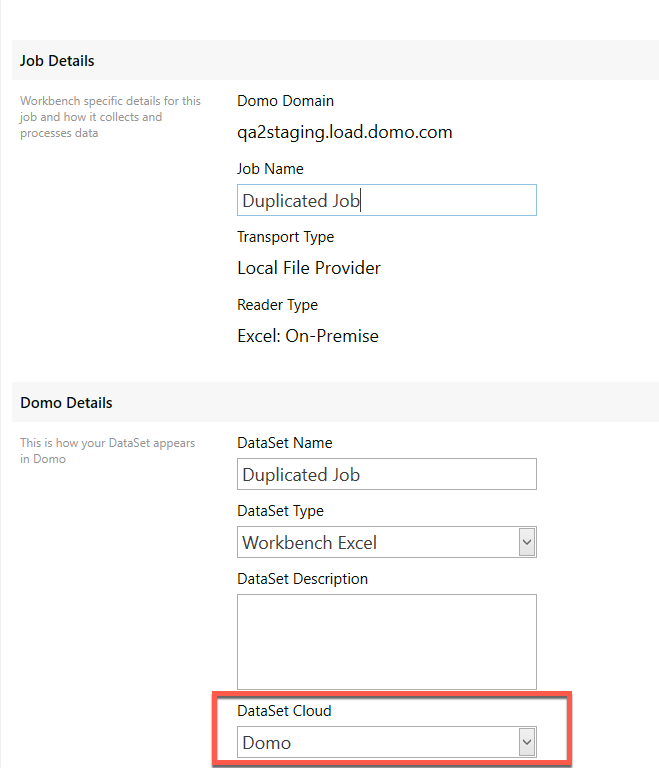
**Domo Details** section of the Overview tab. If your Cloud Amplifier connection is configured properly, you should see a field titled **DataSet Cloud**.
5. Select the
**DataSet Cloud** field to view the list of possible cloud warehouses.
;
};
## Intro
Workbench 5.2 includes a premium option for Cloud Amplifier support. If you have Cloud Amplifier enabled and more than one data warehouse available, a cloud warehouse selector is part of the job configuration. If you need to upgrade to Workbench 5.2, see our article about how to [Upgrade to Workbench 5.2](http://domo-support.domo.com/s/article/000005103?language=en_US).
## Selecting a Cloud Warehouse
1. In Workbench 5.2, go to
**DataSet Jobs**.
2. Select
**Add Job**.
3. Fill out the
**Job Details** section of the **Overview** tab.
4. Fill out the
**Domo Details** section of the Overview tab. If your Cloud Amplifier connection is configured properly, you should see a field titled **DataSet Cloud**.
5. Select the
**DataSet Cloud** field to view the list of possible cloud warehouses.
 6. Select the cloud warehouse you want to write your Workbench job data to.
7. Select
**Create**.
8. Finish the job configuration and select
**Save**.
## Troubleshooting
If you cannot see the field for **DataSet Cloud** during job configuration, make sure you have downloaded Workbench 5.2 from the Appstore.
Confirm that you are connected to an instance of Domo that has Cloud Amplifier enabled and that the authenticated Workbench user has the Override Default Cloud grant in the same instance.
If you still cannot see the field, contact [Domo Support](https://domo-support.domo.com/).
6. Select the cloud warehouse you want to write your Workbench job data to.
7. Select
**Create**.
8. Finish the job configuration and select
**Save**.
## Troubleshooting
If you cannot see the field for **DataSet Cloud** during job configuration, make sure you have downloaded Workbench 5.2 from the Appstore.
Confirm that you are connected to an instance of Domo that has Cloud Amplifier enabled and that the authenticated Workbench user has the Override Default Cloud grant in the same instance.
If you still cannot see the field, contact [Domo Support](https://domo-support.domo.com/).