
> ## Documentation Index
> Fetch the complete documentation index at: https://domoinc-openapi-sync-dataflows.mintlify.site/llms.txt
> Use this file to discover all available pages before exploring further.

# Tag Management

### Accessing the Toolkit

The Governance Toolkit can be found in the **Admin** section of Domo, under **Governance** then **Toolkit**.

<Note>
  **Note:**
  If the tool you wish to use is not enabled, please reach out to your Account Executive.
</Note>

If you are unable to find the Toolkit, ensure your user role has the required grants.

### Required Grants

To access the Governance Toolkit, a user will need 1 of 2 grants enabled for a user. Grants can be added to a custom user role. The Administer Custom Pipeline Process grant is enabled for Admin users by default.

* Create Custom Pipeline Processes
  * This grant will allow a user to create, update, share and delete jobs.
  * This grant will only allow a user to see jobs that they created or jobs that have been shared with them.
* Administer Custom Pipeline Processes
  * This Grant will allow a user to create, update, share and delete jobs.
  * this grant will allow a user to see all jobs

To learn more about custom roles and grants see [Managing Custom Roles](/s/article/360043438973).

### Types of Jobs

There are two different job types to choose from: **Tag Settings** or **Configuration DataSet.**

A Tag Settings job allows users to create a job with prebuilt Domo tags. Users are be able to filter to a subset of datasets or dataflows and then apply Domo generated tags to those datasets or dataflows.

A Configuration DataSet job uses your input dataset to determine which datasets or dataflows will have custom tags.

### Creating a Tag Settings Job

1. In the navigation header, go to
   **Admin.**

2. Under
   **Governance**, select **Toolkit**

3. Select
   **Tag Management**.

4. Select
   **+ New Job**

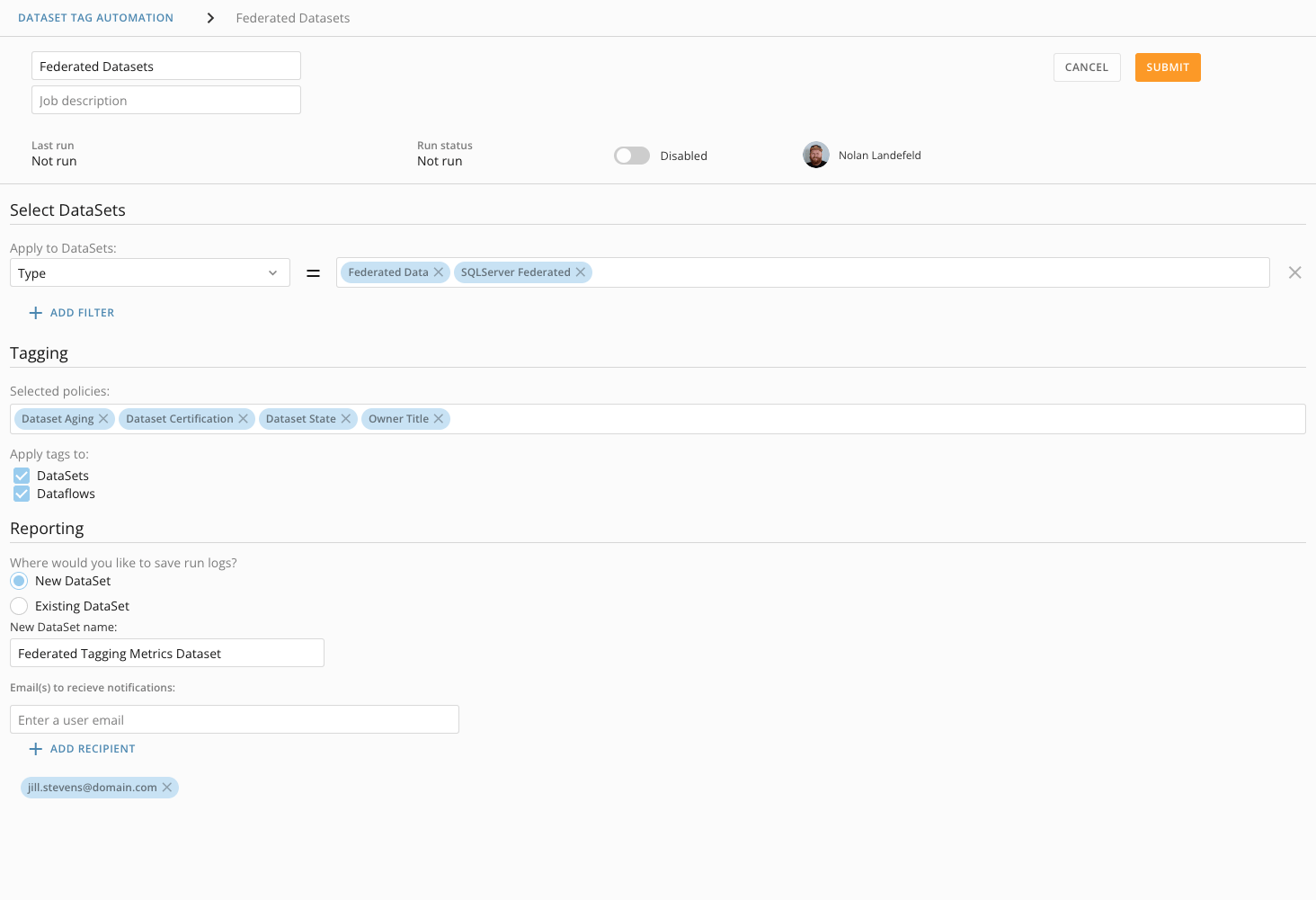
5. Enter the following information:

* **Job name**
  (required)
* **Job description**
  (optional)
* **Select DataSets**
  (optional)
  * You can add filtering to narrow down which DataSets you would like to include in the backup job.
  * Each filter category will work as an AND statement.
  * Each value in a filter category will work as an OR statement.

The screenshot below represents the following filters:

Owner Name = 'Nolan Landefeld'

AND

(Tag = 'Child Cards: 4022' OR Tag= 'Downstream Datasets: 288')

AND

(Type = 'Federated Data' OR Type = MySQL Federated')

<Frame>
  <img alt="Screen_Shot_2021-12-03_at_1.49.30_PM.png" src="https://mintcdn.com/domoinc-openapi-sync-dataflows/GZtBW7DeR7whzwbr/images/kb/ka0Vq0000000RwH-00N5w00000Ri7BU-0EM5w000005vNoh.png?fit=max&auto=format&n=GZtBW7DeR7whzwbr&q=85&s=522abfda7c76b55783d06e88cde28b7f" width="1460" height="255" data-path="images/kb/ka0Vq0000000RwH-00N5w00000Ri7BU-0EM5w000005vNoh.png" />
</Frame>

5. Tag the
   **Selected policies** you wish to add to your filtered DataSets.

#### Tagging Policies Reference Guide

<table border="1" data-aura-rendered-by="33:196;a"><tbody><tr><td class="wysiwyg-text-align-left" colspan="1" rowspan="1" width="312"><p> DataSet Aging </p></td><td colspan="1" rowspan="1" width="312"><p> Will add a tag of how long it has been since the DataSet was last run. </p><p> Aging is bucketed into different categories. Example: 30+ days, 60+ days, etc. </p></td></tr><tr><td class="wysiwyg-text-align-left" colspan="1" rowspan="1" width="312"><p> DataSet Certification </p><p /></td><td colspan="1" rowspan="1" width="312"><p> Will add a tag for the current certification state of the DataSet. </p></td></tr><tr><td class="wysiwyg-text-align-left" colspan="1" rowspan="1" width="312"><p> DataSet Lineage </p><p /></td><td colspan="1" rowspan="1" width="312"><p> Will add tags about how many downstream DataSets, DataFlows, and Cards the DataSet has, as well as the DataSet type of the parent DataSet, if any. </p></td></tr><tr><td class="wysiwyg-text-align-left" colspan="1" rowspan="1" width="312"><p> DataSet State </p><p /></td><td colspan="1" rowspan="1" width="312"><p> Will add a tag of the current state of the DataSet. </p></td></tr><tr><td class="wysiwyg-text-align-left" colspan="1" rowspan="1" width="312"><p> Owner Email </p><p /></td><td colspan="1" rowspan="1" width="312"><p> Will add a tag with the DataSet owner’s email. </p></td></tr><tr><td class="wysiwyg-text-align-left" colspan="1" rowspan="1" width="312"><p> Owner Inactive </p></td><td colspan="1" rowspan="1" width="312"><p> Will add a tag indicting if the DataSet owner is no longer a Domo user. </p></td></tr><tr><td class="wysiwyg-text-align-left" colspan="1" rowspan="1" width="312"><p> Owner Name </p></td><td colspan="1" rowspan="1" width="312"><p> Will add a tag with the DataSet owner’s name. </p></td></tr><tr><td class="wysiwyg-text-align-left" colspan="1" rowspan="1" width="312"><p> Owner Role </p></td><td colspan="1" rowspan="1" width="312"><p> Will add a tag with the DataSet owner’s role. </p></td></tr><tr><td class="wysiwyg-text-align-left" colspan="1" rowspan="1" width="312"><p> Owner Title </p></td><td colspan="1" rowspan="1" width="312"><p> Will add a tag with the DataSet owner’s title. </p></td></tr></tbody></table>

6. **Apply tags to** (required)

Apply tags created by the job to DataSets, DataFlows, or both.

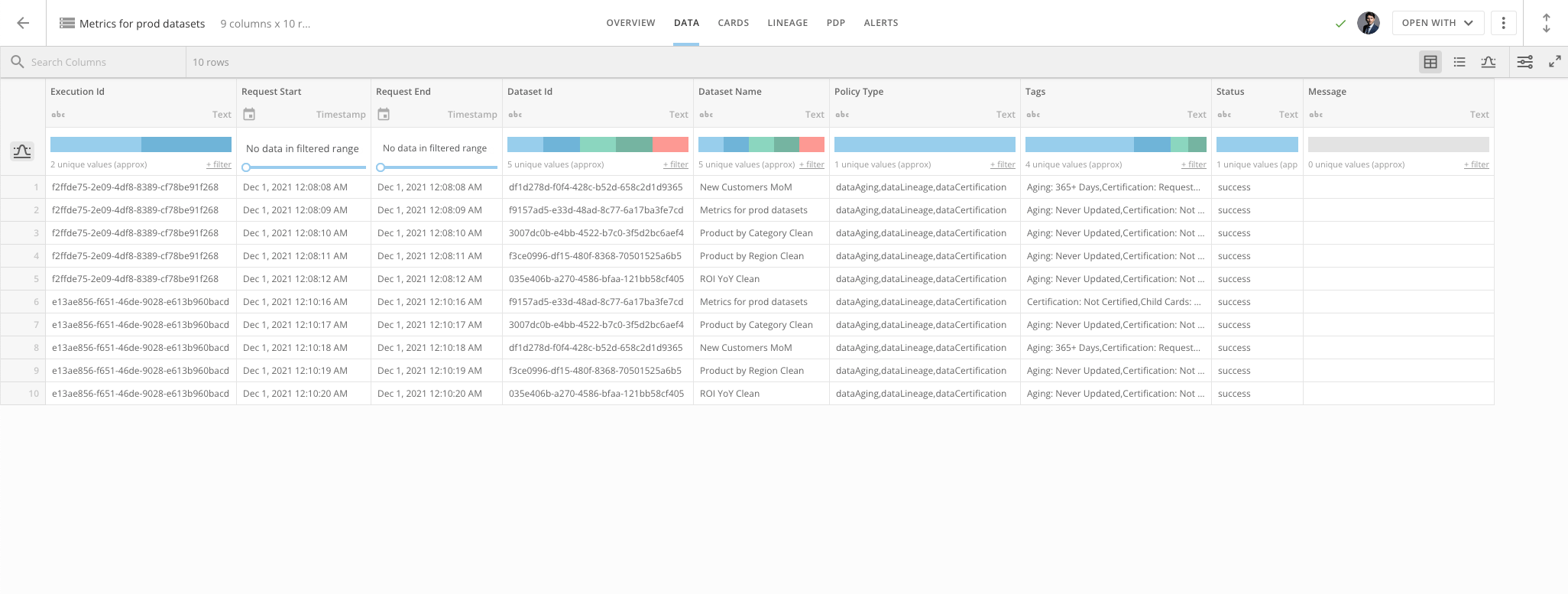
7. Run Logs (required)

Each job will keep track of executions and information surrounding the job at hand.

* **New DataSet**
  : Creates a new DataSet in your Domo instance and all runs of the job will write logging to the new DataSet.
* **Existing DataSet**
  : Combines multiple DataSet Tagging jobs into a single logging DataSet.

  <Warning>
    **Important:**

    * The dataset must be created by the DataSet Tagging tool.
    * The dataset must already contain rows of data
  </Warning>

<Frame>
  <img alt="Tagging_Metrics_Dataset.png" src="https://mintcdn.com/domoinc-openapi-sync-dataflows/GZtBW7DeR7whzwbr/images/kb/ka0Vq0000000RwH-00N5w00000Ri7BU-0EM5w000005vNol.png?fit=max&auto=format&n=GZtBW7DeR7whzwbr&q=85&s=8fa5766e235d2a7c88c0b3e2604413d4" width="2052" height="777" data-path="images/kb/ka0Vq0000000RwH-00N5w00000Ri7BU-0EM5w000005vNol.png" />
</Frame>

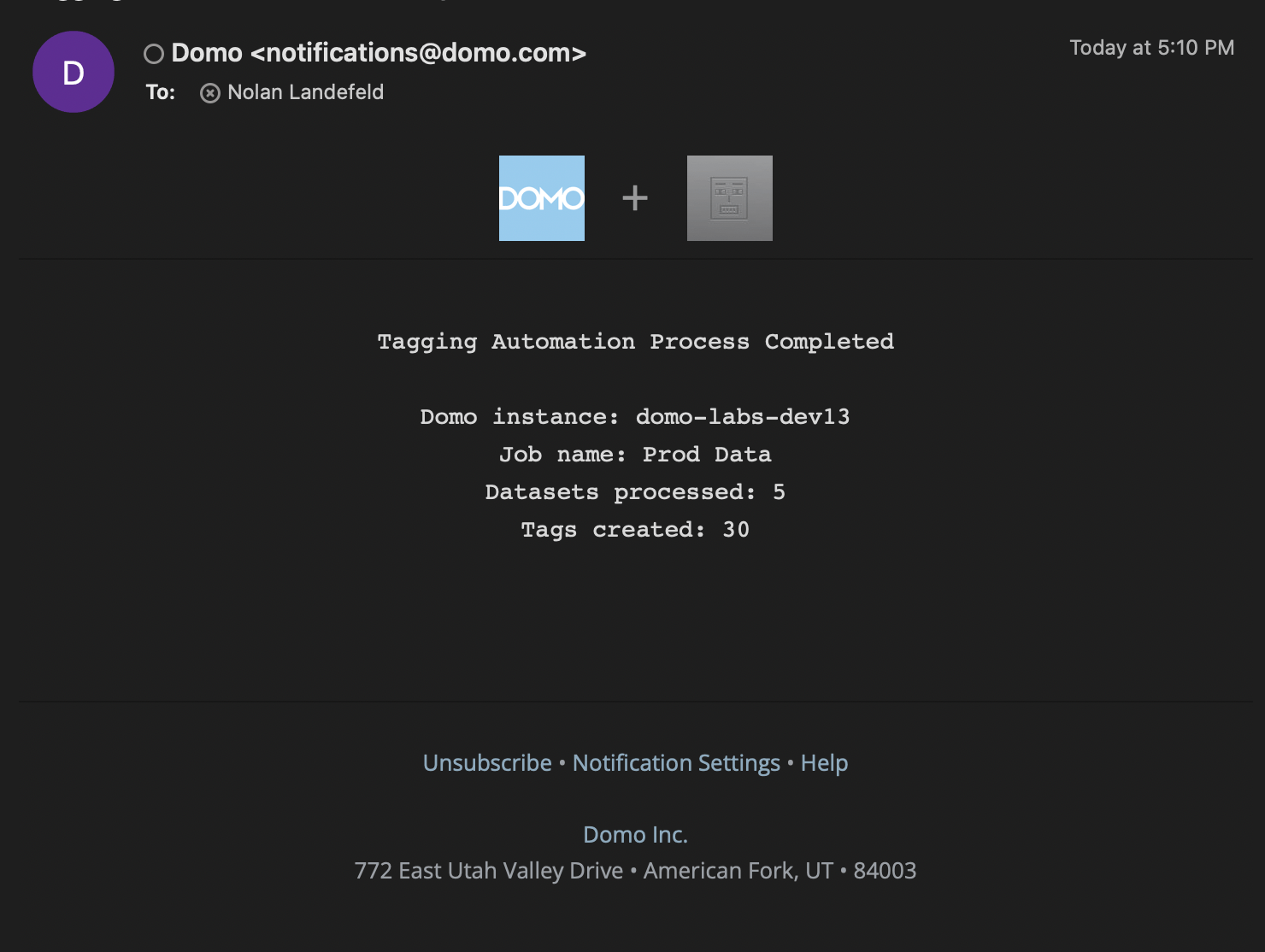
8. **Email(s) to receive notifications** (optional)

* You can add user emails to this field.
* Users will receive an email notification from Domo each time the job runs.
* The notification will outline what the job did during the run and any failures that occurred.

  <Columns>
    <Frame>
      <img alt="Tagging_Notification.png" src="https://mintcdn.com/domoinc-openapi-sync-dataflows/GZtBW7DeR7whzwbr/images/kb/ka0Vq0000000RwH-00N5w00000Ri7BU-0EM5w000005vNoi.png?fit=max&auto=format&n=GZtBW7DeR7whzwbr&q=85&s=836dec217c80fdb68aeb543e7d07d183" width="1480" height="1114" data-path="images/kb/ka0Vq0000000RwH-00N5w00000Ri7BU-0EM5w000005vNoi.png" />
    </Frame>

    <Frame>
      <img alt="Screen_Shot_2021-12-03_at_1.57.01_PM.png" src="https://mintcdn.com/domoinc-openapi-sync-dataflows/GZtBW7DeR7whzwbr/images/kb/ka0Vq0000000RwH-00N5w00000Ri7BU-0EM5w000005vNok.png?fit=max&auto=format&n=GZtBW7DeR7whzwbr&q=85&s=e719d5eea305649766f91e2394c08122" width="1464" height="1001" data-path="images/kb/ka0Vq0000000RwH-00N5w00000Ri7BU-0EM5w000005vNok.png" />
    </Frame>
  </Columns>

## Creating a Configuration Dataset Job

<Warning>
  **Important:**
  For the Configuration DataSet, "On-Demand" DataSet Views are not supported. Only Views that update on a schedule or via DataSet update are allowed.
</Warning>

1. In the navigation header, go to
   **Admin.**

2. Under
   **Governance**, select **Toolkit**

3. Select
   **Tag Management**.

4. Select
   **+ New Job**

5. Enter the following information:

* **Job name**
  (required)
* **Job description**
  (optional)
* Select your
  **Configuration DataSet**

<Warning>
  **Important:**
  When choosing a Configuration DataSet, there are three required columns.

  * **ID:**
    the ID of the object (dataset or dataflow) to be tagged. Currently, tags are only supported on datasets or dataflows.
  * **Tags:**
    A list of tags you would like added to the dataset/dataflow. Multiple tags can be pipe (1) separated. All tags defined in the config file will be taken as a text literal (custom), so if "Dataset Aging" was added, it would add a tag of "Dataset Aging" and not the actual age of the dataset.
  * **Type:**
    The type of Domo object that is being tagged ("Dataflow" or "Dataset")
</Warning>

5. **Handle existing Tags** (required)

Users can **Append** existing tags on the datasets or dataflows from your input configuration dataset, or **Replace** them.

6. Run Logs (required)

   Each job will keep track of executions and information surrounding the job at hand.

   * **New DataSet:**
     Creates a new dataset in your Domo domain. All runs of the job will writ logging to the new dataset.
   * **Existing DataSet:**
     Allows you to combine multiple DataSet Tagging jobs into a single logging dataset.

7. **Email(s) to receive notifications** (optional)

   * You can add user emails to this field.
   * Users will receive an email notification from Domo each time the job runs.
   * The notification will outline what the job did during the run and any failures that occurred.

     <Frame>
       <img alt="Tagging_Notification.png" src="https://mintcdn.com/domoinc-openapi-sync-dataflows/GZtBW7DeR7whzwbr/images/kb/ka0Vq0000000RwH-00N5w00000Ri7BU-0EM5w000005vNoi.png?fit=max&auto=format&n=GZtBW7DeR7whzwbr&q=85&s=836dec217c80fdb68aeb543e7d07d183" width="1480" height="1114" data-path="images/kb/ka0Vq0000000RwH-00N5w00000Ri7BU-0EM5w000005vNoi.png" />
     </Frame>

## Running a Job

Each job has an Enabled Toggle. This will control how a job is run.

* Disabled
  * The job will only execute when the job is manually run.
* Active
  * The job will execute every 12 hours.
  * A Configuration DataSet job will run when the configuration dataset updates.

<Frame>
  <img alt="Screen_Shot_2021-12-03_at_1.58.08_PM.png" src="https://mintcdn.com/domoinc-openapi-sync-dataflows/GZtBW7DeR7whzwbr/images/kb/ka0Vq0000000RwH-00N5w00000Ri7BU-0EM5w000005vNoj.png?fit=max&auto=format&n=GZtBW7DeR7whzwbr&q=85&s=0aed6a2317b4e6b73731427af62eb274" width="1466" height="202" data-path="images/kb/ka0Vq0000000RwH-00N5w00000Ri7BU-0EM5w000005vNoj.png" />
</Frame>