> ## Documentation Index
> Fetch the complete documentation index at: https://domoinc-openapi-sync-dataflows.mintlify.site/llms.txt
> Use this file to discover all available pages before exploring further.
# Virtual DataSets
### Intro
The Virtual DataSets tool allows you to share a DataSet from one Domo instance to another. The DataSet created on the second instance is a virtual DataSet. Virtual DataSets are DataSets linked to the original DataSets, receiving new data and schema changes in real-time as the primary DataSet receives them.
Alongside [Domo Sandbox](/s/article/4403367344023), this allows you to share DataSets from the prod instance to the dev or testing instance.
**Important:**
Federated DataSets cannot be virtualized. Only materialized DataSets can be virtualized.
***
### Access the Toolkit
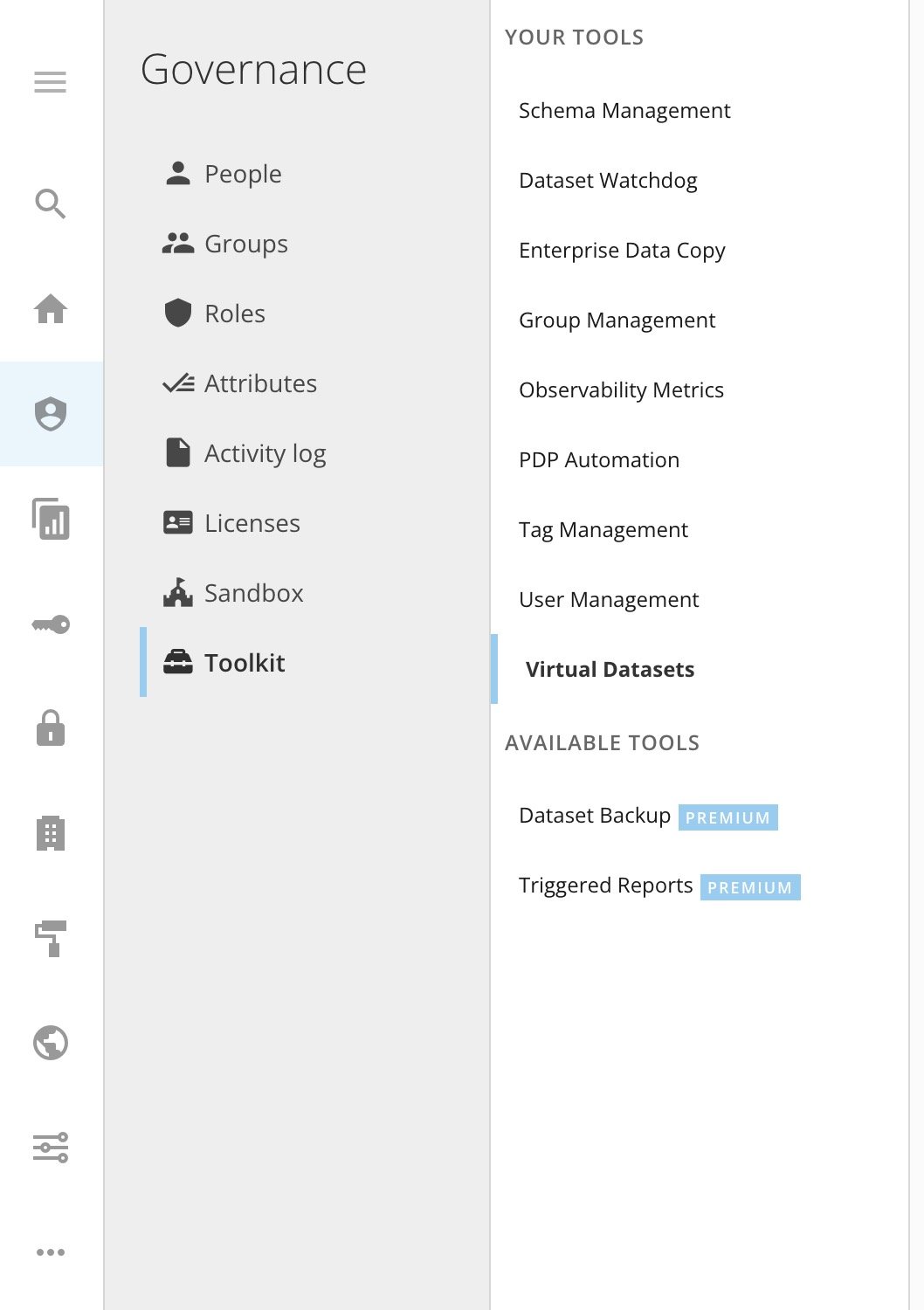
Access the Governance Toolkit from the navigation header by selecting **More** > **Admin Settings**. In the **Governance** menu, select **Toolkit**.
**Note:**
If the tool you wish to use is not enabled, please reach out to your Account Executive.
If you are unable to find the Toolkit, ensure your user role has the [required grants](#h_01G0CVRZJTC0TJMDJXVK83AJTV).
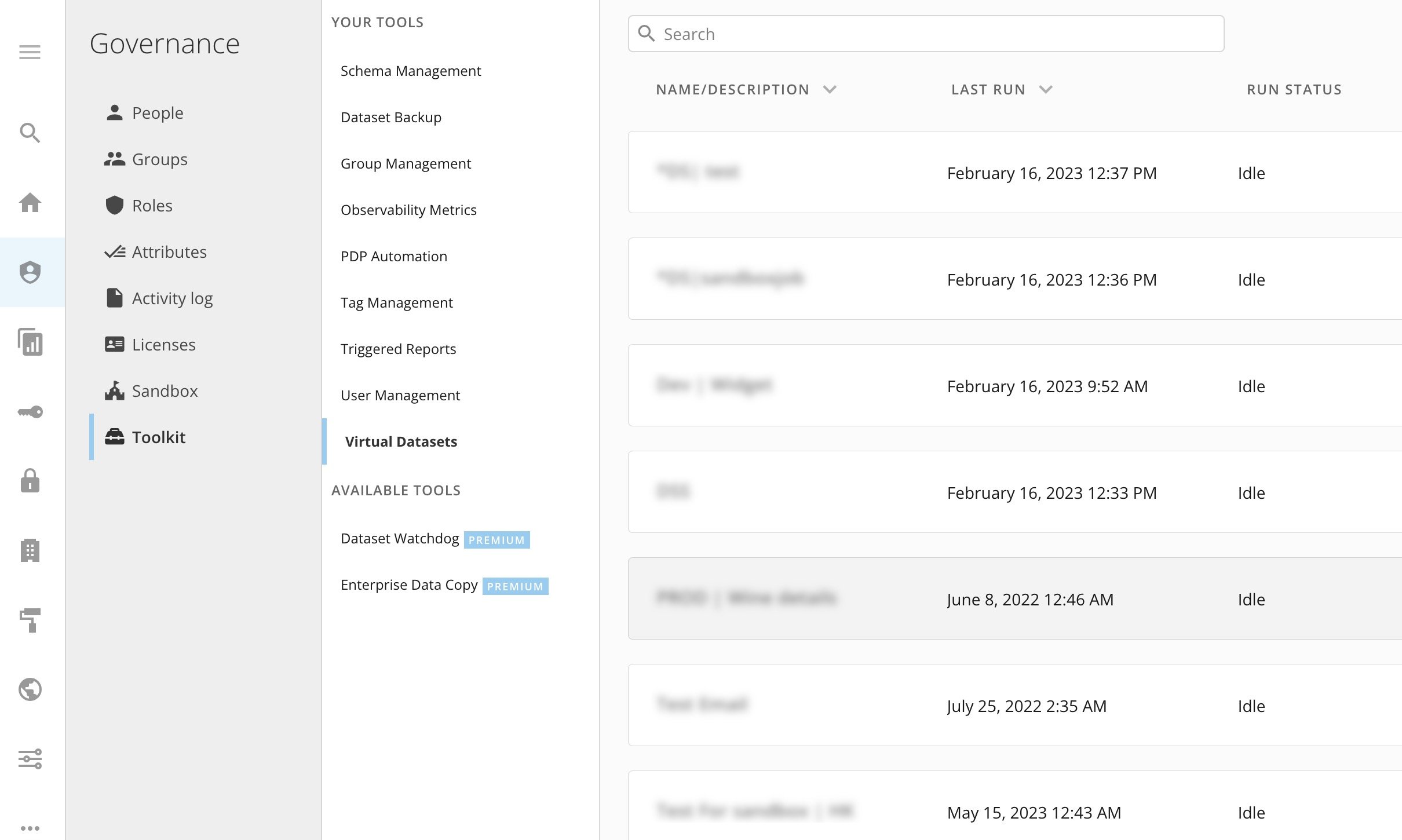
 The default view of the Virtual DataSets tool is a list of existing DataSet sharing jobs.
 ### Required Grants
To access Virtual DataSets, you need the following grants enabled. You can add these grants to a custom user role. By default the Administer Custom Pipeline Process grant is enabled for users with an Admin default security role.
* **Create Custom Pipeline Processes —**
This grant allows a user to create, update, share, and delete jobs. Users with this grant can only see jobs that they created or jobs that have been shared with them.
* **Administer Custom Pipeline Processes —**
This grant allows a user to create, update, share, and delete jobs. Users with this grant can see all jobs in the instance.
* **Edit DataSets**
To learn more about custom roles and grants see [Managing Custom Roles](/s/article/360043438973).
### Create DataSet Copy Account
Before using Virtual DataSets, you must create a DataSet Copy Account that contains the developer token and instance URL for your destination instance. Follow these steps to create a DataSet Copy Account:
1. From the navigation header, select
**Data**.
The Data Center displays.
2. Select
**Accounts**.
3. Select
**Add New**.
The **Add Account** modal displays.
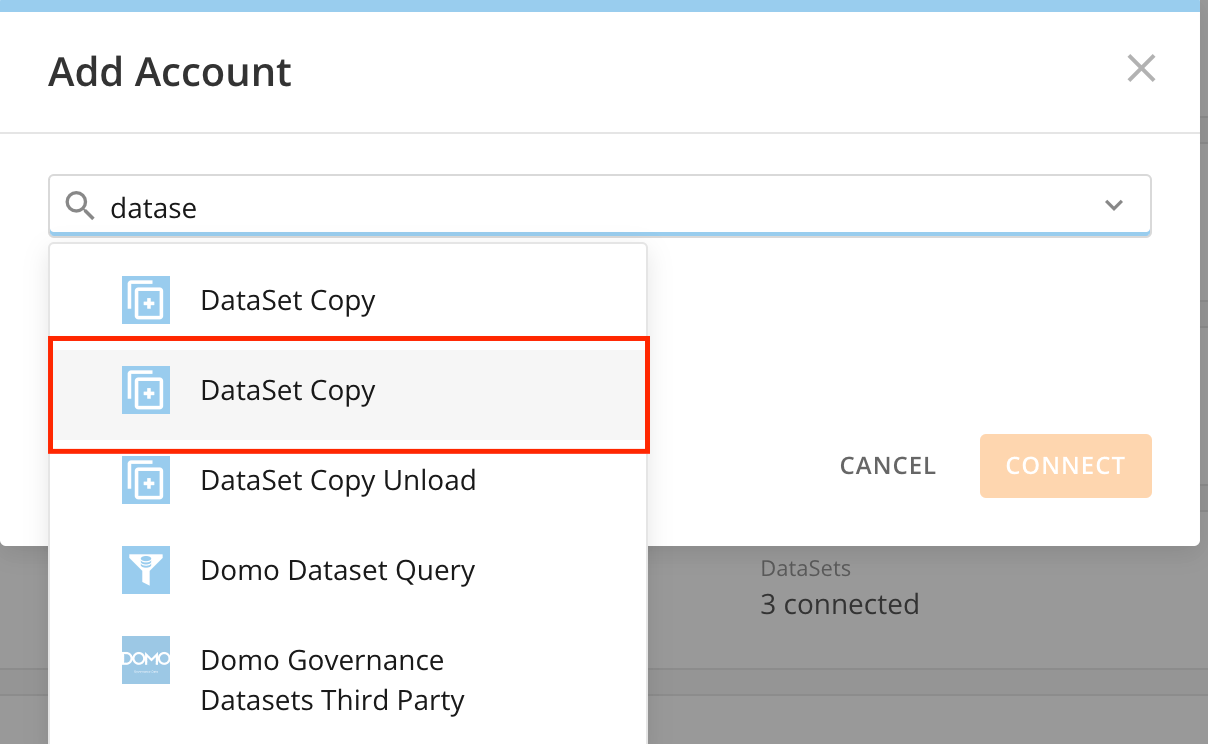
4. In the search bar, search for "DataSet Copy".
5. Select the second DataSet Copy account that displays in the predictive search results.
### Required Grants
To access Virtual DataSets, you need the following grants enabled. You can add these grants to a custom user role. By default the Administer Custom Pipeline Process grant is enabled for users with an Admin default security role.
* **Create Custom Pipeline Processes —**
This grant allows a user to create, update, share, and delete jobs. Users with this grant can only see jobs that they created or jobs that have been shared with them.
* **Administer Custom Pipeline Processes —**
This grant allows a user to create, update, share, and delete jobs. Users with this grant can see all jobs in the instance.
* **Edit DataSets**
To learn more about custom roles and grants see [Managing Custom Roles](/s/article/360043438973).
### Create DataSet Copy Account
Before using Virtual DataSets, you must create a DataSet Copy Account that contains the developer token and instance URL for your destination instance. Follow these steps to create a DataSet Copy Account:
1. From the navigation header, select
**Data**.
The Data Center displays.
2. Select
**Accounts**.
3. Select
**Add New**.
The **Add Account** modal displays.
4. In the search bar, search for "DataSet Copy".
5. Select the second DataSet Copy account that displays in the predictive search results.
 6. (Optional) Hover over the
**Account Name** to see the editable field and rename the account.
7. In the
**Access Token** field, enter the access token of the owner of the instance where you would like the data to go. Make sure this token is not expired. See [Manage Access Tokens](/s/article/360042934494) to learn how to generate an access token.
**Note:** Virtual DataSets are created by the user that the token was generated for.
8. In the
**Domo Instance** field, enter the Domo domain for the destination Domo instance. The format must be: *mydomain*. [domo.com](http://domo.com).
6. (Optional) Hover over the
**Account Name** to see the editable field and rename the account.
7. In the
**Access Token** field, enter the access token of the owner of the instance where you would like the data to go. Make sure this token is not expired. See [Manage Access Tokens](/s/article/360042934494) to learn how to generate an access token.
**Note:** Virtual DataSets are created by the user that the token was generated for.
8. In the
**Domo Instance** field, enter the Domo domain for the destination Domo instance. The format must be: *mydomain*. [domo.com](http://domo.com).
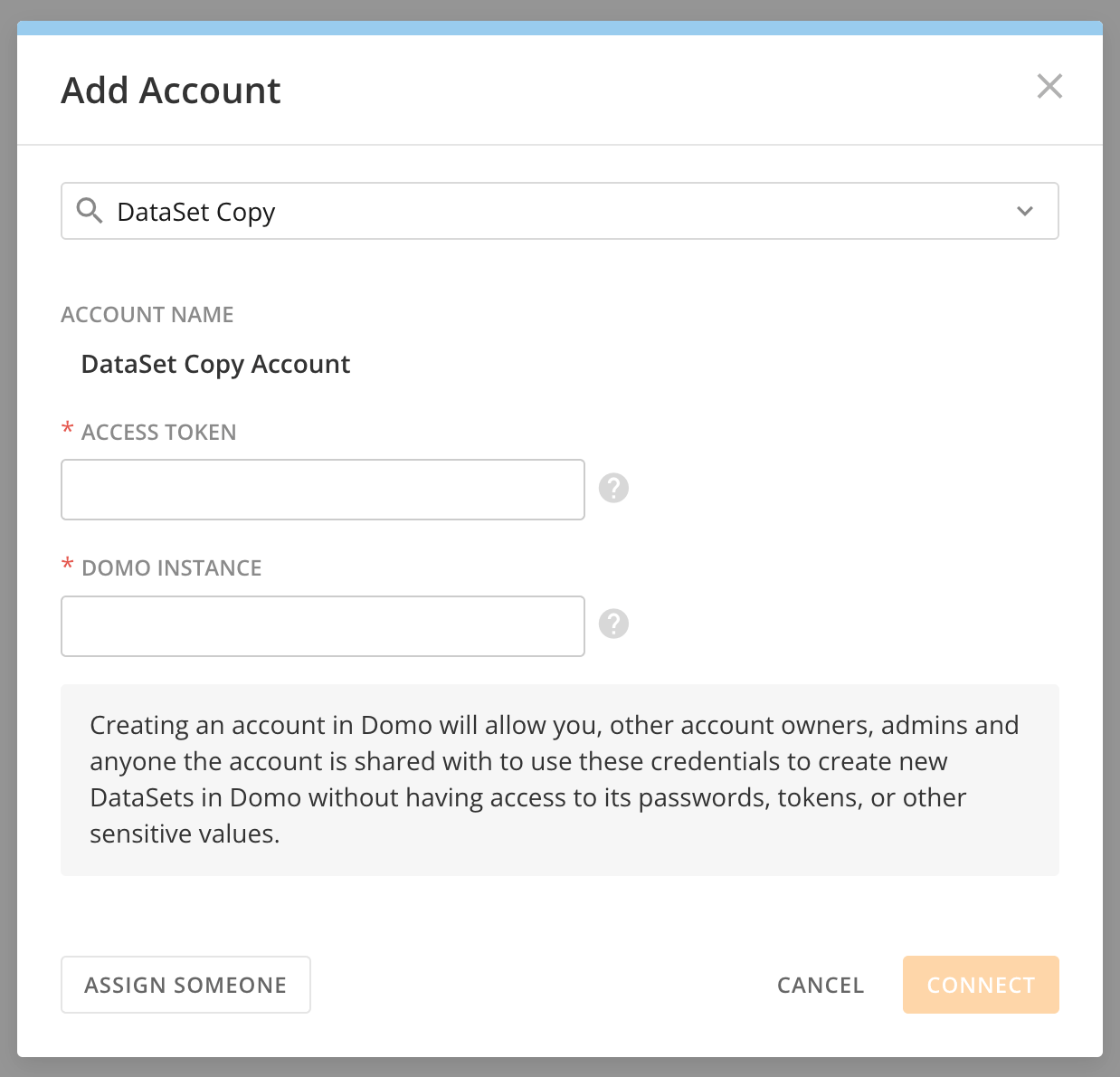 9. Select
**Connect** to save the account.
### Create a Job
A job is a configuration of one destination instance and any number of DataSets to be shared.
1. Select
**+ New Job**.
2. Enter a name for your job.
3. (Optional) Enter a description of your job.
4. Search for and select the
[DataSet Copy Account](#create_dataset_copy_account) you created that contains the developer token and instance URL for your destination instance.
5. Select
**Next**.
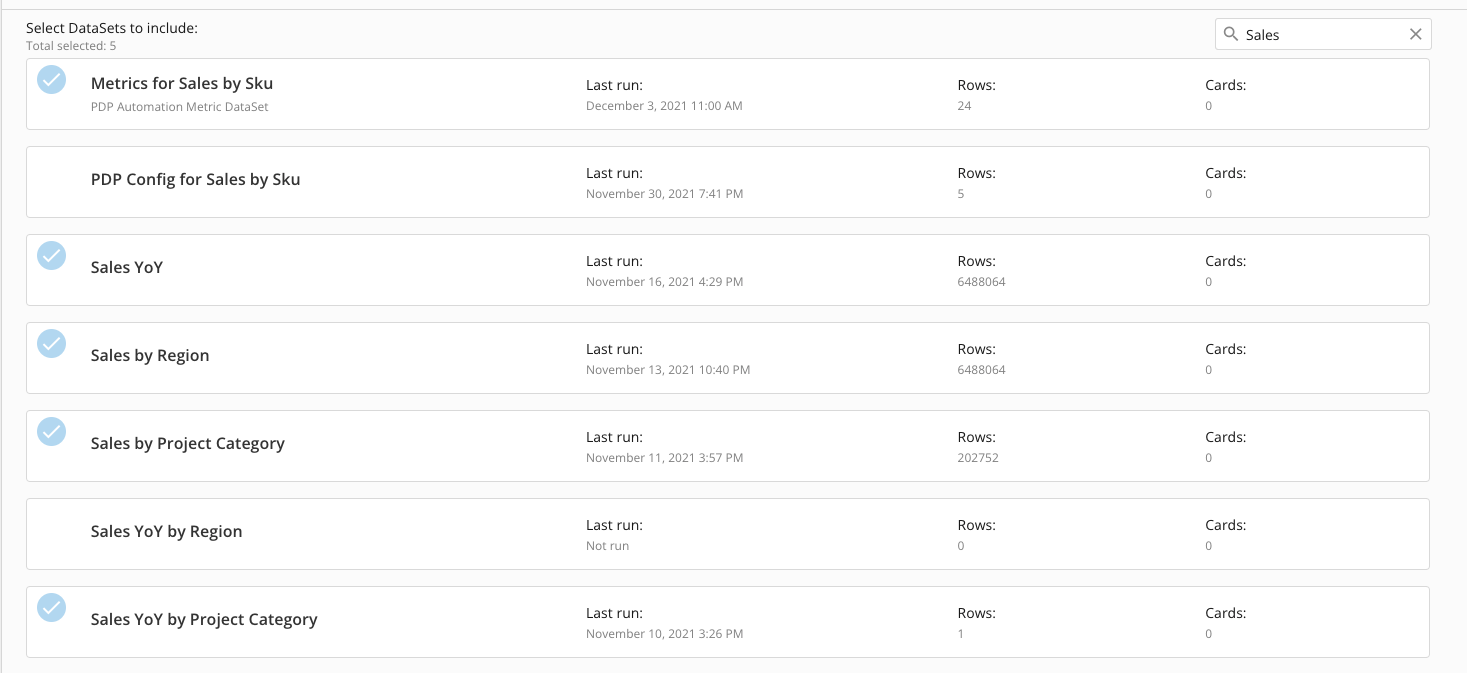
6. Select the
DataSets to share with the destination instance.
9. Select
**Connect** to save the account.
### Create a Job
A job is a configuration of one destination instance and any number of DataSets to be shared.
1. Select
**+ New Job**.
2. Enter a name for your job.
3. (Optional) Enter a description of your job.
4. Search for and select the
[DataSet Copy Account](#create_dataset_copy_account) you created that contains the developer token and instance URL for your destination instance.
5. Select
**Next**.
6. Select the
DataSets to share with the destination instance.
 7. Select
**Ne** **xt**.
8. Map the PDP accounts you wish to use to restrict data access in the destination instance.
**Note:** This process requires PDP to be enabled on the source DataSet and the PDP policy in place. The All rows policy is created by default and you can use it in this tool. However, you must still enable PDP for this to work. The destination DataSet uses the PDP policy selected to restrict data access in the destination instance.
9. Select
**Submit** to save your job and create the DataSets you selected in the destination instance.
**Note:**
After the job is created there is nothing you need to do to keep the DataSet in the destination up to date. Any changes to the parent instance are immediately reflected in the destination DataSet.
### Delete a Job
When you delete a job, the DataSets in the destination instance are not deleted.
**Important:**
After deleting a job, if you want to remove DataSets from the destination instance, you must do it manually.
### Troubleshooting
If no data displays in the DataSet in the destination instance, make sure that PDP is enabled in the parent instance.
### FAQ
Yes, as long as they have the [required grants](#required_grants) listed above. Non-admin users are only allowed to share DataSets of which they are the owner or co-owner because only these personas have access to update the PDP policies on the DataSource.
Yes, you can have any number of jobs with one or many DataSets.
No, the Virtual DataSets do not inherit tags and descriptions from the source DataSet.
Yes, if the Beta feature allowing virtual DataSets to be used in Magic ETL jobs is enabled. You can request this through the Domo Beta process.
7. Select
**Ne** **xt**.
8. Map the PDP accounts you wish to use to restrict data access in the destination instance.
**Note:** This process requires PDP to be enabled on the source DataSet and the PDP policy in place. The All rows policy is created by default and you can use it in this tool. However, you must still enable PDP for this to work. The destination DataSet uses the PDP policy selected to restrict data access in the destination instance.
9. Select
**Submit** to save your job and create the DataSets you selected in the destination instance.
**Note:**
After the job is created there is nothing you need to do to keep the DataSet in the destination up to date. Any changes to the parent instance are immediately reflected in the destination DataSet.
### Delete a Job
When you delete a job, the DataSets in the destination instance are not deleted.
**Important:**
After deleting a job, if you want to remove DataSets from the destination instance, you must do it manually.
### Troubleshooting
If no data displays in the DataSet in the destination instance, make sure that PDP is enabled in the parent instance.
### FAQ
Yes, as long as they have the [required grants](#required_grants) listed above. Non-admin users are only allowed to share DataSets of which they are the owner or co-owner because only these personas have access to update the PDP policies on the DataSource.
Yes, you can have any number of jobs with one or many DataSets.
No, the Virtual DataSets do not inherit tags and descriptions from the source DataSet.
Yes, if the Beta feature allowing virtual DataSets to be used in Magic ETL jobs is enabled. You can request this through the Domo Beta process.