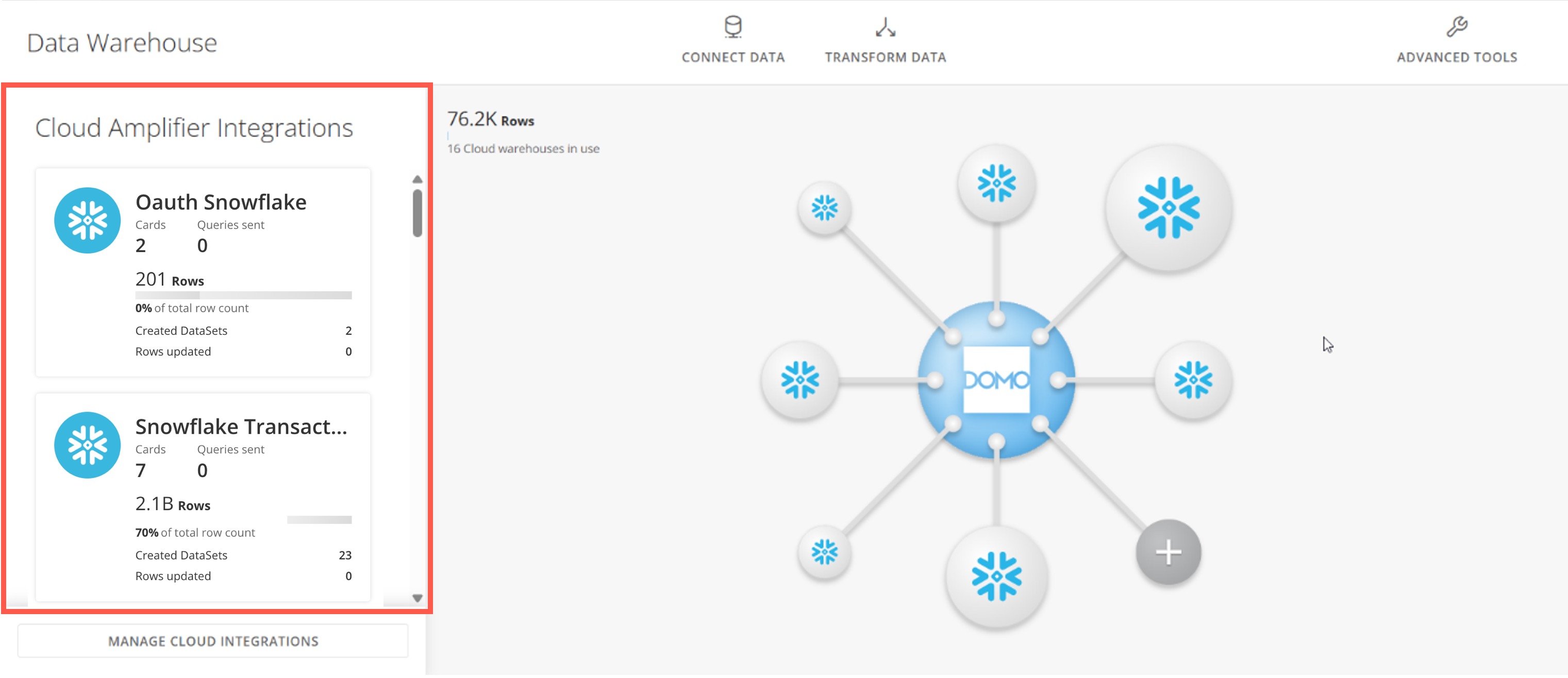
> ## Documentation Index
> Fetch the complete documentation index at: https://domoinc-openapi-sync-dataflows.mintlify.site/llms.txt
> Use this file to discover all available pages before exploring further.

# - Cloud Amplifier Overview -

export const InlineImage = ({src, alt = '', height = '1.6em'}) => {
  return <img noZoom src={src} alt={alt} style={{
    display: 'inline',
    verticalAlign: 'start',
    height: height,
    margin: '0'
  }} />;
};

### Intro

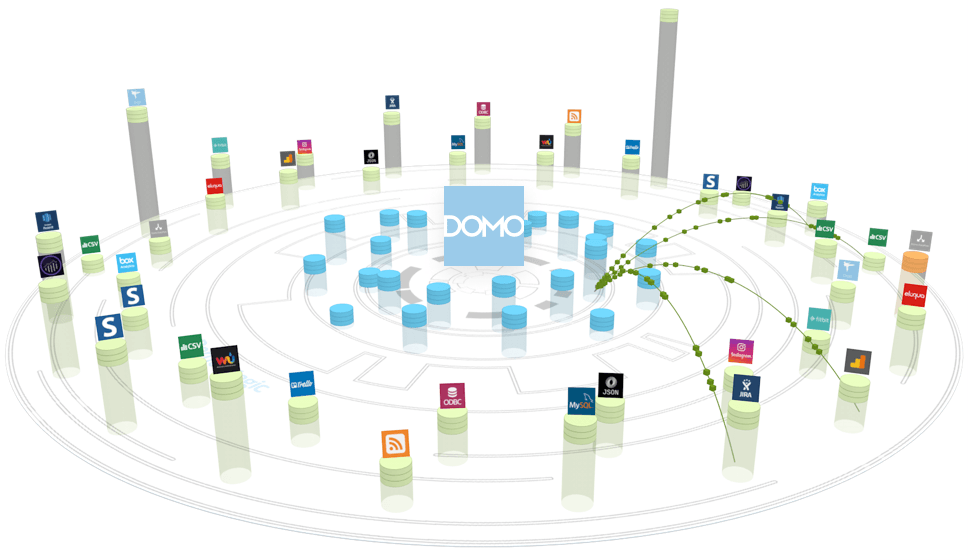
Cloud Amplifier provides a native integration with cross-cloud systems to unlock data products at the speed your business needs them.

<Frame>
  <img alt="cloud amplifier image.png" src="https://mintcdn.com/domoinc-openapi-sync-dataflows/t-REVUfgwLiw_Ine/images/kb/ka0Vq000000A23l-00N5w00000Ri7BU-0EMVq000000Awp7.jpg?fit=max&auto=format&n=t-REVUfgwLiw_Ine&q=85&s=dfb37dfde782ed86afca93ba5ca00fc0" style={{ width: 898, height: 519 }} width="968" height="560" data-path="images/kb/ka0Vq000000A23l-00N5w00000Ri7BU-0EMVq000000Awp7.jpg" />
</Frame>

# Why Cloud Amplifier?

* **IT limitations —**
  IT alone cannot realize the full potential of data. A broad, inclusive approach with all LOBs is required, and all valuable data is not yet controlled by IT.
* **Increased stress and time constraints —**
  Business users demand timely access to data products, increasing the pressure to deliver.
* **Rigidity and friction in data processes —**
  Rigid processes and tooling prevent the quick building of flexible databases, requiring too much time and effort.

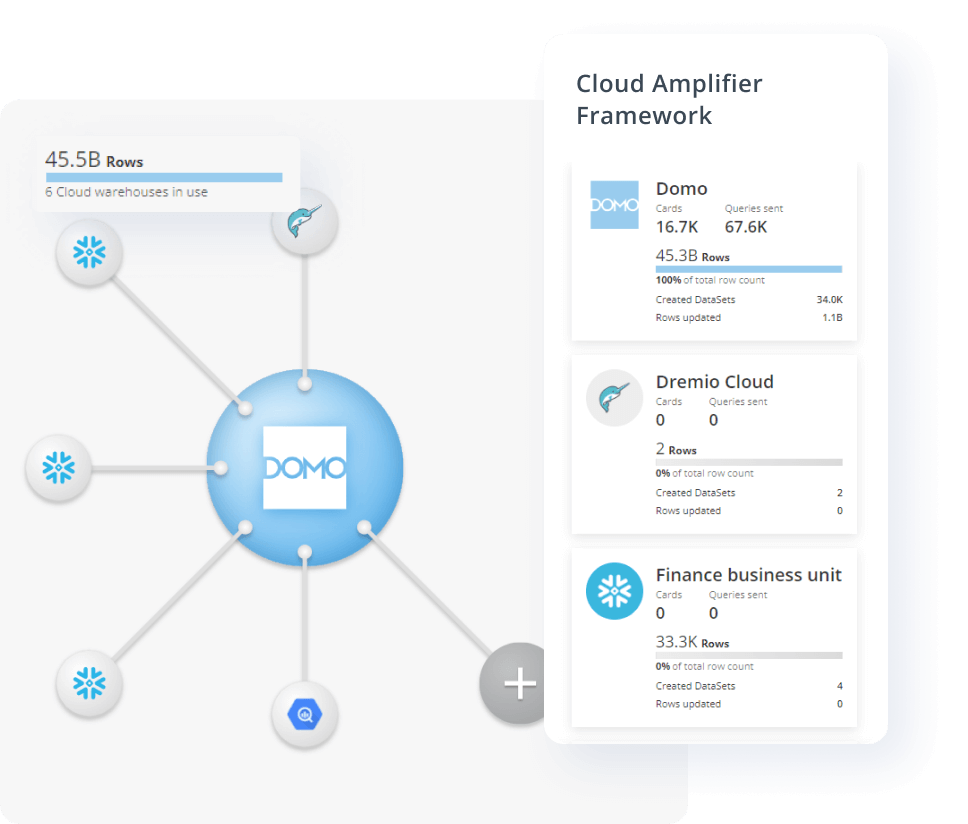
Cloud Amplifier can provide solutions for

these issues and more.
<Frame>
  <img alt="ca image 2.png" src="https://mintcdn.com/domoinc-openapi-sync-dataflows/t-REVUfgwLiw_Ine/images/kb/ka0Vq000000A23l-00N5w00000Ri7BU-0EMVq000000AwVm.jpg?fit=max&auto=format&n=t-REVUfgwLiw_Ine&q=85&s=acd76c5b0c256fc7eda7bc0f23747ac2" style={{ width: 700, height: 596 }} width="968" height="824" data-path="images/kb/ka0Vq000000A23l-00N5w00000Ri7BU-0EMVq000000AwVm.jpg" />
</Frame>

***

### Required Grants

After Cloud Amplifier is enabled for your Domo environment, you can assign the following Cloud Amplifier grants to manage access to these features:

* **Manage Cloud Accounts**
  — Allows a user to add/remove cloud accounts and add/remove tables from a cloud account. This grant also allows a user to change the default storage cloud.
  <Note>
    **Note:** This grant must be assigned to a user with the Manage DataSet
    grant to work properly.
  </Note>

* **Override Default Cloud**
  — Allows a user to use any storage cloud account that is shared with them instead of the default cloud. If you do not have this grant, you can't use any other cloud besides the default cloud.

  <Note>
    **Note:** This grant must be assigned to a user with the Edit DataSet or
    Manage DataSet grant to work properly.
  </Note>

### Access Cloud Amplifier

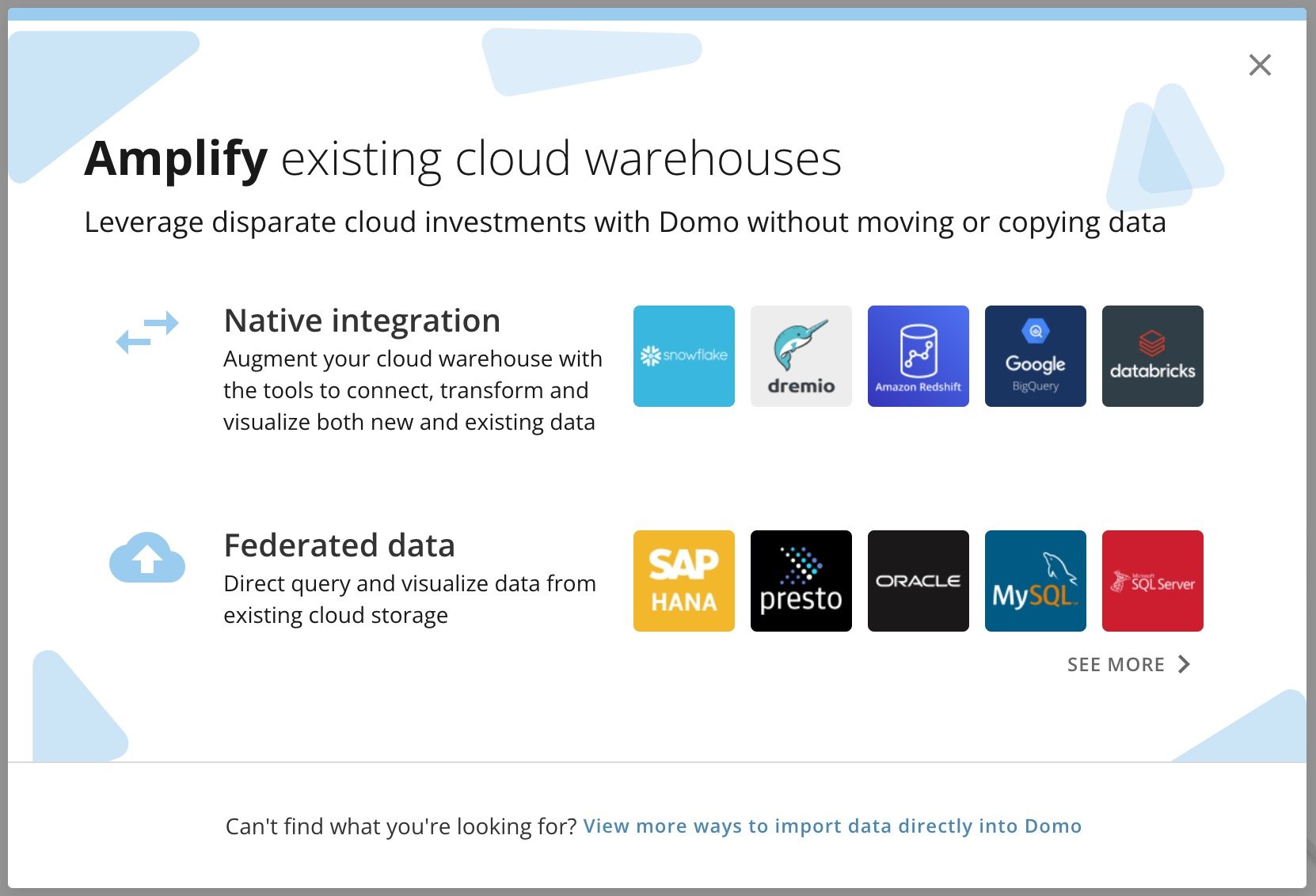
If you're on a consumption agreement, you can access Cloud Amplifier from the Data Center. See [Setup](#setup) below.

If you're not on a consumption agreement, you can enable Cloud Amplifier for your instance by contacting your Domo account team.

<Frame>
  <img alt="cloud amplifier.jpg" src="https://mintcdn.com/domoinc-openapi-sync-dataflows/t-REVUfgwLiw_Ine/images/kb/ka0Vq000000A23l-00N5w00000Ri7BU-0EM5w000006voGj.jpg?fit=max&auto=format&n=t-REVUfgwLiw_Ine&q=85&s=1106b1f99cd00f7400b04e950de7db99" style={{ width: 539, height: 367 }} width="1662" height="1132" data-path="images/kb/ka0Vq000000A23l-00N5w00000Ri7BU-0EM5w000006voGj.jpg" />
</Frame>

### Setup

After Cloud Amplifier is enabled for your account, you can connect your existing data warehouses from the providers listed below. Each provider has their own setup requirements; follow the links below to see our setup documentation for each provider.

Available providers include:

* [Amazon Athena](/s/article/000005744)
* [Amazon Redshift](/s/article/000005312)
* [AzureSQL](/s/article/000005471)
* [Databricks](/s/article/000005289)
* [Dremio](https://domo-support.domo.com/s/article/000005139)
* [Google BigQuery](/s/article/000005237)
* [Lakebase](/s/article/Domo-on-Lakebase)
* [MySQL](/s/article/000005451)
* [Oracle](/s/article/000005586)
* [PostgreSQL](/s/article/000005756)
* [Snowflake](https://domo-support.domo.com/s/article/4402322966807)

### Defaults

Cloud Amplifier allows you to specify a default storage account for all DataSets. Changing these settings does not change existing DataSets or DataFlows. These defaults are only used for new assets.

### Best Practices

We recommend that you choose a default storage cloud. To do this, follow the steps below after Cloud Amplifier is enabled for your account. Before completing this task, make sure that you have the Override Default Cloud [grant](#required_grants).

1. In the Domo navigation header, select **More** > **Admin**.

   The Admin Settings display.

2. Under **Features**, select **Cloud Amplifier**.

   The **Cloud Amplifier** page displays.

3. Select an option from the
   **Select the default storage cloud** dropdown.
   <Note>
     **Note:** We recommend setting up your Cloud Amplifier connections using a
     service account.
   </Note>

If you need to move a DataSet from one warehouse to another, you can use Magic ETL to copy a specific DataSet hosted in your database and materialize it in Domo, where it runs on a schedule.

### Use Advanced Scheduling for Data Freshness

With Cloud Amplifier, you can use Advanced Scheduling to control when to check for data updates in your sources. This allows you to check for updates only when necessary and helps reduce data processing costs.

You can either use basic data freshness checks or advanced checks for any new or existing Cloud Amplifier integration. Follow these steps to configure them for an existing cloud connection:

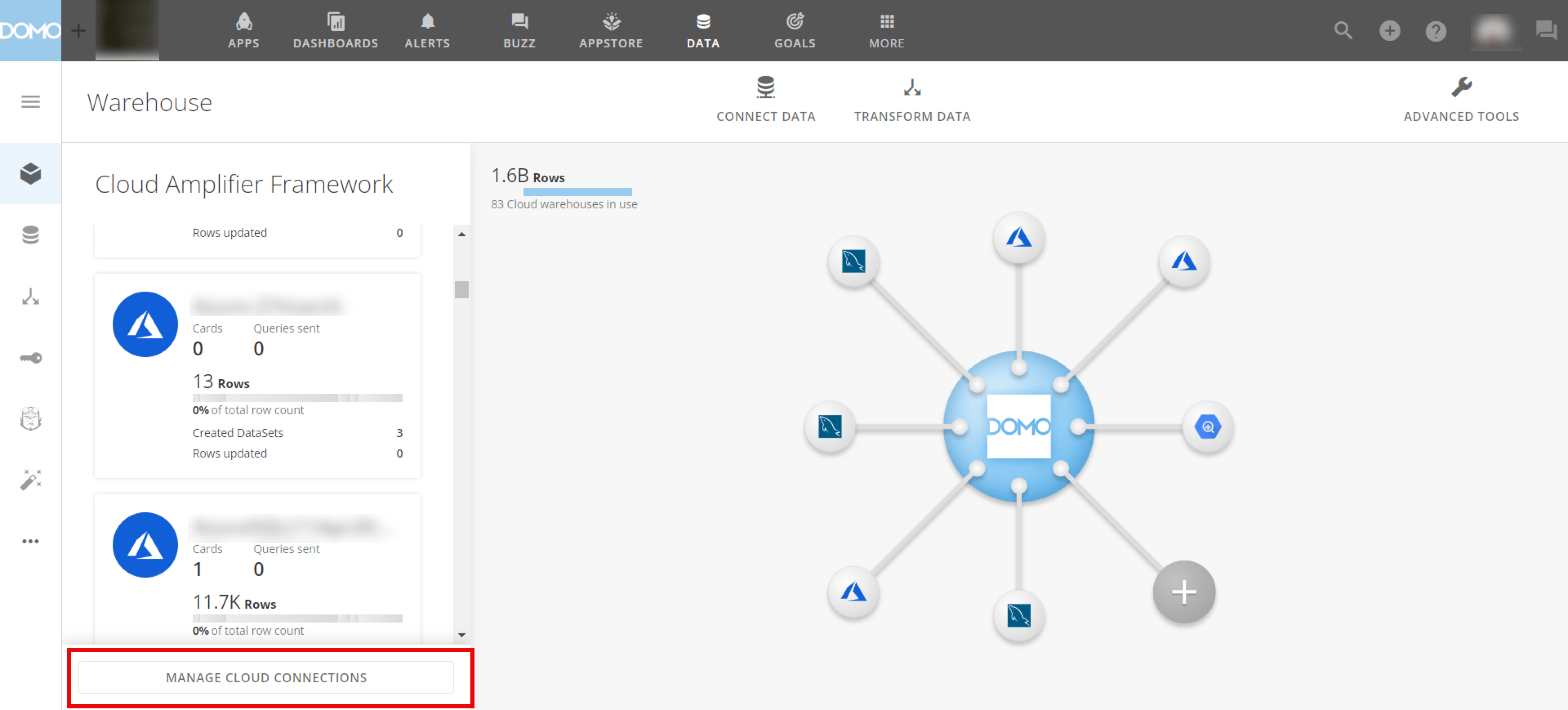
1. Navigate to **Data** > **Data Warehouse** (cube icon) and select **Manage Cloud Connections.**

   <Frame>
     <img alt="Advanced scheduling - Warehouse page.png" src="https://mintcdn.com/domoinc-openapi-sync-dataflows/XLeSvlwfBHPJHbmY/images/kb/ka0Vq000000A23l-00N5w00000Ri7BU-0EMVq000003GwpV.jpg?fit=max&auto=format&n=XLeSvlwfBHPJHbmY&q=85&s=bfb6abb8ebf5b01da0f9b2bb00d330b9" style={{ width: 901, height: 408 }} width="3840" height="1738" data-path="images/kb/ka0Vq000000A23l-00N5w00000Ri7BU-0EMVq000003GwpV.jpg" />
   </Frame>

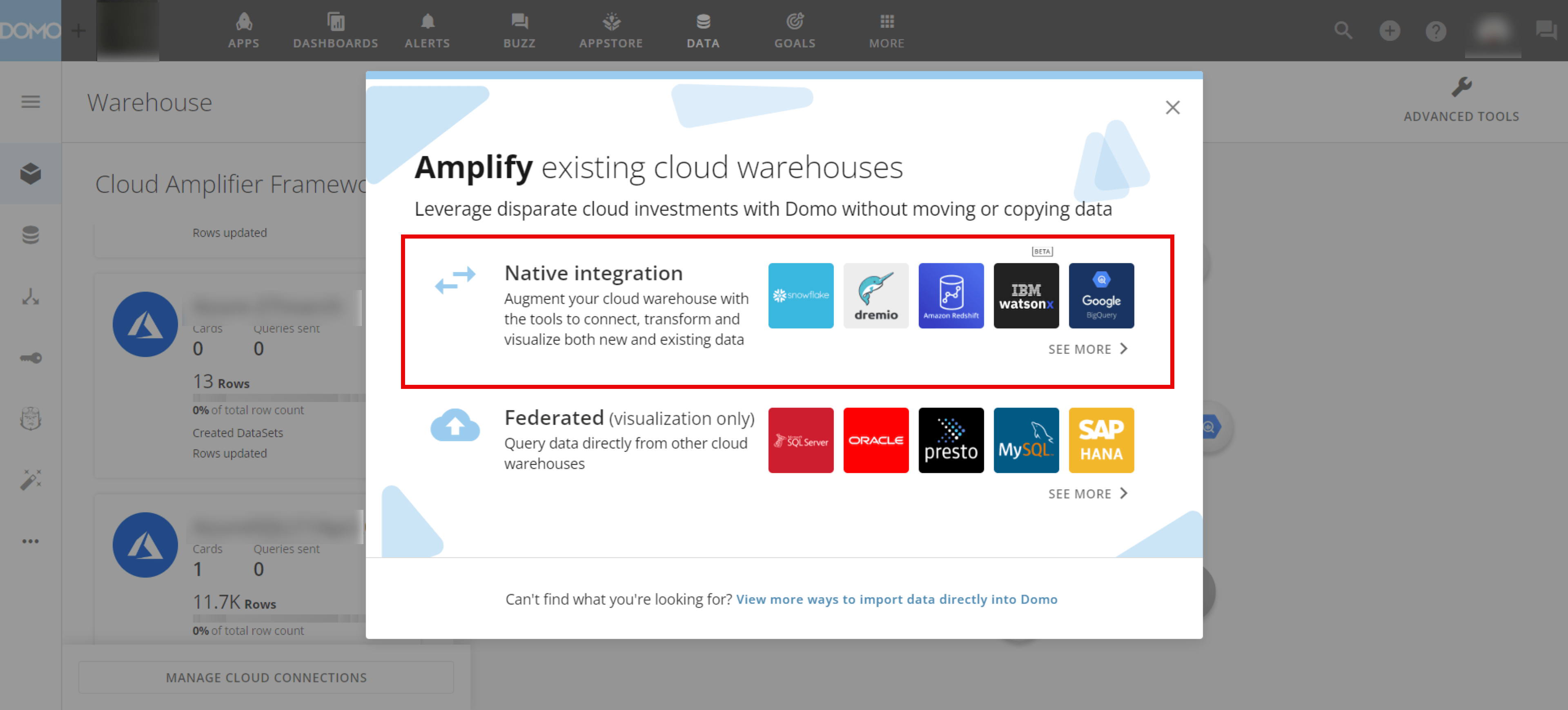
2. Choose any native integration engine by selecting a tile or selecting
   **See more** for additional integration options.
   <Frame>
     <img alt="Advanced scheduling - Engines.png" src="https://mintcdn.com/domoinc-openapi-sync-dataflows/t-REVUfgwLiw_Ine/images/kb/ka0Vq000000A23l-00N5w00000Ri7BU-0EMVq000003Gppe.jpg?fit=max&auto=format&n=t-REVUfgwLiw_Ine&q=85&s=561dba6e339b6df34963ab927aefa18c" style={{ width: 899, height: 407 }} width="3840" height="1738" data-path="images/kb/ka0Vq000000A23l-00N5w00000Ri7BU-0EMVq000003Gppe.jpg" />
   </Frame>

3. (Conditional) Choose an existing integration by hovering over your integration and selecting <InlineImage src="/images/kb/ka0Vq000000A23l-00N5w00000Ri7BU-0EMVq000003GwXn.jpg" /> (wrench icon) > **Edit** **account**. Otherwise, select **+** **Add New Integration**.
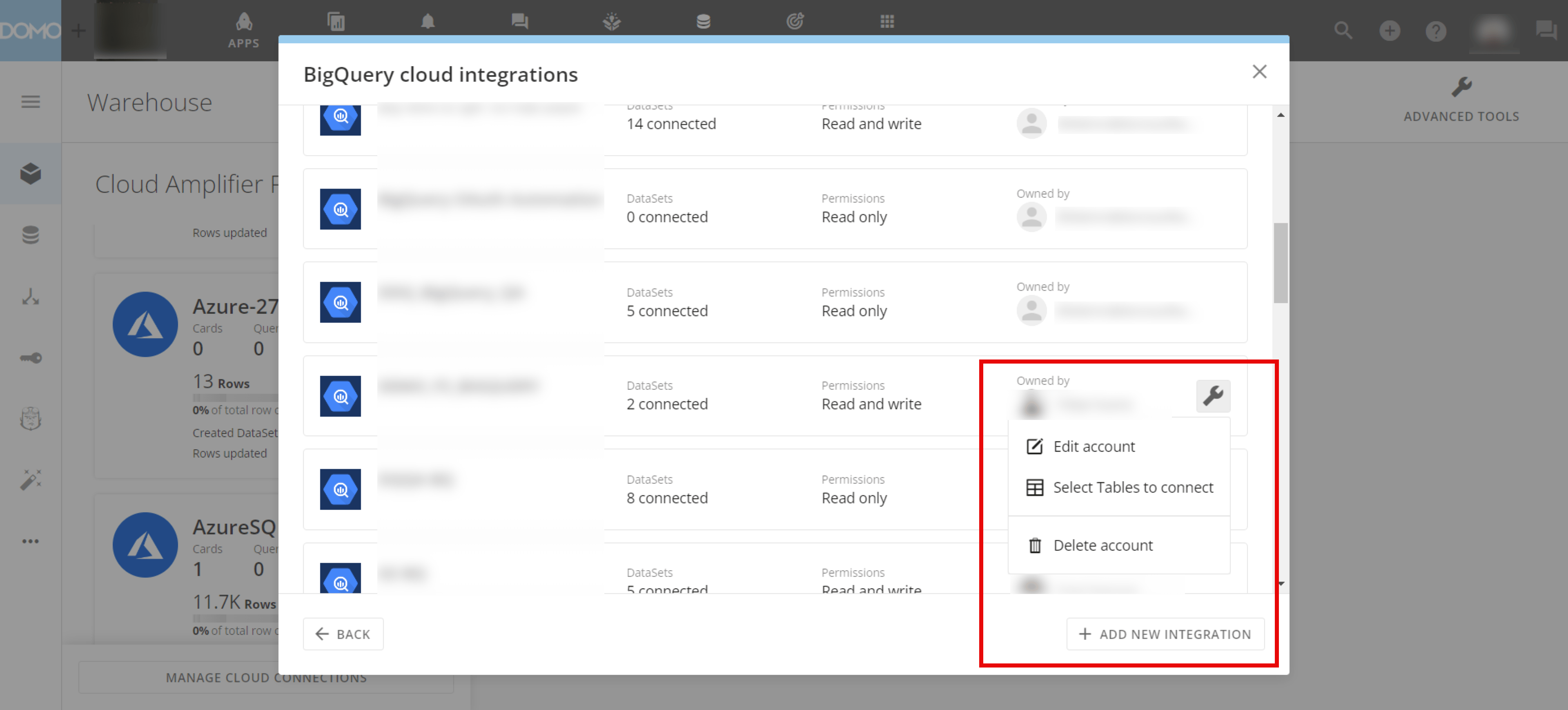
   The integration wizard displays.

   <Frame>
     <img alt="Advanced scheduling - Edit account.png" src="https://mintcdn.com/domoinc-openapi-sync-dataflows/XLeSvlwfBHPJHbmY/images/kb/ka0Vq000000A23l-00N5w00000Ri7BU-0EMVq000003GzaU.jpg?fit=max&auto=format&n=XLeSvlwfBHPJHbmY&q=85&s=50bd4b4fcf17f203e17d9f5acbdd1b88" style={{ width: 897, height: 406 }} width="3840" height="1738" data-path="images/kb/ka0Vq000000A23l-00N5w00000Ri7BU-0EMVq000003GzaU.jpg" />
   </Frame>

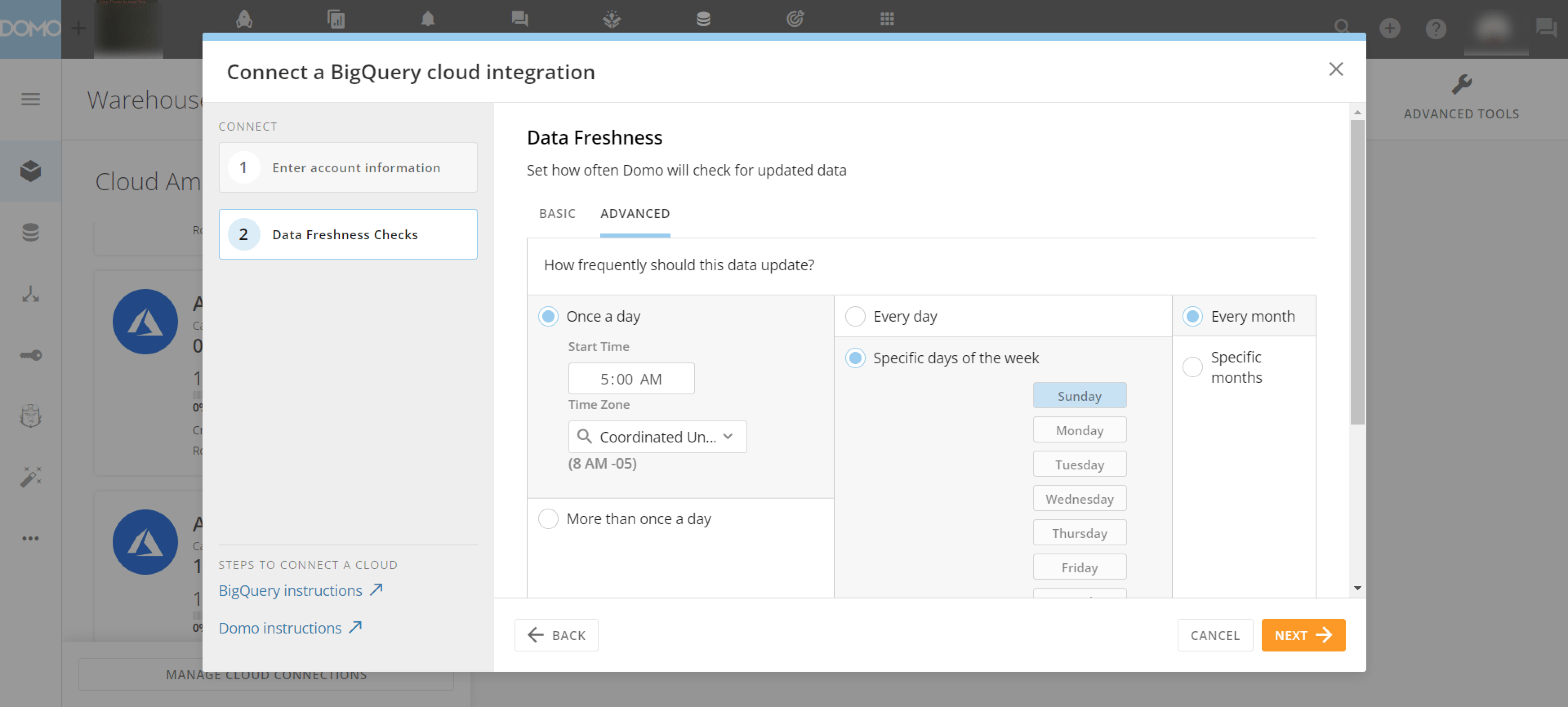
4. In the integration wizard, enter the necessary account information and navigate to the **Data Freshness Checks** step.

5. Configure your data freshness checks using the settings in either the **Basic** or **Advanced** tab. Learn more about the [basic](#basic_settings) and [advanced](#advanced_settings) settings below.
   <Frame>
     <img alt="Advanced scheduling - Settings.png" src="https://mintcdn.com/domoinc-openapi-sync-dataflows/XLeSvlwfBHPJHbmY/images/kb/ka0Vq000000A23l-00N5w00000Ri7BU-0EMVq000003H1u1.jpg?fit=max&auto=format&n=XLeSvlwfBHPJHbmY&q=85&s=9b4be2c7b9538b435eb8c3a67a83ae29" style={{ width: 899, height: 406 }} width="3840" height="1732" data-path="images/kb/ka0Vq000000A23l-00N5w00000Ri7BU-0EMVq000003H1u1.jpg" />
   </Frame>

6. Select **Next** to finish configuring your integration.

# Basic Settings

<table border="1" cellpadding="1" cellspacing="1" data-aura-rendered-by="33:200;a">
  <thead>
    <tr>
      <th colspan="1" rowspan="1">
        <p> Update Frequency </p>
      </th>

      <th colspan="1" rowspan="1">
        <p> Description </p>
      </th>
    </tr>
  </thead>

  <tbody>
    <tr>
      <td colspan="1" rowspan="1">
        <p> Every 15 minutes </p>
      </td>

      <td colspan="1" rowspan="1">
        <p>
          {" "}

          Checks every 15 minutes, all day or during the active hours
          range.{" "}
        </p>
      </td>
    </tr>

    <tr>
      <td colspan="1" rowspan="1">
        <p> Every 30 minutes </p>
      </td>

      <td colspan="1" rowspan="1">
        <p>
          {" "}

          Checks every 30 minutes, all day or during the active hours
          range.{" "}
        </p>
      </td>
    </tr>

    <tr>
      <td colspan="1" rowspan="1">
        <p> Every hour </p>
      </td>

      <td colspan="1" rowspan="1">
        <p> Checks every hour, all day or during the active hours range. </p>
      </td>
    </tr>

    <tr>
      <td colspan="1" rowspan="1">
        <p> Every day </p>
      </td>

      <td colspan="1" rowspan="1">
        <p>
          {" "}

          Checks once per day at the specified time, including weekends
          (Saturday and Sunday).{" "}
        </p>
      </td>
    </tr>

    <tr>
      <td colspan="1" rowspan="1">
        <p> Every weekday </p>
      </td>

      <td colspan="1" rowspan="1">
        <p>
          {" "}

          Checks once per day at the specified time, but not on weekends
          (Saturday and Sunday).{" "}
        </p>
      </td>
    </tr>

    <tr>
      <td colspan="1" rowspan="1">
        <p> Every week </p>
      </td>

      <td colspan="1" rowspan="1">
        <p>
          {" "}

          Checks once per week on the selected day and at the specified time.{" "}

          <a id="advanced_settings" target="_blank" />
        </p>
      </td>
    </tr>

    <tr>
      <td colspan="1" rowspan="1">
        <p> Every month </p>
      </td>

      <td colspan="1" rowspan="1">
        <p>
          {" "}

          Checks once per month on the selected date at the specified time{" "}
        </p>
      </td>
    </tr>
  </tbody>
</table>

# Advanced Settings

The advanced data freshness configuration includes the following:

<table border="1" cellpadding="1" cellspacing="1" data-aura-rendered-by="33:200;a">
  <thead>
    <tr>
      <th colspan="1" rowspan="1">
        <p> Update Frequency </p>
      </th>

      <th colspan="1" rowspan="1">
        <p> Days per week </p>
      </th>

      <th colspan="1" rowspan="1">
        <p> Months </p>
      </th>
    </tr>
  </thead>

  <tbody>
    <tr>
      <td colspan="1" rowspan="1">
        <p>
          <b> Once a day — </b> Checks once per day. You can set the time and
          time zone.{" "}
        </p>
      </td>

      <td colspan="1" rowspan="1">
        <p>
          <b> Every day — </b> Checks daily.{" "}
        </p>
      </td>

      <td colspan="1" rowspan="1">
        <p>
          <b> Every month — </b> Checks every month.{" "}
        </p>
      </td>
    </tr>

    <tr>
      <td colspan="1" rowspan="1">
        <p>
          <b> More than once a day — </b> Choose how frequently the checks
          happen using an hour range.{" "}
        </p>
      </td>

      <td colspan="1" rowspan="1">
        <p>
          <b> Specific days of the week — </b> Choose on which days of the week
          the checks happen.{" "}
        </p>
      </td>

      <td colspan="1" rowspan="1">
        <p>
          <b> Specific months — </b> Choose during which months the checks
          happen.{" "}
        </p>
      </td>
    </tr>

    <tr>
      <td colspan="1" rowspan="1">
        <p> — </p>
      </td>

      <td colspan="1" rowspan="1">
        <p>
          <b> Specific days of the month — </b> Choose on which days of the
          month the checks happen.{" "}

          <a id="compare_federated_ca" target="_blank" />
        </p>
      </td>

      <td colspan="1" rowspan="1">
        <p> — </p>
      </td>
    </tr>
  </tbody>
</table>

### Federated Data vs. Cloud Amplifier

The table below compares federated data to Cloud Amplifier read and read/write configurations:

<table border="1" cellpadding="1" cellspacing="1" class="mt-responsive-table" data-aura-rendered-by="33:200;a">
  <thead>
    <tr>
      <th colspan="1" rowspan="1">
        <p> Capability </p>
      </th>

      <th colspan="1" rowspan="1">
        <p> Federated-Direct Query </p>
      </th>

      <th colspan="1" rowspan="1">
        {" "}

        Cloud Amplifier Integration (Read-Adapter){" "}
      </th>

      <th colspan="1" rowspan="1">
        {" "}

        Cloud Amplifier Integration (Read/Write Adapter){" "}
      </th>
    </tr>
  </thead>

  <tbody>
    <tr>
      <td colspan="1" rowspan="1">
        <p>
          {" "}

          Visualize data from existing tables <br /> - Create cards <br /> -
          Create dashboards{" "}
        </p>
      </td>

      <td colspan="1" rowspan="1">
        <p>✅</p>
      </td>

      <td colspan="1" rowspan="1">
        ✅
      </td>

      <td colspan="1" rowspan="1">
        ✅
      </td>
    </tr>

    <tr>
      <td colspan="1" rowspan="1">
        <p> Visualize on-premise data behind firewall via an agent </p>
      </td>

      <td colspan="1" rowspan="1">
        <p>✅</p>
      </td>

      <td colspan="1" rowspan="1">
        <p>❌</p>
      </td>

      <td colspan="1" rowspan="1">
        ❌
      </td>
    </tr>

    <tr>
      <td colspan="1" rowspan="1">
        <p>
          {" "}

          Get updated metadata from source tables <br /> - Last updated time{" "}
          <br /> - Updated row count{" "}
        </p>
      </td>

      <td colspan="1" rowspan="1">
        <p>❌</p>
      </td>

      <td colspan="1" rowspan="1">
        <p>
          ✅<br />

          <span>
            {" "}

            (

            <b>
              {" "}

              Every 15 minutes <br /> Configurable{" "}
            </b>

            {" "}

            ){" "}
          </span>
        </p>
      </td>

      <td colspan="1" rowspan="1">
        ✅<br />

        <span>
          {" "}

          (

          <b>
            {" "}

            Every 15 minutes <br /> Configurable{" "}
          </b>

          {" "}

          ){" "}
        </span>
      </td>
    </tr>

    <tr>
      <td colspan="1" rowspan="1">
        <p> Card Alerts </p>
      </td>

      <td colspan="1" rowspan="1">
        <p>
          <img src="https://mintlify.s3.us-west-1.amazonaws.com/domoinc-openapi-sync-dataflows/images/kb/ka0Vq000000A23l-00N5w00000Ri7BU-0EM5w000005wybr.png" alt="Screenshot 2023-02-03 at 1.41.27 AM.png" />
        </p>
      </td>

      <td colspan="1" rowspan="1">
        ✅<br />

        <span>
          {" "}

          (

          <b>
            {" "}

            Every 15 minutes <br /> Configurable{" "}
          </b>

          {" "}

          ){" "}
        </span>
      </td>

      <td colspan="1" rowspan="1">
        ✅<br />

        <span>
          {" "}

          (

          <b>
            {" "}

            Every 15 minutes <br /> Configurable{" "}
          </b>

          {" "}

          ){" "}
        </span>
      </td>
    </tr>

    <tr>
      <td colspan="1" rowspan="1">
        {" "}

        DataSet Alerts{" "}
      </td>

      <td colspan="1" rowspan="1">
        ❌
      </td>

      <td colspan="1" rowspan="1">
        ✅<br />

        <span>
          {" "}

          (

          <b>
            {" "}

            Every 15 minutes <br /> Configurable{" "}
          </b>

          {" "}

          ){" "}
        </span>
      </td>

      <td colspan="1" rowspan="1">
        <span>
          ✅<br /> (

          <b>
            {" "}

            Every 15 minutes <br /> Configurable{" "}
          </b>

          {" "}

          ){" "}
        </span>
      </td>
    </tr>

    <tr>
      <td colspan="1" rowspan="1">
        {" "}

        DataSet Views{" "}
      </td>

      <td colspan="1" rowspan="1">
        ✅
      </td>

      <td colspan="1" rowspan="1">
        ✅
      </td>

      <td colspan="1" rowspan="1">
        ✅
      </td>
    </tr>

    <tr>
      <td colspan="1" rowspan="1">
        {" "}

        Use data from existing tables in Magic ETL as inputs{" "}
      </td>

      <td colspan="1" rowspan="1">
        ❌
      </td>

      <td colspan="1" rowspan="1">
        ✅
      </td>

      <td colspan="1" rowspan="1">
        ✅
      </td>
    </tr>

    <tr>
      <td colspan="1" rowspan="1">
        {" "}

        Use data updates from existing tables to trigger other DataFlows{" "}
      </td>

      <td colspan="1" rowspan="1">
        ❌
      </td>

      <td colspan="1" rowspan="1">
        ✅
      </td>

      <td colspan="1" rowspan="1">
        ✅
      </td>
    </tr>

    <tr>
      <td colspan="1" rowspan="1">
        {" "}

        Custom fiscal calendar for source table data (one per instance){" "}
      </td>

      <td colspan="1" rowspan="1">
        ❌
      </td>

      <td colspan="1" rowspan="1">
        ❌
      </td>

      <td colspan="1" rowspan="1">
        ✅
      </td>
    </tr>

    <tr>
      <td colspan="1" rowspan="1">
        {" "}

        Use Domo Connectors, Workbench, SDK, CLI to write to customer-owned
        EDW/Data Lake{" "}
      </td>

      <td colspan="1" rowspan="1">
        <img src="https://mintlify.s3.us-west-1.amazonaws.com/domoinc-openapi-sync-dataflows/images/kb/ka0Vq000000A23l-00N5w00000Ri7BU-0EM5w000005wybc.png" alt="Screenshot 2023-02-03 at 1.29.01 AM.png" />
      </td>

      <td colspan="1" rowspan="1">
        <img src="https://mintlify.s3.us-west-1.amazonaws.com/domoinc-openapi-sync-dataflows/images/kb/ka0Vq000000A23l-00N5w00000Ri7BU-0EM5w000005wybc.png" alt="Screenshot 2023-02-03 at 1.29.01 AM.png" />
      </td>

      <td colspan="1" rowspan="1">
        <p>✅</p>

        <p>
          <b>
            <span> Native direct rewrite </span>
          </b>
        </p>
      </td>
    </tr>

    <tr>
      <td colspan="1" rowspan="1">
        {" "}

        Write Magic ETL output to customer-owned EDW/Data Lake{" "}
      </td>

      <td colspan="1" rowspan="1">
        <img src="https://mintlify.s3.us-west-1.amazonaws.com/domoinc-openapi-sync-dataflows/images/kb/ka0Vq000000A23l-00N5w00000Ri7BU-0EM5w000005wybc.png" alt="Screenshot 2023-02-03 at 1.29.01 AM.png" />
      </td>

      <td colspan="1" rowspan="1">
        <img src="https://mintlify.s3.us-west-1.amazonaws.com/domoinc-openapi-sync-dataflows/images/kb/ka0Vq000000A23l-00N5w00000Ri7BU-0EM5w000005wybc.png" alt="Screenshot 2023-02-03 at 1.29.01 AM.png" />
      </td>

      <td colspan="1" rowspan="1">
        <p>✅</p>

        <p>
          <b>
            <span> Native direct rewrite </span>
          </b>
        </p>
      </td>
    </tr>

    <tr>
      <td colspan="1" rowspan="1">
        {" "}

        PDP | Governance{" "}
      </td>

      <td colspan="1" rowspan="1">
        ✅
      </td>

      <td colspan="1" rowspan="1">
        ✅
      </td>

      <td colspan="1" rowspan="1">
        ✅
      </td>
    </tr>

    <tr>
      <td colspan="1" rowspan="1">
        {" "}

        Domo App Support{" "}
      </td>

      <td colspan="1" rowspan="1">
        ✅
      </td>

      <td colspan="1" rowspan="1">
        ✅
      </td>

      <td colspan="1" rowspan="1">
        ✅
      </td>
    </tr>

    <tr>
      <td colspan="1" rowspan="1">
        {" "}

        Jupyter Workspace Support{" "}
      </td>

      <td colspan="1" rowspan="1">
        ✅
      </td>

      <td colspan="1" rowspan="1">
        ✅
      </td>

      <td colspan="1" rowspan="1">
        ✅
      </td>
    </tr>

    <tr>
      <td colspan="1" rowspan="1">
        {" "}

        Domo auto-caching of card loads{" "}

        <a id="share_integration" target="_blank" />
      </td>

      <td colspan="1" rowspan="1">
        <p>
          <img src="https://mintlify.s3.us-west-1.amazonaws.com/domoinc-openapi-sync-dataflows/images/kb/ka0Vq000000A23l-00N5w00000Ri7BU-0EM5w000006uHUh.png" alt="Screenshot 2023-03-27 at 10.24.52 AM.png" />
        </p>

        <p>
          <b>
            <span> Set static TTL on each DataSet </span>
          </b>
        </p>
      </td>

      <td colspan="1" rowspan="1">
        ✅
      </td>

      <td colspan="1" rowspan="1">
        ✅
      </td>
    </tr>
  </tbody>
</table>

### Share a Cloud Amplifier Integration Account (Beta)

If you own a Cloud Amplifier integration, you can share access to the integration and associated account so that others can help with governance of the account and underlying data. There are different levels of access available, depending on your use case.

The following table can help you determine the right level of access to grant:

<table border="1" cellpadding="1" cellspacing="1" data-aura-rendered-by="33:200;a"><thead><tr><th colspan="1" rowspan="1"><p /></th><th colspan="1" rowspan="1"><p /></th><th colspan="1" rowspan="1"><p> Read </p></th><th colspan="1" rowspan="1"><p> Execute </p></th><th colspan="1" rowspan="1"><p> Share </p></th><th colspan="1" rowspan="1"><p> Write </p></th><th colspan="1" rowspan="1"><p> Delete </p></th><th colspan="1" rowspan="1"><p> Admin </p></th></tr></thead><tbody><tr><td colspan="1" rowspan="1"><p><b /></p></td><td colspan="1" rowspan="1"><p /></td><td colspan="1" rowspan="1"><p> Ability to register new DataSets in Domo </p></td><td colspan="1" rowspan="1"><p> Ability to create new tables on the remote. </p></td><td colspan="1" rowspan="1"> Ability to share the integration. </td><td colspan="1" rowspan="1"><p> Ability to make changes to the integration and its account </p></td><td colspan="1" rowspan="1"><p> Ability to delete an integration </p></td><td colspan="1" rowspan="1"><p> Full access </p></td></tr><tr><td colspan="1" rowspan="1"><p><b> Owner </b></p></td><td colspan="1" rowspan="1"><p> Allows read-write use, sharing, editing, and deleting of the integration. </p></td><td colspan="1" rowspan="1"><p><img src="https://mintlify.s3.us-west-1.amazonaws.com/domoinc-openapi-sync-dataflows/images/kb/ka0Vq000000A23l-00N5w00000Ri7BU-0EMVq000005xDCr" width="17" />.png" alt="" /></p></td><td colspan="1" rowspan="1"><p><img src="https://mintlify.s3.us-west-1.amazonaws.com/domoinc-openapi-sync-dataflows/images/kb/ka0Vq000000A23l-00N5w00000Ri7BU-0EMVq000005xDCr" width="17" />.png" alt="" /></p></td><td colspan="1" rowspan="1"><img src="https://mintlify.s3.us-west-1.amazonaws.com/domoinc-openapi-sync-dataflows/images/kb/ka0Vq000000A23l-00N5w00000Ri7BU-0EMVq000005xDCr" width="17" />.png" alt="" /></td><td colspan="1" rowspan="1"><p><img src="https://mintlify.s3.us-west-1.amazonaws.com/domoinc-openapi-sync-dataflows/images/kb/ka0Vq000000A23l-00N5w00000Ri7BU-0EMVq000005xDCr" width="17" />.png" alt="" /></p></td><td colspan="1" rowspan="1"><p><img src="https://mintlify.s3.us-west-1.amazonaws.com/domoinc-openapi-sync-dataflows/images/kb/ka0Vq000000A23l-00N5w00000Ri7BU-0EMVq000005xDCr" width="17" />.png" alt="" /></p></td><td colspan="1" rowspan="1"><p><img src="https://mintlify.s3.us-west-1.amazonaws.com/domoinc-openapi-sync-dataflows/images/kb/ka0Vq000000A23l-00N5w00000Ri7BU-0EMVq000005xDCr" width="17" />.png" alt="" /></p></td></tr><tr><td colspan="1" rowspan="1"><p><b> Can Edit </b></p></td><td colspan="1" rowspan="1"><p> Allows read-write use, sharing, and editing of the integration, but cannot delete. </p></td><td colspan="1" rowspan="1"><p><img src="https://mintlify.s3.us-west-1.amazonaws.com/domoinc-openapi-sync-dataflows/images/kb/ka0Vq000000A23l-00N5w00000Ri7BU-0EMVq000005xDCr" width="17" />.png" alt="" /></p></td><td colspan="1" rowspan="1"><p><img src="https://mintlify.s3.us-west-1.amazonaws.com/domoinc-openapi-sync-dataflows/images/kb/ka0Vq000000A23l-00N5w00000Ri7BU-0EMVq000005xDCr" width="17" />.png" alt="" /></p></td><td colspan="1" rowspan="1"><p><img src="https://mintlify.s3.us-west-1.amazonaws.com/domoinc-openapi-sync-dataflows/images/kb/ka0Vq000000A23l-00N5w00000Ri7BU-0EMVq000005xDCr" width="17" />.png" alt="" /></p></td><td colspan="1" rowspan="1"><p><img src="https://mintlify.s3.us-west-1.amazonaws.com/domoinc-openapi-sync-dataflows/images/kb/ka0Vq000000A23l-00N5w00000Ri7BU-0EMVq000005xDCr" width="17" />.png" alt="" /></p></td><td colspan="1" rowspan="1"><p /></td><td colspan="1" rowspan="1"><p /></td></tr><tr><td colspan="1" rowspan="1"><p><b> Can Share </b></p></td><td colspan="1" rowspan="1"><p> Allows read-write use and sharing of the integration but cannot edit or delete. </p></td><td colspan="1" rowspan="1"><p><img src="https://mintlify.s3.us-west-1.amazonaws.com/domoinc-openapi-sync-dataflows/images/kb/ka0Vq000000A23l-00N5w00000Ri7BU-0EMVq000005xDCr" width="17" />.png" alt="" /></p></td><td colspan="1" rowspan="1"><p><img src="https://mintlify.s3.us-west-1.amazonaws.com/domoinc-openapi-sync-dataflows/images/kb/ka0Vq000000A23l-00N5w00000Ri7BU-0EMVq000005xDCr" width="17" />.png" alt="" /></p></td><td colspan="1" rowspan="1"><p><img src="https://mintlify.s3.us-west-1.amazonaws.com/domoinc-openapi-sync-dataflows/images/kb/ka0Vq000000A23l-00N5w00000Ri7BU-0EMVq000005xDCr" width="17" />.png" alt="" /></p></td><td colspan="1" rowspan="1"><p /></td><td colspan="1" rowspan="1"><p /></td><td colspan="1" rowspan="1"><p /></td></tr><tr><td colspan="1" rowspan="1"><p><b> Can Write </b></p></td><td colspan="1" rowspan="1"><p> Allows read-write use of the integration but cannot share, edit, or delete. </p></td><td colspan="1" rowspan="1"><p><img src="https://mintlify.s3.us-west-1.amazonaws.com/domoinc-openapi-sync-dataflows/images/kb/ka0Vq000000A23l-00N5w00000Ri7BU-0EMVq000005xDCr" width="17" />.png" alt="" /></p></td><td colspan="1" rowspan="1"><p><img src="https://mintlify.s3.us-west-1.amazonaws.com/domoinc-openapi-sync-dataflows/images/kb/ka0Vq000000A23l-00N5w00000Ri7BU-0EMVq000005xDCr" width="17" />.png" alt="" /></p></td><td colspan="1" rowspan="1" /><td colspan="1" rowspan="1"><p /></td><td colspan="1" rowspan="1"><p /></td><td colspan="1" rowspan="1"><p /></td></tr><tr><td colspan="1" rowspan="1"><p><b> Can Read </b></p></td><td colspan="1" rowspan="1"><p> Allows read-only use of the integration but cannot write, share, edit, or delete. </p></td><td colspan="1" rowspan="1"><p><img src="https://mintlify.s3.us-west-1.amazonaws.com/domoinc-openapi-sync-dataflows/images/kb/ka0Vq000000A23l-00N5w00000Ri7BU-0EMVq000005xDCr" width="17" />.png" alt="" /></p></td><td colspan="1" rowspan="1"><p /></td><td colspan="1" rowspan="1"><p /></td><td colspan="1" rowspan="1"><p /></td><td colspan="1" rowspan="1"><p /></td><td colspan="1" rowspan="1"><p /></td></tr><tr><td colspan="1" rowspan="1"><p><b> No Access </b></p></td><td colspan="1" rowspan="1"><p> No access to the integration </p></td><td colspan="1" rowspan="1"><p /></td><td colspan="1" rowspan="1"><p /></td><td colspan="1" rowspan="1"><p /></td><td colspan="1" rowspan="1"><p /></td><td colspan="1" rowspan="1"><p /></td><td colspan="1" rowspan="1"><p /></td></tr></tbody></table>

Follow these steps to share a Cloud Amplifier integration account:

1. Navigate to the Domo **Data Warehouse** (**Data** > <InlineImage src="/images/kb/ka0Vq000000A23l-00N5w00000Ri7BU-0EMVq000005xN0v.jpg" /> **Data Warehouse**).

2. Scroll through the **Cloud Amplifier Integrations** panel and find the integration you want to share. Select it.

   <Frame>
     <img alt="" src="https://mintcdn.com/domoinc-openapi-sync-dataflows/XLeSvlwfBHPJHbmY/images/kb/ka0Vq000000A23l-00N5w00000Ri7BU-0EMVq000005xObJ.jpg?fit=max&auto=format&n=XLeSvlwfBHPJHbmY&q=85&s=afdefd2e508cef94c166c8b33c8fda5c" style={{ width: 898, height: 388 }} width="3042" height="1316" data-path="images/kb/ka0Vq000000A23l-00N5w00000Ri7BU-0EMVq000005xObJ.jpg" />
   </Frame>

3. Scroll to the **Accounts** section and choose <InlineImage src="/images/kb/ka0Vq000000A23l-00N5w00000Ri7BU-0EMVq000005xPPJ.jpg" /> **Share** for the account you want to share.
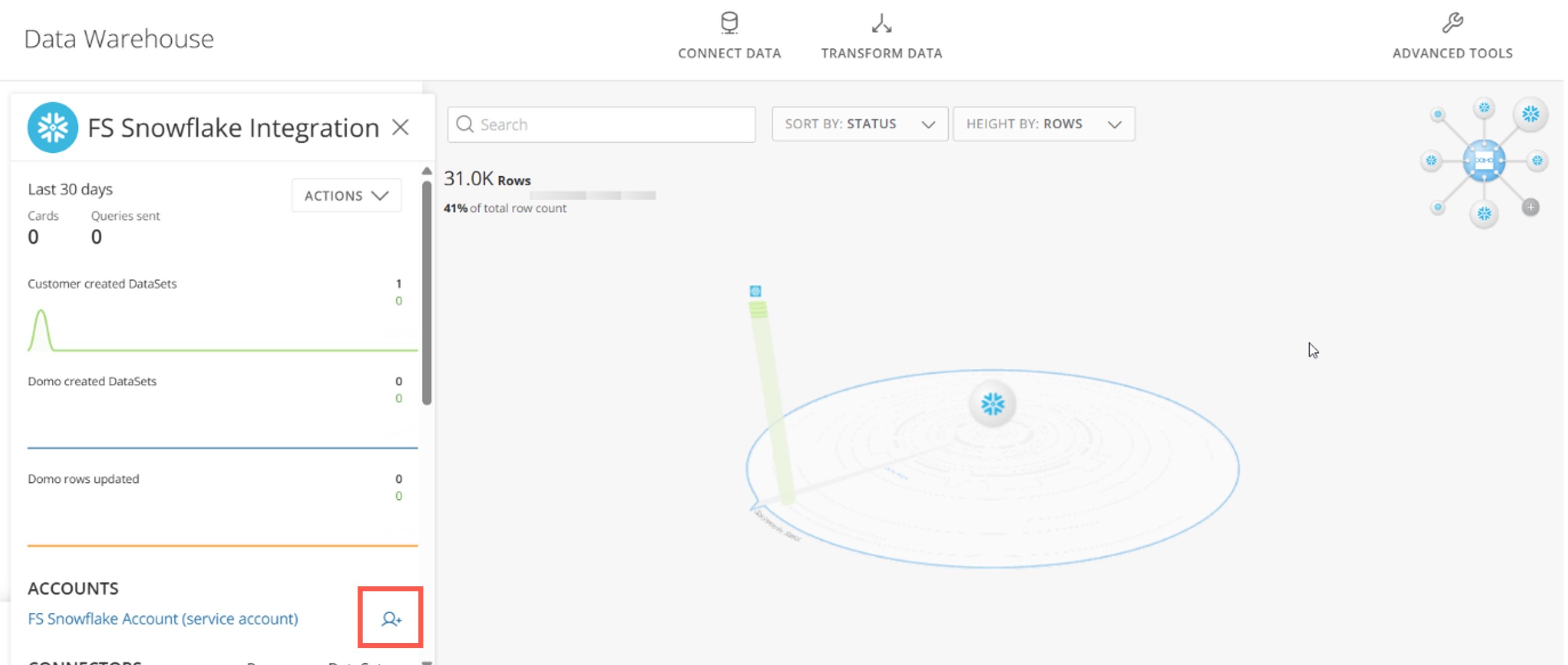
   The **Manage Account access** modal displays.

   <Frame>
     <img alt="" src="https://mintcdn.com/domoinc-openapi-sync-dataflows/XLeSvlwfBHPJHbmY/images/kb/ka0Vq000000A23l-00N5w00000Ri7BU-0EMVq000005xPcD.jpg?fit=max&auto=format&n=XLeSvlwfBHPJHbmY&q=85&s=8945273a1809a498ed44fd94de508d19" style={{ width: 900, height: 382 }} width="3148" height="1336" data-path="images/kb/ka0Vq000000A23l-00N5w00000Ri7BU-0EMVq000005xPcD.jpg" />
   </Frame>

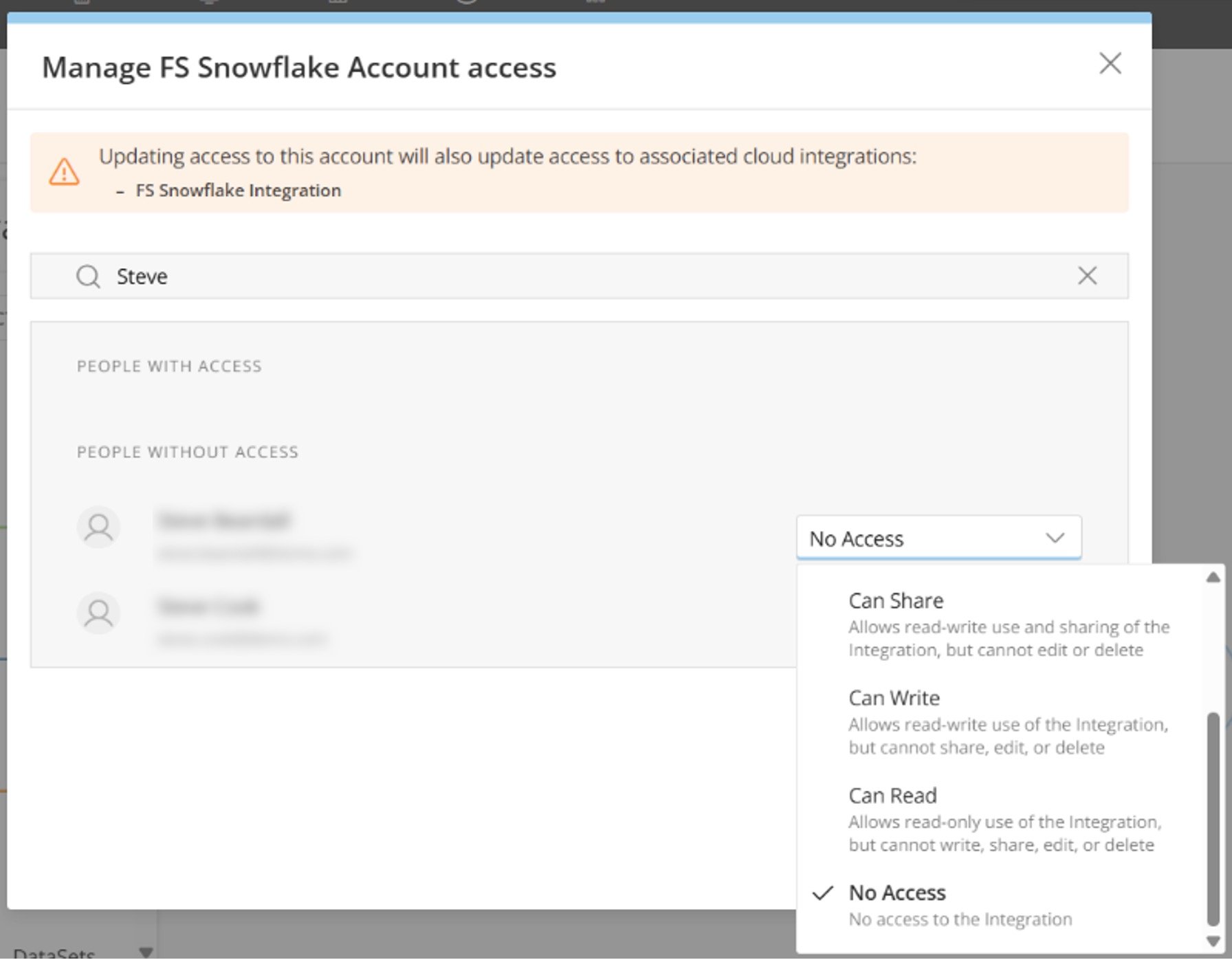
4. In the modal, locate the individual with whom you want to share the integration and use the dropdown to choose the access level. The [table](#table) above can help you decide the appropriate level.
   <Frame>
     <img alt="" src="https://mintcdn.com/domoinc-openapi-sync-dataflows/XLeSvlwfBHPJHbmY/images/kb/ka0Vq000000A23l-00N5w00000Ri7BU-0EMVq000005xSev.jpg?fit=max&auto=format&n=XLeSvlwfBHPJHbmY&q=85&s=724e287eb96ae5db5aca9a2073018c58" style={{ width: 551, height: 429 }} width="1792" height="1396" data-path="images/kb/ka0Vq000000A23l-00N5w00000Ri7BU-0EMVq000005xSev.jpg" />
   </Frame>

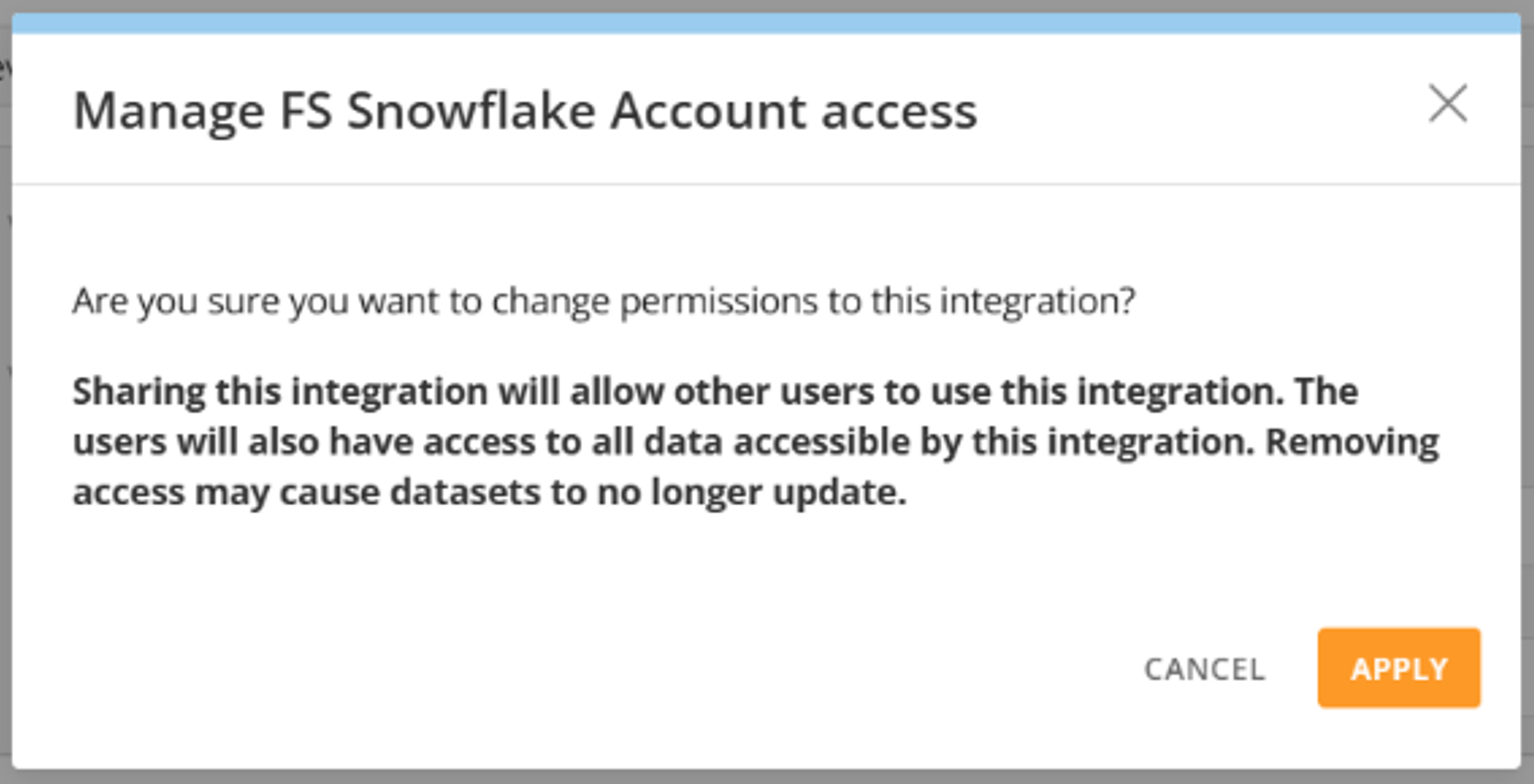
5. Select **Apply** to save your changes.

6. Confirm the permissions changes.
   <Frame>
     <img alt="" src="https://mintcdn.com/domoinc-openapi-sync-dataflows/XLeSvlwfBHPJHbmY/images/kb/ka0Vq000000A23l-00N5w00000Ri7BU-0EMVq000005xO9v.jpg?fit=max&auto=format&n=XLeSvlwfBHPJHbmY&q=85&s=3223b13ca4fd8920df6e0334c8f74f4b" style={{ width: 550, height: 281 }} width="1534" height="784" data-path="images/kb/ka0Vq000000A23l-00N5w00000Ri7BU-0EMVq000005xO9v.jpg" />
   </Frame>

### Technical FAQ

Find answers to frequently asked questions about general topics, caching rules, and external cloud storage.

#### General

<AccordionGroup>
  <Accordion title="How do Cloud Amplifier DataSets impact DataFlows scheduled to run when a DataSet refreshes?">
    Cloud Amplifier DataSets operate the same as Domo DataSets. Additionally, Magic ETL can trigger the DataFlow to run when the data is updated in your database.

    By default, Domo checks the database metadata for updates every 15 minutes.
  </Accordion>

  <Accordion title="How are Cloud Amplifier DataSets supported as inputs?">
    Magic ETL v2 supports Cloud Amplifier DataSets.
  </Accordion>

  <Accordion title="Can I use Cloud Amplifier if I also use Domo Everywhere?">
    Yes, you can. You can designate DataSets created via Cloud Amplifier as published DataSets to create a virtualized DataSet in a subscriber organization. You can then use the virtualized subscriber DataSeta as an input to Magic ETL transformations and configure it for DataSet Alerts.

    You can also use DataSets created via Cloud Amplifier with [Domo Everywhere Embed](https://domo-support.domo.com/s/article/360043437993?language=en_US).
  </Accordion>

  <Accordion title="Does Cloud Amplifier work with Bring Your Own Key (BYOK)?">
    No.
  </Accordion>

  <Accordion title="Does Cloud Amplifier support locales other than en-US?">
    Not at the moment, but we plan to add this feature soon. In the meantime, we recommend setting your locale to en-US when using Cloud Amplifier.
  </Accordion>

  <Accordion title="I've noticed that old dates in a DataSet are shifting by one hour. What could be causing this issue?">
    We have identified an issue affecting old dates—they are incorrectly shifting due to daylight savings time adjustments. We guarantee correct time zone conversions for dates after the epoch start date (January 1st, 1970). Before that, time zone adjustments may be off due to when daylight savings was adopted in the particular time zone.
  </Accordion>
</AccordionGroup>

#### Caching Rules

<AccordionGroup>
  <Accordion title="How often is data queried?">
    There are a few scenarios in which Domo always sends a query and never loads from the cache:

    * When you are viewing the DataSet preview on the DataSet's Details page
    * Whenever a DataSet View loads
    * Whenever a DataSet loads into Magic ETL

    In each scenario, we assume you always want to view the most current data, so a query is always initiated. Card query results, however, are saved and loaded from the cache.
  </Accordion>

  <Accordion title="Is the cloud warehouse queried each time someone views a card?">
    When you are viewing a card, Domo first looks for cached query results. If there are no cached query results, Domo initiates a query to the cloud warehouse to get the most current data.
  </Accordion>

  <Accordion title="Is the cloud warehouse queried each time someone makes changes to a card?">
    When building or editing a card, new data is needed after every chart modification to visualize the changes. If the **Auto Preview** option is enabled in Analyzer, there is a new query each time a change is made to the card. It is possible to disable the **Auto Preview** option; you can then decide when to preview the chart. Each preview effectively sends another query.
  </Accordion>

  <Accordion title="Is the cloud warehouse queried when using the API?">
    Yes.
  </Accordion>

  <Accordion title="How long are the results of a query cached?">
    Card query results are stored for up to 24 hours.
  </Accordion>

  <Accordion title="Is there a limit to the number of query results that Domo will cache?">
    There is no explicit limit on the number of queries cached.
  </Accordion>

  <Accordion title="Can the user choose how long something from Cloud Amplifier lives in the cache?">
    Yes. However, the cache and Time to Live (TTL) is configured for the integration and not for individual DataSets.
  </Accordion>

  <Accordion title="Where is data physically stored when it is saved in the cache?">
    Cached data is stored in the same geographical data center as your deployed Domo environment—in an AWS EC2 server using Redis.
  </Accordion>

  <Accordion title="Are there differences between how different Cloud Amplifier integrations cache data coming from different cloud warehouses?">
    All card queries are cached the same in Domo, no matter which cloud data warehouse they come from. However, some warehouses have their own rules for caching query results in addition to those from Domo. These rules vary by warehouse. For example, Snowflake caches query results for every query. You can go to the warehouse's documentation to read more about how they handle caching results.

    Given warehouse differences in handling cached results, there may be scenarios in Domo where an action always triggers a query to the warehouse, such as viewing the DataSet preview, but the warehouse does not actually run the query because the results are stored in its cache. In the case of Snowflake, results are returned from the cache.
  </Accordion>

  <Accordion title="Does Cloud Amplifier** **support registering DataSets that reference non-materialized views? Does Domo still detect changes in the table?">
    Yes. However, because the underlying table is a non-materialized view, Domo cannot detect changes and will execute the view query each time data is requested. Domo still detects changes on materialized views.
  </Accordion>

  <Accordion title="If I have a view that joins 3 tables (Table A, Table B, and Table C), and then build a card on that view that only uses columns from Tables A and B, will the resulting query still join Table C, even though it's not being used?">
    Yes, it will. However, we are working to optimize this behavior to perform only the necessary joins wherever possible.
  </Accordion>

  <Accordion title="Is there a limitation of the data size (rows or bytes) that can be cached on Domo?">
    Currently, there is no row or data size limit on what is saved in the card cache; however, the card query results are only stored for 24 hours.
  </Accordion>
</AccordionGroup>

#### External Cloud Storage

<AccordionGroup>
  <Accordion title="Can I create DataSet Views or DataFusions that are materialized and then stored in an external cloud (outside of Domo)?">
    Not at this time.
  </Accordion>

  <Accordion title="Can I use Domo to define a DataSet View and have it create a View in my database?">
    Not at this time.
  </Accordion>

  <Accordion title="Does Domo cache data on DataSets that are stored in an external cloud?">
    Data can be cached for up to 24 hours, but the cache is cleared when data updates. For customer-managed DataSets, there may be up to a 15-minute delay between when data updates and the cache is cleared.
  </Accordion>

  <Accordion title="Does Cloud Amplifier use my cloud warehouse account?">
    Yes, Domo operates on your cloud warehouse account.
  </Accordion>

  <Accordion title="How does Domo access my cloud warehouse account?">
    The method Domo uses to access a cloud warehouse account depends on the warehouse. We recommend using a system or service account, rather than individual user accounts, to grant Domo access to all cloud warehouses. See the [individual provider guides](#available_providers) listed above to learn how that Domo accesses that particular provider.
  </Accordion>

  <Accordion title="Does Domo support OAUTH for Cloud Amplifier?">
    This is currently in beta for the [Google BigQuery integration](/s/article/000005237).
  </Accordion>

  <Accordion title="Can I use both 'traditional' Domo and Cloud Amplifier in parallel?">
    Yes. By default, you have access to both Domo's proprietary Adrenaline engine and the Cloud Amplifier engine. You can configure your Domo environment so that only the Cloud Amplifier DataSets are allowed to run in your Domo environment, but [Domo Support](https://domo-support.domo.com/s/) <InlineImage src="/images/kb/ka0Vq00000001FR-00N5w00000Ri7BU-0EMVq0000000XDh.jpg" /> needs to help with this.
  </Accordion>

  <Accordion title="Can I move existing DataSets from Domo to my cloud provider using Cloud Amplifier?">
    For existing DataSets created via a connector or Domo APIs, you can reach out to [Domo Support](https://domo-support.domo.com/s/) <InlineImage src="/images/kb/ka0Vq00000001FR-00N5w00000Ri7BU-0EMVq0000000XDh.jpg" /> for assistance to move them to your cloud provider. If those DataSets were created via some other method, you need to recreate those in your cloud provider manually.
  </Accordion>

  <Accordion title="Does Cloud Amplifier work with Domo's DataSet APIs?">
    Domo's APIs can be used with any DataSet in a Domo-managed database, as long as that table is in the Domo-managed database that was configured during the write integration step of your Cloud Amplifier setup. Customer-managed databases that exist in the cloud, which Domo can read but not write to, cannot be updated with Domo APIs.

    This includes but is not limited to, the Stream API, webhooks, custom apps that generate new data such as Form Builder, and managing a DataSet via the DataSet API (such as updating a DataSet, managing personalized data permissions (PDP) policies, changing the owner of a DataSet, exporting a DataSet).

    For a more comprehensive guide to using the DataSet API, see our [developer docs](http://developer.domo.com/docs/dataset-api-reference/dataset) <InlineImage src="/images/kb/ka0Vq00000001FR-00N5w00000Ri7BU-0EMVq0000000XDh.jpg" />.
  </Accordion>
</AccordionGroup>

## Related articles

* [Connect Tables in Cloud Integrations](/s/article/Connect-Tables-in-Cloud-Integrations)