> ## Documentation Index
> Fetch the complete documentation index at: https://domoinc-openapi-sync-dataflows.mintlify.site/llms.txt
> Use this file to discover all available pages before exploring further.
# Domo Japan Connector for LINE (Messaging API)
## Intro - English
The Domo Japan Connector for LINE (Messaging API) integrates Domo with LINE to extract insight data from the LINE Messaging API. This Connector provides access to read LINE Official Account data, including number of followers, message deliveries, and friend demographics.
This connector returns data based on the logged-in LINE Official Account user (channel access token).
Choose Three Reports as below.
1. Delivery: Number of message deliveries
2. Followers: Number of followers
3. Demographic: Rate of friend demographics
The Delivery and Followers reports can be set to specific date.
You can choose patterns of date as below.
This connector only displays Japanese.
**Note:** You can get one day's worth of data for one request. If you get 30 days, it will be 30 requests.
#### 日付の選択(Date selection)
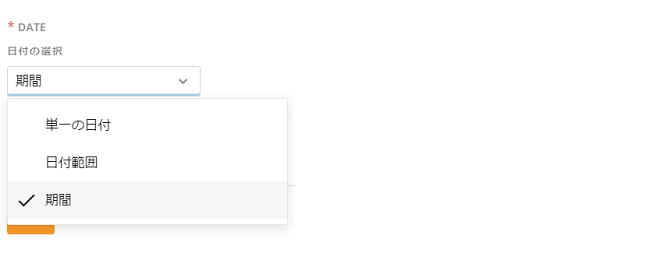
Delivery and Followers reports can select the following three kinds of date.
* 「単一の日付」(Unique date)
* 「日付範囲」(Any date range)
* 「期間」(Predefined specific term)
 #### **「単一の日付」**(Unique date)
To get specific unique date.
#### **「単一の日付」**(Unique date)
To get specific unique date.
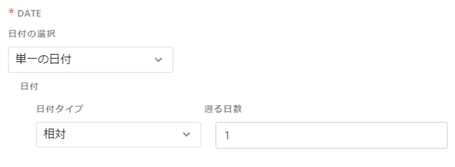
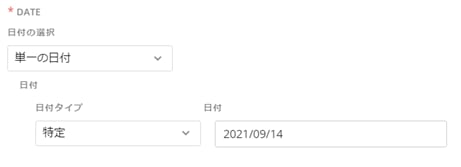 「日付」(Date)
「日付タイプ」 「相対」(relative) 「遡る日数」 How many days before today.
(Date Type) 「特定」 (specific) 「日付」 Choose the date from calendar.
#### **「日付範囲」**(Any date range)
「日付」(Date)
「日付タイプ」 「相対」(relative) 「遡る日数」 How many days before today.
(Date Type) 「特定」 (specific) 「日付」 Choose the date from calendar.
#### **「日付範囲」**(Any date range)
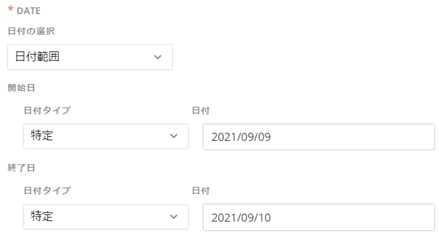
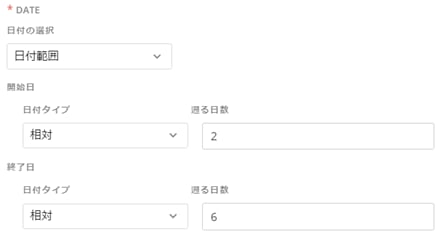 「開始日」(Start Date)
「日付タイプ」 「特定」(specific) 「日付」 Choose the date from calendar.
(Date Type) 「相対」(relative) 「遡る日数」How many days before today.
「終了日」(End Date)
「日付タイプ」 「特定」(specific) 「日付」 Choose the date from calendar.
(Date Type) 「相対」(relative) 「遡る日数」How many days before today.
#### **「期間」**(Predefined specific term)
「開始日」(Start Date)
「日付タイプ」 「特定」(specific) 「日付」 Choose the date from calendar.
(Date Type) 「相対」(relative) 「遡る日数」How many days before today.
「終了日」(End Date)
「日付タイプ」 「特定」(specific) 「日付」 Choose the date from calendar.
(Date Type) 「相対」(relative) 「遡る日数」How many days before today.
#### **「期間」**(Predefined specific term)
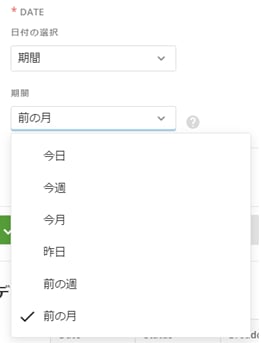 You can get these pattern of date as below.
「今日」(Today)
「今週」(Previous Week)
「今月」(This Month)
「昨日」(Yesterday)
「前の週」(Previous week)
「前の月」(Previous Month)
## Prerequisites
To connect to your LINE official account, you have to create your LINE official account and setting to use LINE Messaging API.
The detail is as below.
[https://developers.line.biz/ja/docs/messaging-api/getting-started/](https://developers.line.biz/ja/docs/messaging-api/getting-started/)
[https://www.linebiz.com/jp/manual/OfficialAccountManager/account-settings\_messaging\_api/](https://www.linebiz.com/jp/manual/OfficialAccountManager/account-settings_messaging_api/)
## Connecting to Your LINE Official Account
This section enumerates the options in the **Credentials** and **Details** panes in the Domo Japan Connector for LINE(Messaging API) page. The components of the other panes in this page, **Scheduling** and **Name & Describe Your DataSet**, are universal across most connector types and are discussed in greater length in [Adding a DataSet Using a Data Connector.](/s/article/360042926274)
### Credentials Pane
[https://developers.line.biz/ja/docs/messaging-api/getting-started/](https://developers.line.biz/ja/docs/messaging-api/getting-started/)
[https://www.linebiz.com/jp/manual/OfficialAccountManager/account-settings\_messaging\_api/](https://www.linebiz.com/jp/manual/OfficialAccountManager/account-settings_messaging_api/)
You need to get Messaging API Channel access token / Channel access token (long-lived) according to above sites.
You can get these pattern of date as below.
「今日」(Today)
「今週」(Previous Week)
「今月」(This Month)
「昨日」(Yesterday)
「前の週」(Previous week)
「前の月」(Previous Month)
## Prerequisites
To connect to your LINE official account, you have to create your LINE official account and setting to use LINE Messaging API.
The detail is as below.
[https://developers.line.biz/ja/docs/messaging-api/getting-started/](https://developers.line.biz/ja/docs/messaging-api/getting-started/)
[https://www.linebiz.com/jp/manual/OfficialAccountManager/account-settings\_messaging\_api/](https://www.linebiz.com/jp/manual/OfficialAccountManager/account-settings_messaging_api/)
## Connecting to Your LINE Official Account
This section enumerates the options in the **Credentials** and **Details** panes in the Domo Japan Connector for LINE(Messaging API) page. The components of the other panes in this page, **Scheduling** and **Name & Describe Your DataSet**, are universal across most connector types and are discussed in greater length in [Adding a DataSet Using a Data Connector.](/s/article/360042926274)
### Credentials Pane
[https://developers.line.biz/ja/docs/messaging-api/getting-started/](https://developers.line.biz/ja/docs/messaging-api/getting-started/)
[https://www.linebiz.com/jp/manual/OfficialAccountManager/account-settings\_messaging\_api/](https://www.linebiz.com/jp/manual/OfficialAccountManager/account-settings_messaging_api/)
You need to get Messaging API Channel access token / Channel access token (long-lived) according to above sites.
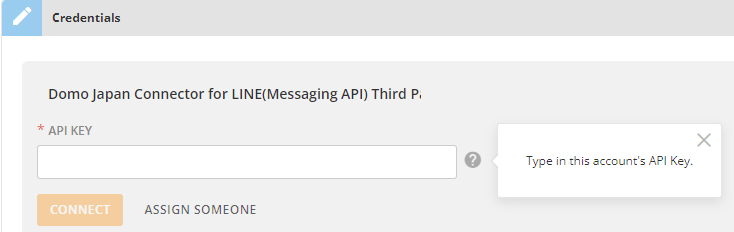 Once you have entered LINE Messaging API credentials, you can use the same account any time you go to create a new Domo Japan Connector for LINE(Messaging API) DataSet. You can manage connector accounts in the **Accounts** tab in the Data Center. For more information about this tab, see [Managing User Accounts for Connectors](/s/article/360042926054).
### Details Pane
This pane contains Data Column and description on the report type you select.
#### **1. Delivery**
**status** **String**
Status of the counting process. One of:
* ready: Calculation has finished; the numbers are up-to-date.
* unready: We haven't finished calculating the number of sent messages for the specified date. Try again later. Calculation usually takes about a day.
* out\_of\_service: The specified date is earlier than the date on which we first started calculating sent messages (March 1, 2017).
**broadcast** **Number**
Number of push messages sent to *all* of this LINE Official Account's friends (broadcast messages).
**targeting** **Number**
Number of push messages sent to *some* of this LINE Official Account's friends, based on specific attributes (targeted/segmented messages).
**autoResponse** **Number**
Number of auto-response messages sent.
**welcomeResponse** **Number**
Number of greeting messages sent.
**chat** **Number**
Number of messages sent from LINE Official Account Manager [Chat screen (opens new window)](https://www.linebiz.com/jp-en/manual/OfficialAccountManager/chats/screens/).
**apiBroadcast** **Number**
Number of broadcast messages sent with the [Send broadcast message](https://developers.line.biz/en/reference/messaging-api/#send-broadcast-message) Messaging API operation.
**apiPush** **Number**
Number of push messages sent with the [Send push message](https://developers.line.biz/en/reference/messaging-api/#send-push-message) Messaging API operation.
**apiMulticast** **Number**
Number of multicast messages sent with the [Send multicast message](https://developers.line.biz/en/reference/messaging-api/#send-multicast-message) Messaging API operation.
**apiNarrowcast** **Number**
Number of narrowcast messages sent with the [Send narrowcast message](https://developers.line.biz/en/reference/messaging-api/#send-narrowcast-message) Messaging API operation.
**apiReply** **Number**
Number of replies sent with the [Send reply message](https://developers.line.biz/en/reference/messaging-api/#send-reply-message) Messaging API operation.
Properties after broadcast contain the number of messages sent on the date specified in date. These extra properties are included only if status is ready.
[https://developers.line.biz/en/reference/messaging-api/#get-number-of-delivery-messages](https://developers.line.biz/en/reference/messaging-api/#get-number-of-delivery-messages)
#### **2. Followers**
**status** **String**
Calculation status. One of:
* ready: Calculation has finished. The numbers are up-to-date.
* unready: We haven't finished calculating followers for the specified date. Try again later. Calculation usually takes about a day.
* out\_of\_service: The specified date is earlier than the date on which we first started calculating followers (November 1, 2016).
**followers** **Number**
The number of times, as of the specified date, that a user added this LINE Official Account as a friend for the first time. The number doesn't decrease even if a user later blocks the account or when they delete their LINE account.
**targetedReaches** **Number**
The number of users, as of the specified date, that the LINE Official Account can reach through targeted messages based on gender, age, and/or region. This number only includes users who are active on LINE or LINE services and whose demographics have a high level of certainty.
**blocks** **Number**
The number of users blocking the account as of the specified date. The number decreases when a user unblocks the account.
Properties after followers are only returned if status is ready.
[https://developers.line.biz/en/reference/messaging-api/#get-number-of-followers](https://developers.line.biz/en/reference/messaging-api/#get-number-of-followers)
#### **3. Demographic**
**available** **Boolean**
True if friend demographic information is available.
**genders** **Array**
Percentage per gender
**genders\[].gender** **String**
Returns these values based on the users' gender:
* male
* female
* unknown
**genders\[].percentage** **Number**
Percentage
**ages** **Array**
Percentage per age group
**ages\[].age** **String**
Returns these values based on the users' age:
* from0to14
* from15to19
* from20to24
* from25to29
* from30to34
* from35to39
* from40to44
* from45to49
* from50
* unknown
**ages\[].percentage** **Number**
Percentage
**areas** **Array**
Percentage per area
**areas\[].area** **String**
Returns these values based on the users' country and region:\
**JP**
* 北海道 (Hokkaido)
* 青森 (Aomori)
* 岩手 (Iwate)
* 宮城 (Miyagi)
* 秋田 (Akita)
* 山形 (Yamagata)
* 福島 (Fukushima)
* 茨城 (Ibaraki)
* 栃木 (Tochigi)
* 群馬 (Gunma)
* 埼玉 (Saitama)
* 千葉 (Chiba)
* 東京 (Tokyo)
* 神奈川 (Kanagawa)
* 新潟 (Niigata)
* 富山 (Toyama)
* 石川 (Ishikawa)
* 福井 (Fukui)
* 山梨 (Yamanashi)
* 長野 (Nagano)
* 岐阜 (Gifu)
* 静岡 (Shizuoka)
* 愛知 (Aichi)
* 三重 (Mie)
* 滋賀 (Shiga)
* 京都 (Kyoto)
* 大阪 (Osaka)
* 兵庫 (Hyogo)
* 奈良 (Nara)
* 和歌山 (Wakayama)
* 鳥取 (Tottori)
* 島根 (Shimane)
* 岡山 (Okayama)
* 広島 (Hiroshima)
* 山口 (Yamaguchi)
* 徳島 (Tokushima)
* 香川 (Kagawa)
* 愛媛 (Ehime)
* 高知 (Kochi)
* 福岡 (Fukuoka)
* 佐賀 (Saga)
* 長崎 (Nagasaki)
* 熊本 (Kumamoto)
* 大分 (Oita)
* 宮崎 (Miyazaki)
* 鹿児島 (Kagoshima)
* 沖縄 (Okinawa)
* unknown
**TW**
* 台北市 (Taipei City)
* 新北市 (New Taipei City)
* 桃園市 (Taoyuan City)
* 台中市 (Taichung)
* 台南市 (Tainan City)
* 高雄市 (Kaohsiung)
* 基隆市 (Keelung)
* 新竹市 (Hsinchu City)
* 嘉義市 (Chiayi City)
* 新竹縣 (Hisnchu County)
* 苗栗縣 (Miaoli County)
* 彰化縣 (Changhua County)
* 南投縣 (Nantou County)
* 雲林縣 (Yunlin County)
* 嘉義縣 (Chiayi County)
* 屏東縣 (Pingtung County)
* 宜蘭縣 (Yilan County)
* 花蓮縣 (Hualien County)
* 台東縣 (Taitung County)
* 澎湖縣 (Penghu County)
* 金門縣 (Kinmen County)
* 連江縣 (Lianjiang County)
* unknown
**TH**
* Bangkok
* Pattaya
* Northern
* Central
* Southern
* Eastern
* NorthEastern
* Western
* unknown
**ID**
* Bali
* Bandung
* Banjarmasin
* Jabodetabek
* Makassar
* Medan
* Palembang
* Samarinda
* Semarang
* Surabaya
* Yogyakarta
* Lainnya
* unknown
**areas\[].percentage** **Number**
Percentage
**appTypes** **Array**
Percentage by OS
**appTypes\[].appType** **String**
Returns these values based on the users' OS:
* ios
* android
* others
**appTypes\[].percentage** **Number**
Percentage
**subscriptionPeriods** **Array**
Percentage per friendship duration
**subscriptionPeriods\[].subscriptionPeriod** **String**
Returns these values based on the friendship duration with the users:
* within7days
* within30days
* within90days
* within180days
* within365days
* over365days
* unknown
**subscriptionPeriods\[].percentage** **Number**
Percentage
The elements of each array are included in the response only if the value of available is true.
[https://developers.line.biz/en/reference/messaging-api/#get-demographic](https://developers.line.biz/en/reference/messaging-api/#get-demographic)
Once you have entered LINE Messaging API credentials, you can use the same account any time you go to create a new Domo Japan Connector for LINE(Messaging API) DataSet. You can manage connector accounts in the **Accounts** tab in the Data Center. For more information about this tab, see [Managing User Accounts for Connectors](/s/article/360042926054).
### Details Pane
This pane contains Data Column and description on the report type you select.
#### **1. Delivery**
**status** **String**
Status of the counting process. One of:
* ready: Calculation has finished; the numbers are up-to-date.
* unready: We haven't finished calculating the number of sent messages for the specified date. Try again later. Calculation usually takes about a day.
* out\_of\_service: The specified date is earlier than the date on which we first started calculating sent messages (March 1, 2017).
**broadcast** **Number**
Number of push messages sent to *all* of this LINE Official Account's friends (broadcast messages).
**targeting** **Number**
Number of push messages sent to *some* of this LINE Official Account's friends, based on specific attributes (targeted/segmented messages).
**autoResponse** **Number**
Number of auto-response messages sent.
**welcomeResponse** **Number**
Number of greeting messages sent.
**chat** **Number**
Number of messages sent from LINE Official Account Manager [Chat screen (opens new window)](https://www.linebiz.com/jp-en/manual/OfficialAccountManager/chats/screens/).
**apiBroadcast** **Number**
Number of broadcast messages sent with the [Send broadcast message](https://developers.line.biz/en/reference/messaging-api/#send-broadcast-message) Messaging API operation.
**apiPush** **Number**
Number of push messages sent with the [Send push message](https://developers.line.biz/en/reference/messaging-api/#send-push-message) Messaging API operation.
**apiMulticast** **Number**
Number of multicast messages sent with the [Send multicast message](https://developers.line.biz/en/reference/messaging-api/#send-multicast-message) Messaging API operation.
**apiNarrowcast** **Number**
Number of narrowcast messages sent with the [Send narrowcast message](https://developers.line.biz/en/reference/messaging-api/#send-narrowcast-message) Messaging API operation.
**apiReply** **Number**
Number of replies sent with the [Send reply message](https://developers.line.biz/en/reference/messaging-api/#send-reply-message) Messaging API operation.
Properties after broadcast contain the number of messages sent on the date specified in date. These extra properties are included only if status is ready.
[https://developers.line.biz/en/reference/messaging-api/#get-number-of-delivery-messages](https://developers.line.biz/en/reference/messaging-api/#get-number-of-delivery-messages)
#### **2. Followers**
**status** **String**
Calculation status. One of:
* ready: Calculation has finished. The numbers are up-to-date.
* unready: We haven't finished calculating followers for the specified date. Try again later. Calculation usually takes about a day.
* out\_of\_service: The specified date is earlier than the date on which we first started calculating followers (November 1, 2016).
**followers** **Number**
The number of times, as of the specified date, that a user added this LINE Official Account as a friend for the first time. The number doesn't decrease even if a user later blocks the account or when they delete their LINE account.
**targetedReaches** **Number**
The number of users, as of the specified date, that the LINE Official Account can reach through targeted messages based on gender, age, and/or region. This number only includes users who are active on LINE or LINE services and whose demographics have a high level of certainty.
**blocks** **Number**
The number of users blocking the account as of the specified date. The number decreases when a user unblocks the account.
Properties after followers are only returned if status is ready.
[https://developers.line.biz/en/reference/messaging-api/#get-number-of-followers](https://developers.line.biz/en/reference/messaging-api/#get-number-of-followers)
#### **3. Demographic**
**available** **Boolean**
True if friend demographic information is available.
**genders** **Array**
Percentage per gender
**genders\[].gender** **String**
Returns these values based on the users' gender:
* male
* female
* unknown
**genders\[].percentage** **Number**
Percentage
**ages** **Array**
Percentage per age group
**ages\[].age** **String**
Returns these values based on the users' age:
* from0to14
* from15to19
* from20to24
* from25to29
* from30to34
* from35to39
* from40to44
* from45to49
* from50
* unknown
**ages\[].percentage** **Number**
Percentage
**areas** **Array**
Percentage per area
**areas\[].area** **String**
Returns these values based on the users' country and region:\
**JP**
* 北海道 (Hokkaido)
* 青森 (Aomori)
* 岩手 (Iwate)
* 宮城 (Miyagi)
* 秋田 (Akita)
* 山形 (Yamagata)
* 福島 (Fukushima)
* 茨城 (Ibaraki)
* 栃木 (Tochigi)
* 群馬 (Gunma)
* 埼玉 (Saitama)
* 千葉 (Chiba)
* 東京 (Tokyo)
* 神奈川 (Kanagawa)
* 新潟 (Niigata)
* 富山 (Toyama)
* 石川 (Ishikawa)
* 福井 (Fukui)
* 山梨 (Yamanashi)
* 長野 (Nagano)
* 岐阜 (Gifu)
* 静岡 (Shizuoka)
* 愛知 (Aichi)
* 三重 (Mie)
* 滋賀 (Shiga)
* 京都 (Kyoto)
* 大阪 (Osaka)
* 兵庫 (Hyogo)
* 奈良 (Nara)
* 和歌山 (Wakayama)
* 鳥取 (Tottori)
* 島根 (Shimane)
* 岡山 (Okayama)
* 広島 (Hiroshima)
* 山口 (Yamaguchi)
* 徳島 (Tokushima)
* 香川 (Kagawa)
* 愛媛 (Ehime)
* 高知 (Kochi)
* 福岡 (Fukuoka)
* 佐賀 (Saga)
* 長崎 (Nagasaki)
* 熊本 (Kumamoto)
* 大分 (Oita)
* 宮崎 (Miyazaki)
* 鹿児島 (Kagoshima)
* 沖縄 (Okinawa)
* unknown
**TW**
* 台北市 (Taipei City)
* 新北市 (New Taipei City)
* 桃園市 (Taoyuan City)
* 台中市 (Taichung)
* 台南市 (Tainan City)
* 高雄市 (Kaohsiung)
* 基隆市 (Keelung)
* 新竹市 (Hsinchu City)
* 嘉義市 (Chiayi City)
* 新竹縣 (Hisnchu County)
* 苗栗縣 (Miaoli County)
* 彰化縣 (Changhua County)
* 南投縣 (Nantou County)
* 雲林縣 (Yunlin County)
* 嘉義縣 (Chiayi County)
* 屏東縣 (Pingtung County)
* 宜蘭縣 (Yilan County)
* 花蓮縣 (Hualien County)
* 台東縣 (Taitung County)
* 澎湖縣 (Penghu County)
* 金門縣 (Kinmen County)
* 連江縣 (Lianjiang County)
* unknown
**TH**
* Bangkok
* Pattaya
* Northern
* Central
* Southern
* Eastern
* NorthEastern
* Western
* unknown
**ID**
* Bali
* Bandung
* Banjarmasin
* Jabodetabek
* Makassar
* Medan
* Palembang
* Samarinda
* Semarang
* Surabaya
* Yogyakarta
* Lainnya
* unknown
**areas\[].percentage** **Number**
Percentage
**appTypes** **Array**
Percentage by OS
**appTypes\[].appType** **String**
Returns these values based on the users' OS:
* ios
* android
* others
**appTypes\[].percentage** **Number**
Percentage
**subscriptionPeriods** **Array**
Percentage per friendship duration
**subscriptionPeriods\[].subscriptionPeriod** **String**
Returns these values based on the friendship duration with the users:
* within7days
* within30days
* within90days
* within180days
* within365days
* over365days
* unknown
**subscriptionPeriods\[].percentage** **Number**
Percentage
The elements of each array are included in the response only if the value of available is true.
[https://developers.line.biz/en/reference/messaging-api/#get-demographic](https://developers.line.biz/en/reference/messaging-api/#get-demographic)