> ## Documentation Index
> Fetch the complete documentation index at: https://domoinc-openapi-sync-dataflows.mintlify.site/llms.txt
> Use this file to discover all available pages before exploring further.
# Best Practices for Creating Visualization Cards
When building KPI cards in Domo, always adhere to the following practices:
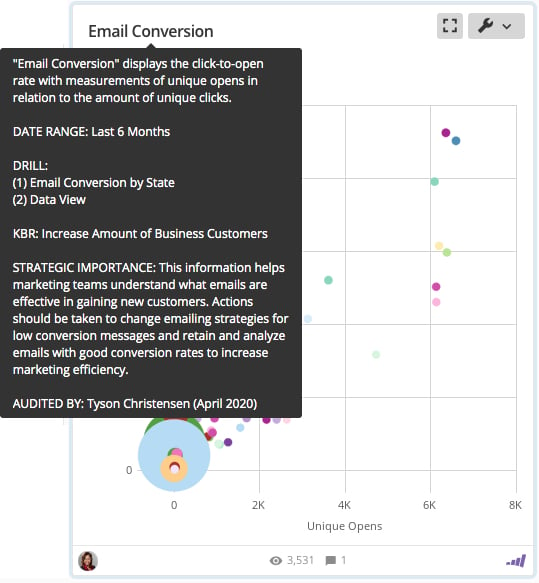
* Be sure to include the following information in the
[description](/s/article/360042924174 "Editing the Name or Description of a KPI Card"):
* The business initiative
* The card's strategic importance
* Actions the user can take based on this data
* Helpful
[alerts](/s/article/360043430533 "Notifications and Alerts") the user can set
* The date range
* [Drilldown options](/s/article/360042924094 "Adding Drill Path to Your Chart") for the card
* The refresh rate
* Who the card is audited by
 * Use an appropriate chart type with...
* [A descriptive title](/s/article/360042924174 "Editing the Name or Description of a KPI Card")
* [Named axes](/s/article/360042925174 "Adding Scale Titles to Your Chart")
* Consistent
[formatting](/s/article/360043439993 "Chart Properties") with other cards in the collection (for example, blue line = forecast, green bar = current, and so on)
* A
[goal line](/s/article/360043428773 "Adding a Goal Line to Your Chart") if there is a goal associated with the data
* Use an appropriate
[summary number](/s/article/360043428753 "Configuring Your Chart Summary Number") for the data represented in the card.
* Ensure the card is
[linked to other appropriate content](/s/article/360042923774 "Linking Related Cards") that applies to the same business question.
* Ensure the card is assigned to the appropriate
[owner](/s/article/360042923794 "Changing a Card Owner") (the person responsible for answering questions about the card).
## Other Best Practices Topics
For more Domo best practices, visit the following topics:
* [Projects and Tasks Best Practices](/s/article/360043430493 "Projects and Tasks Best Practices")
* [Best Practices for Managing DataSets](/s/article/360042926154 "Best Practices for Managing DataSets")
* [Best Practices for Choosing Chart Types](/s/article/360042935294 "Best Practices for Choosing Chart Types")
* [Top 10 Dashboard Design Best Practices](/s/article/360043440173 "Top 10 Dashboard Design Best Practices")
* [Best Practices for Standardizing Visualization Cards](/s/article/360043439993 "Best Practices for Standardizing KPIs")
* Best Practices for Designing KPIs
Or, for a handy Domo best practices guide, you can download the following PDF:
* [Best\_Practices for Cards, Collections, & DataSets.pdf](https://domosoftware.sharepoint.com/:b:/s/CS-Edu-PublicFiles/Edek5Dy1GGNLsCDmQ7xJZvQBOMvk3rUGhG4yyyBt-EXUgA?e=0NAgwp "Best_Practices_for_cards%252C_collections%252C_datasets_job_aid.revised.pdf")
* Use an appropriate chart type with...
* [A descriptive title](/s/article/360042924174 "Editing the Name or Description of a KPI Card")
* [Named axes](/s/article/360042925174 "Adding Scale Titles to Your Chart")
* Consistent
[formatting](/s/article/360043439993 "Chart Properties") with other cards in the collection (for example, blue line = forecast, green bar = current, and so on)
* A
[goal line](/s/article/360043428773 "Adding a Goal Line to Your Chart") if there is a goal associated with the data
* Use an appropriate
[summary number](/s/article/360043428753 "Configuring Your Chart Summary Number") for the data represented in the card.
* Ensure the card is
[linked to other appropriate content](/s/article/360042923774 "Linking Related Cards") that applies to the same business question.
* Ensure the card is assigned to the appropriate
[owner](/s/article/360042923794 "Changing a Card Owner") (the person responsible for answering questions about the card).
## Other Best Practices Topics
For more Domo best practices, visit the following topics:
* [Projects and Tasks Best Practices](/s/article/360043430493 "Projects and Tasks Best Practices")
* [Best Practices for Managing DataSets](/s/article/360042926154 "Best Practices for Managing DataSets")
* [Best Practices for Choosing Chart Types](/s/article/360042935294 "Best Practices for Choosing Chart Types")
* [Top 10 Dashboard Design Best Practices](/s/article/360043440173 "Top 10 Dashboard Design Best Practices")
* [Best Practices for Standardizing Visualization Cards](/s/article/360043439993 "Best Practices for Standardizing KPIs")
* Best Practices for Designing KPIs
Or, for a handy Domo best practices guide, you can download the following PDF:
* [Best\_Practices for Cards, Collections, & DataSets.pdf](https://domosoftware.sharepoint.com/:b:/s/CS-Edu-PublicFiles/Edek5Dy1GGNLsCDmQ7xJZvQBOMvk3rUGhG4yyyBt-EXUgA?e=0NAgwp "Best_Practices_for_cards%252C_collections%252C_datasets_job_aid.revised.pdf")