> ## Documentation Index
> Fetch the complete documentation index at: https://domoinc-openapi-sync-dataflows.mintlify.site/llms.txt
> Use this file to discover all available pages before exploring further.

# Encrypting Data with Domo's Bring Your Own Key (BYOK)

export const InlineImage = ({src, alt = '', height = '1.6em'}) => {
  return <img noZoom src={src} alt={alt} style={{
    display: 'inline',
    verticalAlign: 'start',
    height: height,
    margin: '0'
  }} />;
};

### Intro

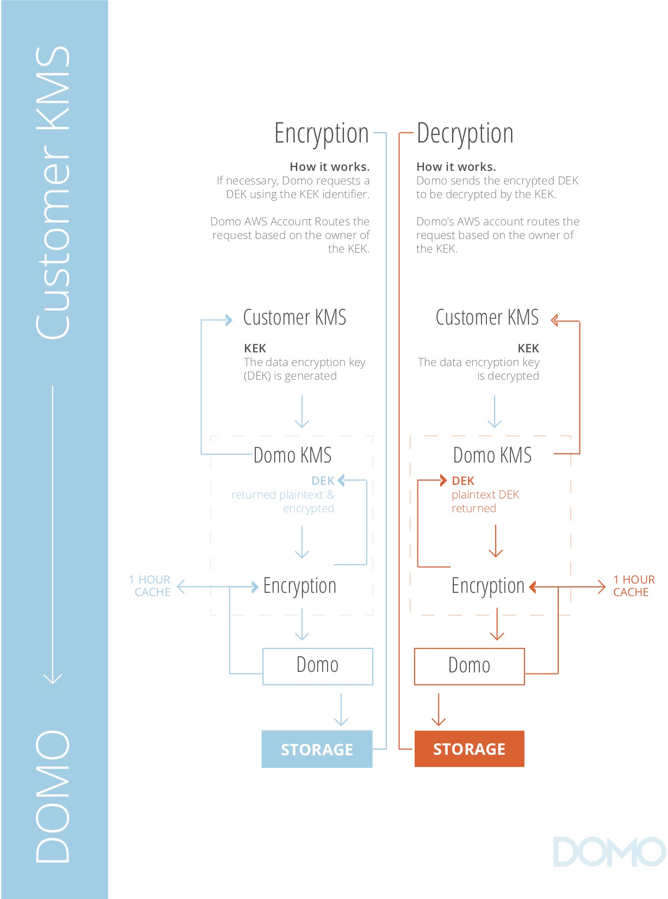
Domo BYOK is a security tool that gives you complete control of the encryption keys for your Domo instance. It allows you to verify that your data is kept private at all times. In addition, BYOK includes a rolling generation of data encryption keys and a built-in kill switch. You can revoke the encryption key at any time, nullifying all of your data in Domo and ensuring that no one will have access to sensitive data.

### How Does it Work?

Domo BYOK is composed of the following three parts:

<table class="mt-responsive-table" data-aura-rendered-by="33:208;a"><tbody><tr><td class="mt-noheading mt-column-width-15 wysiwyg-text-align-center" colspan="1" rowspan="1"><InlineImage src="/images/kb/ka0Vq000000Dwm9-00N5w00000Ri7BU-0EM5w000005vNml.png" /></td><td class="mt-noheading mt-column-width-60" colspan="1" rowspan="1"><p><b> Encryption Key Management </b></p><p> BYOK supports rotating the encryption keys every hour, which equates to 8,760 rotating keys annually. Domo access to the encrypted key can be revoked at any time, so the data can no longer be accessed. </p></td></tr><tr><td class="mt-noheading mt-column-width-15 wysiwyg-text-align-center" colspan="1" rowspan="1"><img alt="BYOK%2B-%2Bkill%2Bswitch.png" src="https://mintcdn.com/domoinc-openapi-sync-dataflows/MASerVWvu6gNOdRh/images/kb/ka0Vq000000Dwm9-00N5w00000Ri7BU-0EM5w000005vNmf.png?fit=max&auto=format&n=MASerVWvu6gNOdRh&q=85&s=d8848a1a50ea1552c2102bd5307d0ca6" style={{width: 51, height: 51}} width="133" height="133" data-path="images/kb/ka0Vq000000Dwm9-00N5w00000Ri7BU-0EM5w000005vNmf.png" /></td><td class="mt-noheading mt-column-width-60" colspan="1" rowspan="1"><p><b> Kill Switch </b></p><p> Utilizing the kill switch immediately caches and indexes data, rendering it unusable within seconds. This includes data accessed through laptops and mobile devices. To use this feature, you need to first revoke Domo access to Amazon. Then, two different Domo Admins will need to activate the kill switch in their Domo Admin settings. </p></td></tr><tr><td class="mt-noheading mt-column-width-15 wysiwyg-text-align-left" colspan="1" rowspan="1"><InlineImage src="/images/kb/ka0Vq000000Dwm9-00N5w00000Ri7BU-0EM5w000005vNmh.png" /></td><td class="mt-noheading mt-column-width-60" colspan="1" rowspan="1"><p><b> Activity Logs </b></p><p> If a user chooses to revoke their encryption keys and execute the kill switch, these events are logged in the Domo Activity Log. This allows for immediate confirmation that data is no longer accessible. </p></td></tr></tbody></table>

<Frame>
  <img alt="BYOK%2BInfographic.png" src="https://mintcdn.com/domoinc-openapi-sync-dataflows/MASerVWvu6gNOdRh/images/kb/ka0Vq000000Dwm9-00N5w00000Ri7BU-0EM5w000005vNmb.png?fit=max&auto=format&n=MASerVWvu6gNOdRh&q=85&s=b21f0394ef3f23ed7655f3bf3a0a05db" style={{width: 831, height: 934}} width="668" height="899" data-path="images/kb/ka0Vq000000Dwm9-00N5w00000Ri7BU-0EM5w000005vNmb.png" />
</Frame>

### How Do I Get This?

To begin using BYOK, speak with your Domo account team.

<Note>
  **Note:** Be prepared to include your IT team in the process of setting up BYOK.
</Note>

### Prerequisites

* If you are not on a consumption contract, you must have a Domo Enterprise account.

  Users on a consumption contract have access to BYOK as long as they meet the remaining prerequisites.
* An active Amazon Key Management System (KMS) account.

  * Speak with your Domo account team to determine the type of KMS account needed.
* Only supported on AWS
* Cannot be a federated data customer.
