> ## Documentation Index
> Fetch the complete documentation index at: https://domoinc-openapi-sync-dataflows.mintlify.site/llms.txt
> Use this file to discover all available pages before exploring further.

# 2017 Release 7 | July

export const InlineImage = ({src, alt = '', height = '1.6em'}) => {
  return <img noZoom src={src} alt={alt} style={{
    display: 'inline',
    verticalAlign: 'start',
    height: height,
    margin: '0'
  }} />;
};

## New features and enhancements

Features and enhancements in this release include the following:

### Domo Everywhere: Embed

Domo is a business optimization tool that is unlike anything on the market. Combining a data warehouse with ETL tools, a collaboration platform, high-end visualizations, and the efficiency of a cloud platform, all available from any device at any time, makes Domo the ultimate tool for any level of business. Now, Domo is letting you take the content you've built and distribute it to your own customers or partners.

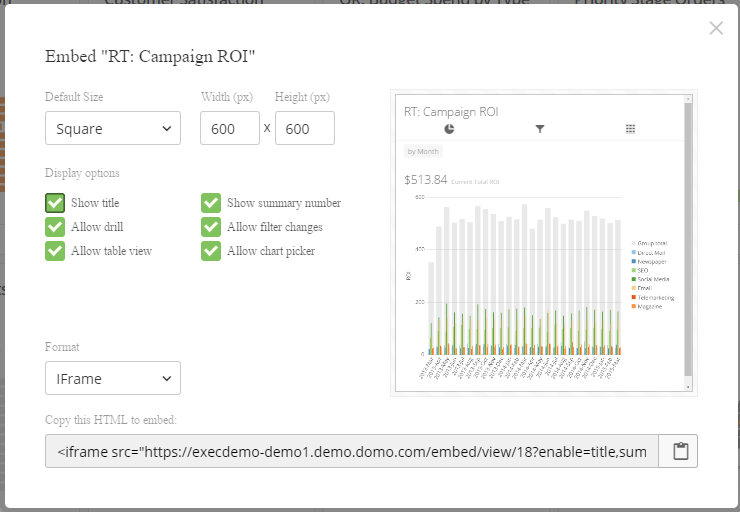
Often, our customers wish to share insights with their own customer base or partners. Domo's Embedded Analytics feature now provides that capability by generating a piece of code that can be used in websites, customer portals, or any application. A secure connection through SSO providers ensures that content is delivered only to permitted end-users.

Domo's embedded analytics are fully functioning Domo cards that live outside of the Domo platform. Users can enjoy features that let them explore the data in a card, including drill capabilities, filters, PDP (so users only see the data that applies to them), and the ability to easily change the visualizations and focus interactions.

Welcome to the next evolution of Domo! The product you love is now available to anyone you wish to share it with, fully managed by you.

<Frame>
  <img alt="" src="https://mintcdn.com/domoinc-openapi-sync-dataflows/1pUbNiMC_kZqIvej/images/kb/ka05w00000129vN-00N5w00000Ri7BU-0EM5w000005vOmb.png?fit=max&auto=format&n=1pUbNiMC_kZqIvej&q=85&s=bdddce11415ea22fdf16f29c5a8510ca" style={{width: 474, height: 328}} width="740" height="512" data-path="images/kb/ka05w00000129vN-00N5w00000Ri7BU-0EM5w000005vOmb.png" />
</Frame>

For detailed information about this feature, including step-by-step instructions for embedding cards as well as conditions for use, see Sharing Cards Outside of Domo.

### Advanced Notebook Card

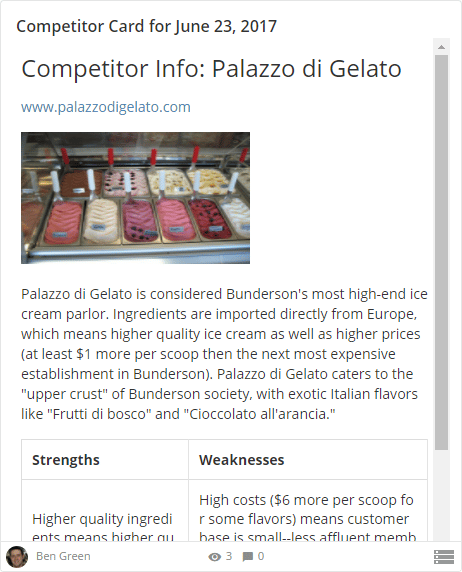
With the revamped notebook card, Domo enables all types of users to create notes and presentations with style. The new version of the notebook card includes the following features:

* Card locking while editing—only one person can edit any given card at a time, preventing changes from being overwritten.
* Ability to add hyperlinks.
* Ability to add images from your computer/network or from the Internet.
* Ability to add tables.
* Ability to pick between three font sizes.
* Ability to change the font color and style.
* Ability to add nested lists.
<Frame>
  <img alt="" src="https://mintcdn.com/domoinc-openapi-sync-dataflows/1pUbNiMC_kZqIvej/images/kb/ka05w00000129vN-00N5w00000Ri7BU-0EM5w000005vOmc.png?fit=max&auto=format&n=1pUbNiMC_kZqIvej&q=85&s=d83f66f73e8fa53a868447a015eba291" style={{width: 291, height: 360}} width="462" height="572" data-path="images/kb/ka05w00000129vN-00N5w00000Ri7BU-0EM5w000005vOmc.png" />
</Frame>

For more information, see [Adding a Notebook Card](/s/article/360043430233 "Adding a Notebook Card").

### New Self-Service Connectors

This month we have polished and released another 21 connectors that are now available to all customers in their Domo account. These connectors are self-service, so you no longer need to contact support to get help powering them up. Here are the new connectors:

<table class="mt-responsive-table" data-aura-rendered-by="33:209;a"><thead><tr><th colspan="1" rowspan="1"><p> Connector </p></th><th colspan="1" rowspan="1"><p> Link to Knowledge Base article </p></th></tr></thead><tbody><tr><td colspan="1" rowspan="1"><p> Amazon Redshift Advanced </p></td><td colspan="1" rowspan="1"><p><a href="/s/article/360043436033" target="_blank" title="Amazon Redshift Advanced Connector"> Amazon Redshift Advanced Connector </a></p></td></tr><tr><td colspan="1" rowspan="1"><p> AvidTrak </p></td><td colspan="1" rowspan="1"><p><a href="/s/article/360043430853" target="_blank" title="AvidTrak Connector"> AvidTrak Connector </a></p></td></tr><tr><td colspan="1" rowspan="1"><p> Bidlogix </p></td><td colspan="1" rowspan="1"><p><a href="/s/article/360042927714" target="_blank" title="Bidlogix Connector"> Bidlogix Connector </a></p></td></tr><tr><td colspan="1" rowspan="1"><p> Bureau of Economic Analysis </p></td><td colspan="1" rowspan="1"><p> Bureau of Economic Analysis Connector </p></td></tr><tr><td colspan="1" rowspan="1"><p> CallTrackingMetrics </p></td><td colspan="1" rowspan="1"><p><a href="/s/article/360043433773" target="_blank" title="CallTrackingMetrics Connector"> CallTrackingMetrics Connector </a></p></td></tr><tr><td colspan="1" rowspan="1"><p> Clavis </p></td><td colspan="1" rowspan="1"><p><a href="/s/article/360042929214" target="_blank" title="Clavis Connector"> Clavis Connector </a></p></td></tr><tr><td colspan="1" rowspan="1"><p> DoubleClick Ad Exchange for Sellers </p></td><td colspan="1" rowspan="1"><a href="/s/article/360042926654" target="_blank" title="DoubleClick Ad Exchange for Sellers Connector"> DoubleClick Ad Exchange for Sellers Connector </a></td></tr><tr><td colspan="1" rowspan="1"><p> DoubleClick Search </p></td><td colspan="1" rowspan="1"><p> DoubleClick Search Connector </p></td></tr><tr><td colspan="1" rowspan="1"><p> Facebook Advanced </p></td><td colspan="1" rowspan="1"><p><a href="/s/article/360043434413" target="_blank" title="Facebook Advanced Connector"> Facebook Advanced Connector </a></p></td></tr><tr><td colspan="1" rowspan="1"><p> Facebook Ads Advanced </p></td><td colspan="1" rowspan="1"><p><a href="/s/article/360042926754" target="_self" title="Facebook Ads Advanced Connector"> Facebook Ads Advanced Connector </a></p></td></tr><tr><td colspan="1" rowspan="1"><p> Google Calendar </p></td><td colspan="1" rowspan="1"><p><a href="/s/article/360043434953" target="_blank" title="Google Calendar Connector"> Google Calendar Connector </a></p></td></tr><tr><td colspan="1" rowspan="1"><p> Montage </p></td><td colspan="1" rowspan="1"><p><a href="/s/article/360042928234" target="_blank" title="Montage Connector"> Montage Connector </a></p></td></tr><tr><td colspan="1" rowspan="1"><p> OmegaFi </p></td><td colspan="1" rowspan="1"><p><a href="/s/article/360043435913" target="_blank" title="OmegaFi Connector"> OmegaFi Connector </a></p></td></tr><tr><td colspan="1" rowspan="1"><p> Owler </p></td><td colspan="1" rowspan="1"><p><a href="/s/article/360043435933" target="_blank" title="Owler Connector"> Owler Connector </a></p></td></tr><tr><td colspan="1" rowspan="1"><p> Pipeline Deals </p></td><td colspan="1" rowspan="1"><p><a href="/s/article/360042927854" target="_blank" title="PipelineDeals Connector"> PipelineDeals Connector </a></p></td></tr><tr><td colspan="1" rowspan="1"><p> ProBusinessTools (formerly called ProSite) </p></td><td colspan="1" rowspan="1"><p><a href="/s/article/360042930014" target="_blank" title="ProBusinessTools Connector"> ProBusinessTools Connector </a></p></td></tr><tr><td colspan="1" rowspan="1"><p> Quandl Stock Quotes </p></td><td colspan="1" rowspan="1"><p><a href="https://domo-support.domo.com/s/article/360042928394" target="_blank" title="Quandl Stock Quote Connector"> Quandl Stock Quotes Connector </a></p></td></tr><tr><td colspan="1" rowspan="1"><p> RevContent </p></td><td colspan="1" rowspan="1"><p><a href="/s/article/360042927114" target="_blank" title="RevContent Connector"> RevContent Connector </a></p></td></tr><tr><td colspan="1" rowspan="1"><p> SugarCRM Advanced </p></td><td colspan="1" rowspan="1"><p><a href="/s/article/360043434333" target="_self" title="SugarCRM Advanced Connector"> SugarCRM Advanced Connector </a></p></td></tr><tr><td colspan="1" rowspan="1"><p> SurveyMonkey Advanced </p></td><td colspan="1" rowspan="1"><p><a href="/s/article/360042930754" target="_blank" title="SurveyMonkey Advanced Connector"> SurveyMonkey Advanced Connector </a></p></td></tr><tr><td colspan="1" rowspan="1"><p> Teckst </p></td><td colspan="1" rowspan="1"><p><a href="/s/article/360043434353" target="_blank" title="Teckst Connector"> Teckst Connector </a></p></td></tr></tbody></table>

### Java, Python, and Node SDKs

Domo now provides first-class SDKs to significantly reduce the level of effort needed to implement integrations with Domo’s set of Public APIs. Domo SDKs eliminate extra layers of work needed to create and maintain the authentication connection to the API Gateway. These SDKs allow developers to create custom integrations much faster and easier without needing to manage the underlying communications infrastructure.

Additionally, these libraries have been made open-source to accelerate the time it takes for developers to leverage Domo’s public endpoints and enables them to adapt and tailor each SDK to meet their specific needs.

Take a test drive today by visiting Domo’s [Github repository](https://github.com/domoinc) or reviewing more details within our developer documentation: [https://developer.domo.com/docs/domo-sdks/sdks](https://developer.domo.com/docs/domo-sdks/sdks). Or you can view our FAQ at Public API SDKs FAQ.

### Buzz Onboarding

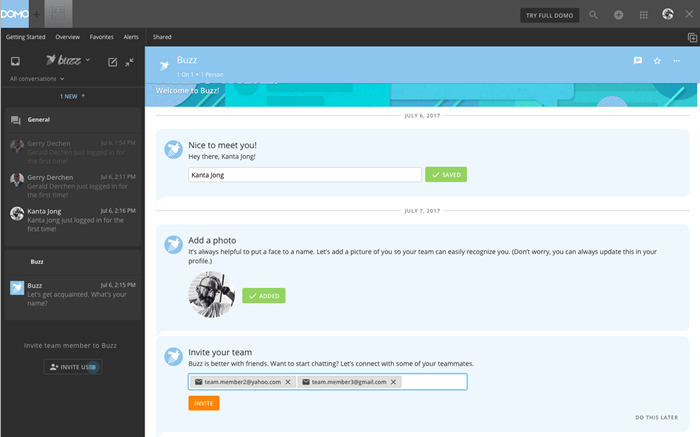
Buzz now includes promptings and easy, fast steps to follow to find and share immediate value. Add/edit your name and profile photo to enhance your communication. Send easy, one-click invitations to your network without worrying about who can or can’t have access because of licensing restrictions or budget. New users will see unobtrusive blue dots, gently pulsating to draw attention to beneficial elements such as inviting others, creating new conversations, identifying important and favorite people, and optimizing conversations with the use of data.

<Frame>
  <img alt="" src="https://mintcdn.com/domoinc-openapi-sync-dataflows/1pUbNiMC_kZqIvej/images/kb/ka05w00000129vN-00N5w00000Ri7BU-0EM5w000005vOku.png?fit=max&auto=format&n=1pUbNiMC_kZqIvej&q=85&s=0fce0d9903865603ae94bcdc43983bdf" width="700" height="437" data-path="images/kb/ka05w00000129vN-00N5w00000Ri7BU-0EM5w000005vOku.png" />
</Frame>

For more information about Buzz, see Buzz Onboarding.

### No Friction Buzz Invite

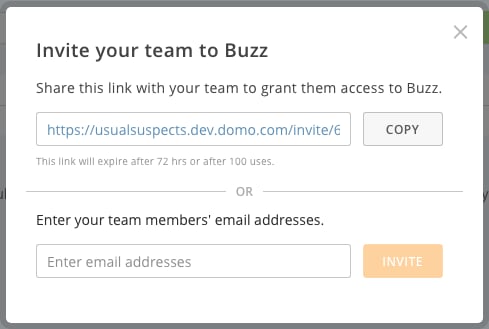
Buzz is only as robust as the network of collaborators that exists within it—a network organically grown by users inviting users. Users now are enabled to invite anyone at anytime, either directly using email addresses or by sharing a unique URL link with anyone—again, without worrying about growth constraints. Don't hesitate to get the right people in to collaborate whenever needed—they're a simple click away.
<Frame>
  <img alt="" src="https://mintcdn.com/domoinc-openapi-sync-dataflows/1pUbNiMC_kZqIvej/images/kb/ka05w00000129vN-00N5m00000Ri7BU-0EM5w000005vOkt.png?fit=max&auto=format&n=1pUbNiMC_kZqIvej&q=85&s=24c8a3914ee17e4220379fb4b8515281" width="489" height="329" data-path="images/kb/ka05w00000129vN-00N5m00000Ri7BU-0EM5w000005vOkt.png" />
</Frame>

For more information about Buzz, see [Inviting Others to Join Domo](/s/article/360043438893 "Inviting Others to Join Domo").

### "What's Happening in Domo?" Email

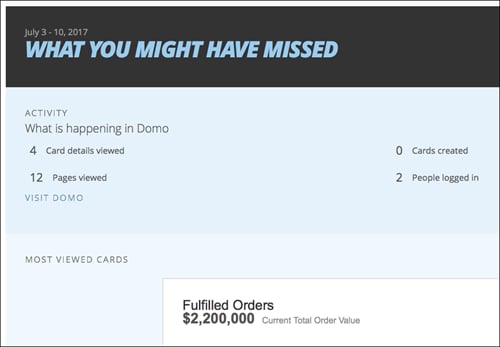
Each week, Domo users will receive a personalized email that highlights interesting events in their Domo instance—such as new cards created, active Buzz conversations, and new users—that occurred over the previous week. The email also contains information on trending topics and Domo usage. In this way, Domo users can stay informed on activities that concern them. The email is sent every Monday morning (US Mountain Time).

Information in each email is based on the individual user's access privileges, favorites, etc. Access controls are fully enforced.
<Frame>
  <img alt="" src="https://mintcdn.com/domoinc-openapi-sync-dataflows/_Ljp6rbTQtrUUZqN/images/kb/ka05m00000129vN-00N5w00000Ri7BU-0EM5w000005vOkr.png?fit=max&auto=format&n=_Ljp6rbTQtrUUZqN&q=85&s=14ac1e28918652c08220238324a23bc6" width="500" height="347" data-path="images/kb/ka05m00000129vN-00N5w00000Ri7BU-0EM5w000005vOkr.png" />
</Frame>

In the Notification Settings, you can turn off these emails if you want. You do this by changing settings for **Weekly Activity Report**. For more information, see [Configuring Notification and Alert Settings](/s/article/360042925814 "Configuring Notification and Alert Settings").

## Getting Help

You can view the latest release notes information in the Help Center, which you can access from Domo by clicking <InlineImage src="/images/kb/ka05w00000124Tr-00N5w00000Ri7BU-0EM5w000005vPKS.png" /> **> Help Center**.

If you have questions about Domo,

* search for a topic in the Help Center
* train in Domo University at
  [http://www.domo.com/university](http://www.domo.com/university "http://www.domo.com/university")
* get answers in the Domo Community at
  [https://dojo.domo.com](https://dojo.domo.com "https://dojo.domo.com")
* contact Technical Support by entering a help ticket in the Domo Support Portal, by sending a Buzz message to \support, or by emailing [support@domo.com](mailto:support@domo.com "support@domo.com").
* reach out to your Domo Customer Success Manager or Technical Consultant

If you have feedback, please send it from within Domo (<InlineImage src="/images/kb/ka05w00000124Tr-00N5w00000Ri7BU-0EM5w000005vPKS.png" /> **> Feedback**). Or send an email to [product.feedback@domo.com](mailto:product.feedback@domo.com "product.feedback@domo.com").

For more information about getting help, see [Getting Help](/s/article/360042922874 "Getting Help").