> ## Documentation Index
> Fetch the complete documentation index at: https://domoinc-openapi-sync-dataflows.mintlify.site/llms.txt
> Use this file to discover all available pages before exploring further.

# Understanding the CourseBuilder Layout

## Intro

This topic goes through all of the screens you'll encounter in CourseBuilder and points out the different elements present in each one.

## Welcome Screen A

Before you create or import a CourseBuilder app or apps, the Welcome screen looks like this:
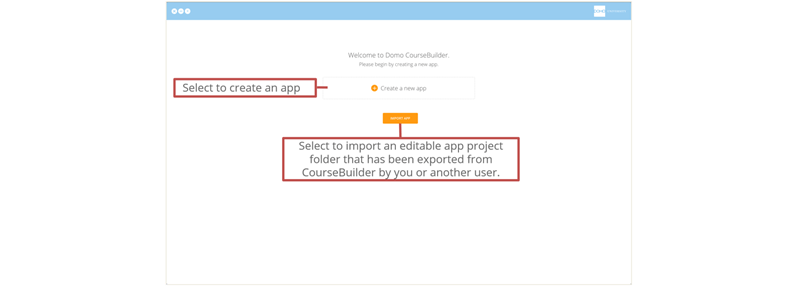
<Frame>
  <img alt="WelcomeSceenA.png" src="https://mintcdn.com/domoinc-openapi-sync-dataflows/KCcJNfmszCLwcqSc/images/kb/ka05w00000123g2-00N5w00000Ri7BU-0EM5w000005vOr1.png?fit=max&auto=format&n=KCcJNfmszCLwcqSc&q=85&s=665786897eab95e5a2856c9feda185bd" width="800" height="286" data-path="images/kb/ka05w00000123g2-00N5w00000Ri7BU-0EM5w000005vOr1.png" />
</Frame>

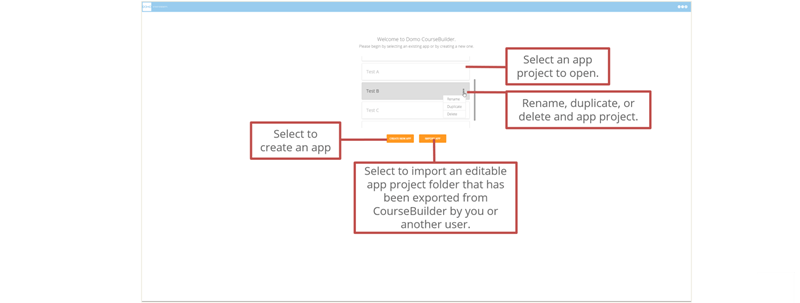
## Welcome Screen B

After you have created or imported apps, the Welcome screen looks like this:
<Frame>
  <img alt="WelcomeSceenB.png" src="https://mintcdn.com/domoinc-openapi-sync-dataflows/KCcJNfmszCLwcqSc/images/kb/ka05w00000123g2-00N5w00000Ri7BU-0EM5w000005vOr0.png?fit=max&auto=format&n=KCcJNfmszCLwcqSc&q=85&s=f7ea2b0d8ebe67758b1a766b990bf257" style={{width: 800, height: 303}} width="800" height="303" data-path="images/kb/ka05w00000123g2-00N5w00000Ri7BU-0EM5w000005vOr0.png" />
</Frame>

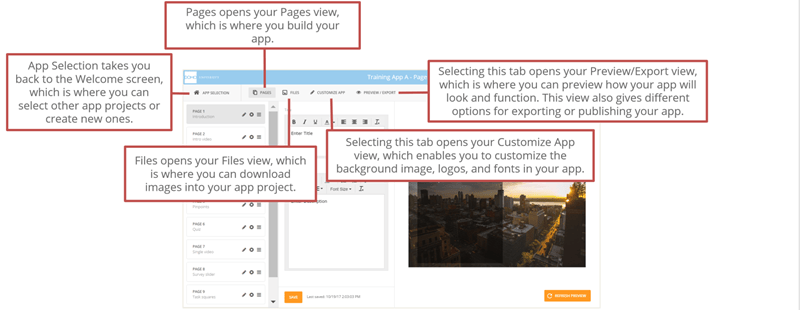
## CourseBuilder Menu

Once you create or open an app project, the following menu options appear along the top:
<Frame>
  <img alt="CourseBuilderMenu.png" src="https://mintcdn.com/domoinc-openapi-sync-dataflows/KCcJNfmszCLwcqSc/images/kb/ka05w00000123g2-00N5w00000Ri7BU-0EM5w000005vOqt.png?fit=max&auto=format&n=KCcJNfmszCLwcqSc&q=85&s=03fcc01618e1a8d486dcae44d63a6472" style={{width: 800, height: 310}} width="800" height="310" data-path="images/kb/ka05w00000123g2-00N5w00000Ri7BU-0EM5w000005vOqt.png" />
</Frame>

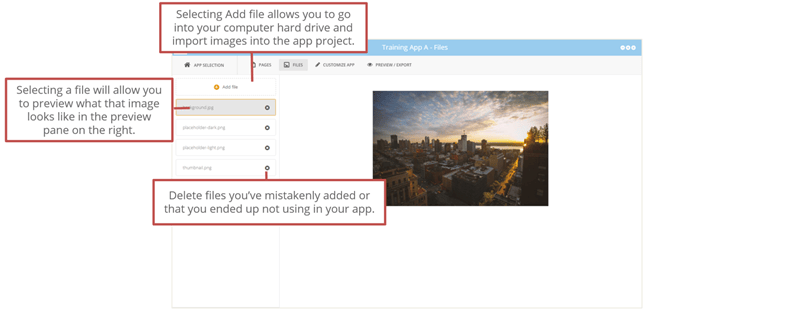
## Files View

<Frame>
  <img alt="FilesView.png" src="https://mintcdn.com/domoinc-openapi-sync-dataflows/KCcJNfmszCLwcqSc/images/kb/ka05w00000123g2-00N5w00000Ri7BU-0EM5w000005vOqq.png?fit=max&auto=format&n=KCcJNfmszCLwcqSc&q=85&s=f84c9148757b31dd9d9f9081a555edd4" style={{width: 800, height: 311}} width="800" height="311" data-path="images/kb/ka05w00000123g2-00N5w00000Ri7BU-0EM5w000005vOqq.png" />
</Frame>

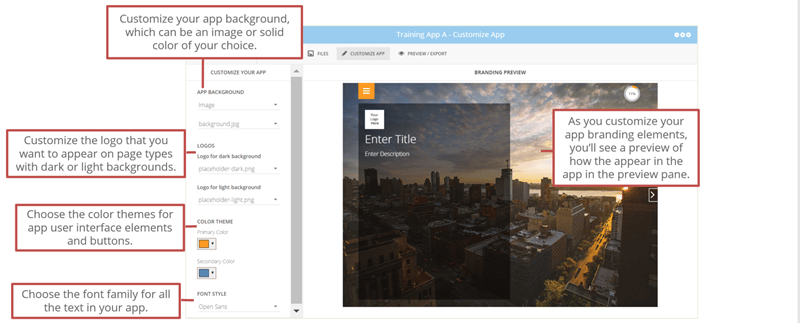
## Customize App View

<Frame>
  <img alt="CustomizeView.png" src="https://mintcdn.com/domoinc-openapi-sync-dataflows/KCcJNfmszCLwcqSc/images/kb/ka05w00000123g2-00N5w00000Ri7BU-0EM5w000005vOr2.png?fit=max&auto=format&n=KCcJNfmszCLwcqSc&q=85&s=bc392f569ee1cbecc560cc40d6ae5170" style={{width: 800, height: 323}} width="800" height="323" data-path="images/kb/ka05w00000123g2-00N5w00000Ri7BU-0EM5w000005vOr2.png" />
</Frame>

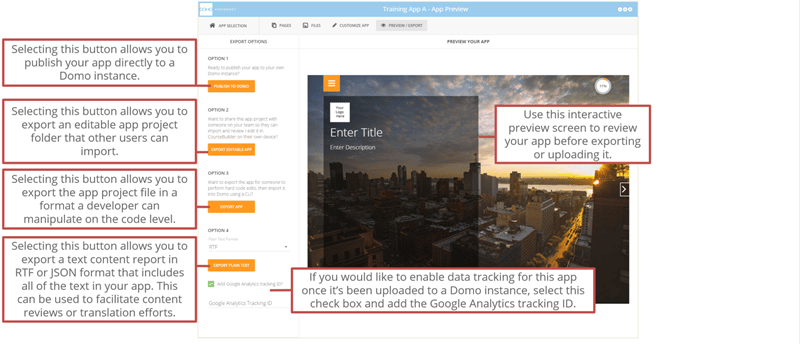
## Preview/Export View

<Frame>
  <img alt="Preview-ExportView.png" src="https://mintcdn.com/domoinc-openapi-sync-dataflows/KCcJNfmszCLwcqSc/images/kb/ka05w00000123g2-00N5w00000Ri7BU-0EM5w000005vOqs.png?fit=max&auto=format&n=KCcJNfmszCLwcqSc&q=85&s=52650f4911d8b599cc0a6e38f4b7b491" style={{width: 800, height: 344}} width="800" height="344" data-path="images/kb/ka05w00000123g2-00N5w00000Ri7BU-0EM5w000005vOqs.png" />
</Frame>