> ## Documentation Index
> Fetch the complete documentation index at: https://domoinc-openapi-sync-dataflows.mintlify.site/llms.txt
> Use this file to discover all available pages before exploring further.
# Sample Beast Mode Calculations: Date Transforms
## Intro
Refer to the calculations in this article when you need to create date transforms in Beast Mode. Many sample calculations are available, including calculations for transforming time zones, converting week numbers to dates, changing date formats, enabling dynamic Daylight Savings, and more.
## GMT and Time Zone
`CASE WHEN HOUR(CURRENT_TIMESTAMP()) < 8 THEN ADDDATE(CURRENT_DATE(), -1) ELSE CURRENT_DATE() END`
Replace 8 with the GMT time difference value.
## Transform a Date or Unrecognized Date
You can use Beast Mode to transform the date format of a column into another column. In the following example, the user wants to reformat the date in the format YYYY-MM-DD:
`STR_TO_DATE(`
`CONCAT (`
``YEAR (`Date`), ‘ – ‘``
``, DAY (`Date`), ‘ – ‘ ``
``, MONTH (`Date`) ``
`)`
`, ‘ %Y-%m-%d ’`
`)`
For more information, see [Date Format Specifier Characters in Beast Mode.](/s/article/360043430153)
## Week Numbers to Dates
If you have an "Admin" default security role in Domo or a custom role with "Manage All Company Settings" enabled, you can convert week numbers in all cards to dates in the Admin Settings, as described in [Changing the week display formatting](/s/article/360043429633 "Changing the Date Format in Your Chart"). If you are not an "Admin," do not have a custom role with "Manage All Company Settings," or do not want to make this change universally, there are a number of ways to convert week numbers to dates on a card-by-card basis using Beast Mode.
**Option 1**
``SUBDATE(`Date`,WEEKDAY(`Date`)-1)``
This is the simplest version and returns the full date of the Sunday for the given week. So if the week number was Week 1 of 2015, the calculation would return "2015-01-04" (as Sunday fell on the 4th of January this year). Note that even though this looks like a date, Domo will consider it a character value. You cannot use the date grain selector on this value, as all cards using this Beast Mode will always be locked to weekly.
**Option 2**
``DATE_FORMAT(SUBDATE(`Date`,WEEKDAY(`Date`)-1),'%m/%d/%Y')``
This is the same as the previous option but formats the date differently (so "01/04/2015" is returned instead of "2015-01-04."
**Option 3**
``CONCAT('Week beg: ',DATE_FORMAT(SUBDATE(`Date`,WEEKDAY(`Date`)-1),'%b-%d'))``
This version puts the text "Week beg:" and then only shows the month and day of that week's Sunday. For example: "Week beg: Jan 04."
**Option 4**
``CONCAT(DATE_FORMAT(SUBDATE(`Date`,WEEKDAY(`Date`)-1),'%b %d'),' - ',DATE_FORMAT(SUBDATE(`Date`,WEEKDAY(`Date`)-7),'%b %d %Y'))``
In this version, values span both months and years. This version returns "Jan 01 - Jan 07 2015." The year is always associated with the end of the week. For the last week of 2014, you would see "Dec 28 - Jan 03 2015."
## Removing the Timestamp from Dates
If you have a date format that includes month, day, year, hour, minute, and second (for example, 21-Apr-16 1:53:46 ), you can change the format using Beast Mode.
The formula below will maintain your data type as a date if you need it. This requires that the data type in Domo be a date type.
``DATE (`DateField`)``
If the Domo data type is a string, you can convert it. The following example shows how to do this:
`str_to_date('21-APR-16 1:53:46','%d-%b-%y’)`
Depending on the raw string format, this Beast Mode may need to be slightly adjusted to interpret the raw values correctly.
## Dynamic Daylight Savings
The following dynamic Beast Mode calculations allow you to compare a date column to daylight savings dates. A "yes" or "no" is returned if the dates are in a certain range of daylight savings.
**Sample Beast Mode**
"Date" is the date column.
`CASE`
``WHEN `date`>= CASE``
`WHEN DAYOFWEEK(STR_TO_DATE(CONCAT(YEAR(curdate()), '-03-08'),'%Y-%m-%d')) = 0 THEN STR_TO_DATE(CONCAT(YEAR(curdate()), '-03-08'),'%Y-%m-%d')`
`WHEN DAYOFWEEK(STR_TO_DATE(CONCAT(YEAR(curdate()), '-03-09'),'%Y-%m-%d')) = 0 THEN STR_TO_DATE(CONCAT(YEAR(curdate()), '-03-09'),'%Y-%m-%d')`
`WHEN DAYOFWEEK(STR_TO_DATE(CONCAT(YEAR(curdate()), '-03-10'),'%Y-%m-%d')) = 0 THEN STR_TO_DATE(CONCAT(YEAR(curdate()), '-03-10'),'%Y-%m-%d')`
`WHEN DAYOFWEEK(STR_TO_DATE(CONCAT(YEAR(curdate()), '-03-11'),'%Y-%m-%d')) = 0 THEN STR_TO_DATE(CONCAT(YEAR(curdate()), '-03-11'),'%Y-%m-%d')`
`WHEN DAYOFWEEK(STR_TO_DATE(CONCAT(YEAR(curdate()), '-03-12'),'%Y-%m-%d')) = 0 THEN STR_TO_DATE(CONCAT(YEAR(curdate()), '-03-12'),'%Y-%m-%d')`
`WHEN DAYOFWEEK(STR_TO_DATE(CONCAT(YEAR(curdate()), '-03-13'),'%Y-%m-%d')) = 0 THEN STR_TO_DATE(CONCAT(YEAR(curdate()), '-03-13'),'%Y-%m-%d')`
`WHEN DAYOFWEEK(STR_TO_DATE(CONCAT(YEAR(curdate()), '-03-14'),'%Y-%m-%d')) = 0 THEN STR_TO_DATE(CONCAT(YEAR(curdate()), '-03-14'),'%Y-%m-%d')`
`END`
``AND `date`< CASE``
`WHEN DAYOFWEEK(STR_TO_DATE(CONCAT(YEAR(curdate()), '-11-01'),'%Y-%m-%d')) = 0 THEN STR_TO_DATE(CONCAT(YEAR(curdate()), '-11-01'),'%Y-%m-%d')`
`WHEN DAYOFWEEK(STR_TO_DATE(CONCAT(YEAR(curdate()), '-11-02'),'%Y-%m-%d')) = 0 THEN STR_TO_DATE(CONCAT(YEAR(curdate()), '-11-02'),'%Y-%m-%d')`
`WHEN DAYOFWEEK(STR_TO_DATE(CONCAT(YEAR(curdate()), '-11-03'),'%Y-%m-%d')) = 0 THEN STR_TO_DATE(CONCAT(YEAR(curdate()), '-11-03'),'%Y-%m-%d')`
`WHEN DAYOFWEEK(STR_TO_DATE(CONCAT(YEAR(curdate()), '-11-04'),'%Y-%m-%d')) = 0 THEN STR_TO_DATE(CONCAT(YEAR(curdate()), '-11-14'),'%Y-%m-%d')`
`WHEN DAYOFWEEK(STR_TO_DATE(CONCAT(YEAR(curdate()), '-11-05'),'%Y-%m-%d')) = 0 THEN STR_TO_DATE(CONCAT(YEAR(curdate()), '-11-05'),'%Y-%m-%d')`
`WHEN DAYOFWEEK(STR_TO_DATE(CONCAT(YEAR(curdate()), '-11-06'),'%Y-%m-%d')) = 0 THEN STR_TO_DATE(CONCAT(YEAR(curdate()), '-11-06'),'%Y-%m-%d')`
`WHEN DAYOFWEEK(STR_TO_DATE(CONCAT(YEAR(curdate()), '-11-07'),'%Y-%m-%d')) = 0 THEN STR_TO_DATE(CONCAT(YEAR(curdate()), '-11-07'),'%Y-%m-%d')`
`END`
`THEN 'yes'`
`ELSE 'no'`
`END`
## Date Difference for Business Days
If you need to calculate the date difference between two dates for weekdays/business days, this can be done in Beast Mode or SQL DataFlow using a query. For more information, see [Date Difference for Business Days](/s/article/360043428153 "Date Difference for Business Days").
## Calendar Month Day
``Date_Format(`MyDateColumn`,'%m/%d')``
## Calendar Year
``Year(`MyDateColumn`)``
## Current Year
``case when Year(`MyDateColumn`) = year(current_date()) then 'True' else 'False' end``
## Last 12 Months
`case`
`when`
``year(`MyDateColumn`) = year(current_date()) - 1``
``and month(current_date()) <= month(`MyDateColumn`)``
`then`
`'Yes'`
`when`
``month(`MyDateColumn`) <= month(current_date())``
``and year(`MyDateColumn`) = year(current_date())``
`then`
`'Yes'`
`else 'No'`
`end `
## Last 12 Months Filter
Use the following code to create a calculation to create a column with a 'Yes' string value where the corresponding date value is greater than or equal to the first day of the month of the current calendar day from the previous year, and a 'No' where it is not.
``CASE WHEN `MyDateColumn` >= STR_TO_DATE(CONCAT((YEAR(CURRENT_DATE())) - 1, MONTH(CURRENT_DATE()), '01'), '%Y%m%d') THEN 'Yes' ELSE 'No' END``
To exclude the current month, add ``AND `MyDateColumn` < DATE_FORMAT(CURRENT_DATE(), '%Y%m01')``
`` CASE WHEN `MyDateColumn` >= STR_TO_DATE(CONCAT((YEAR(CURRENT_DATE())) - 1, MONTH(CURRENT_DATE()), '01'), '%Y%m%d')``
``AND `MyDateColumn` < DATE_FORMAT(CURRENT_DATE(), '%Y%m01')``
`THEN 'Yes' ELSE 'No' END `
## Last Year Filter
Use the following code to create a calculation to create a column with a 'Yes' string value where the corresponding date value is greater than or equal to the current calendar day from the previous year, and a 'No' where it is not.
``CASE WHEN `MyDateColumn` >= STR_TO_DATE(CONCAT(YEAR(CURRENT_DATE() - 1), MONTH(CURRENT_DATE()), DAY(CURRENT_DATE())), '%Y%m%d') THEN 'Yes' ELSE 'No' END``
To exclude the current date, add ``AND `MyDateColumn` < CURRENT_DATE()``
`` CASE WHEN `MyDateColumn` >= STR_TO_DATE(CONCAT(YEAR(CURRENT_DATE() - 1), MONTH(CURRENT_DATE()), DAY(CURRENT_DATE())), '%Y%m%d')``
``AND `MyDateColumn` < CURRENT_DATE()``
`THEN 'Yes' ELSE 'No' END `
## Another Last Year Filter
Use the following code to create a calculation to determine whether to add a zero '0' before the month so that it's a 2-digit month, which helps in setting the date.
``CASE WHEN MONTH(CURRENT_DATE()) < 10 THEN CASE WHEN `MyDateColumn` >= STR_TO_DATE(CONCAT(YEAR(CURRENT_DATE())-1, '0', MONTH(CURRENT_DATE()), '01'), '%Y%m%d') THEN 'Yes' ELSE 'No' END``
## Rolling 13 Months
`` CASE WHEN PERIOD_DIFF(DATE_FORMAT(STR_TO_DATE(CONCAT(YEAR(CURRENT_DATE()), MONTH(CURRENT_DATE())), '%Y%m%d'), '%Y%m'), DATE_FORMAT (`Month`, '%Y%m')) > 14``
`THEN 'No'`
`ELSE 'Yes'`
`END `
## This Fiscal Quarter
Use the following code to create a calculation that returns "Yes" or "No" depending on whether the value falls in the current fiscal quarter:
`` CASE WHEN `FiscalQuarter` = (CASE WHEN MONTH(CURRENT_DATE()) >= 2 AND MONTH(CURRENT_DATE()) <=4 then 1``
`ELSE CASE WHEN MONTH(CURRENT_DATE()) >= 5 AND MONTH(CURRENT_DATE()) <=7 then 2`
`ELSE CASE WHEN MONTH(CURRENT_DATE()) >= 8 AND MONTH(CURRENT_DATE()) <=10 then 3`
`ELSE 4 END`
`END`
`END)`
`THEN 'Yes' ELSE 'No'`
`END `
## This Fiscal Year
Use the following code to create a calculation that returns "Yes" or "No" depending on whether the value falls in the current fiscal year:
``CASE WHEN `FiscalYear` = (CASE WHEN MONTH(CURRENT_DATE())<2 THEN YEAR(CURRENT_DATE())-1 ELSE YEAR(CURRENT_DATE()) END) THEN 'Yes' ELSE 'No' END``
## Fiscal Calendar
Use the following code to create a calculation to create an "Adjusted Date" column that maps current year date and previous year date to the same value:
``Date_Format(`Adjusted Date`, '%b %d')``
Then create a calculation to filter dates:
``CASE WHEN DateDiff(AddDate(Current_Date(), -1), `Adjusted Date`) < 30 AND DateDiff(Current_Date(), `Adjusted Date`) > 0 THEN 'Y' ELSE 'N' END``
## Week Starting on Day X
Use the following code to create a calculation that aggregates your data weekly. To change the week start day, add a value between 1 and 6 in place of x. Note that WEEKDAY() function is not supported in Beast Mode. If it is used, it is replaced with the functionality of DAYOFWEEK(). You can specify additional formatting using DATE\_FORMAT().
``SUBDATE(`Date`, DAYOFWEEK(`Date`)+X)``
## Graphing by Day of Week
Watch the following video to learn how to show data for different days of the week:
## Accounts Payable/Receivable Aging Buckets
Use the following code to create a calculation for accounts receivable:
`CASE`
``when DATEDIFF(CURRENT_DATE(),`TxnDate`) < 31 then ' 30 Days'``
``when DATEDIFF(CURRENT_DATE(),`TxnDate`) < 61 then ' 60 Days'``
``when DATEDIFF(CURRENT_DATE(),`TxnDate`) < 91 then ' 90 Days'``
``when DATEDIFF(CURRENT_DATE(),`TxnDate`) < 121 then '120 Days'``
``when DATEDIFF(CURRENT_DATE(),`TxnDate`) > 120 then 'Over 120'``
`end `
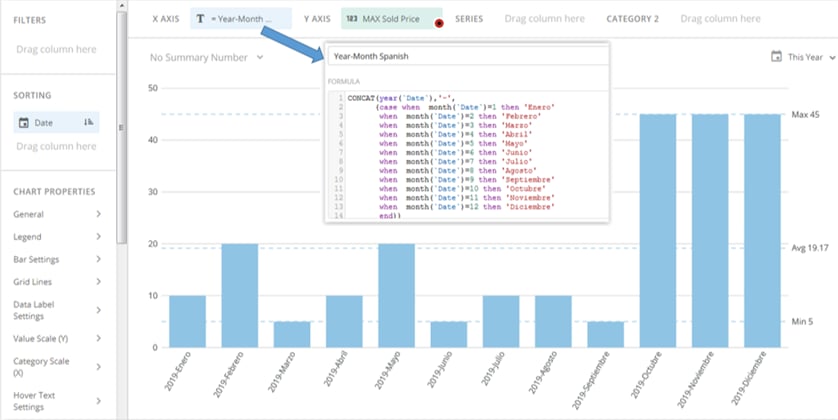
## Changing the Language for Months
You can use a CONCAT Beast Mode function to change the language of month names. For example, if your dates were in the format %Y-%M (e.g. 2019-January ), you would open with CONCAT(year(`Date`),'-', followed by a nested CASE statement in which you specify the translated term for each month.
So, for example, if you wanted to change the language of your months to Spanish, your Beast Mode calculation would look as follows:
`` CONCAT(year(`Date`),'-',``
\`\`(CASE when month(`Date`) = 1 then 'Enero'
``when month (`Date`) = 2 then 'Febrero'``
``when month (`Date`) = 3 then 'Marzo'``
``when month (`Date`) = 4 then 'Abril'``
``when month (`Date`) = 5 then 'Mayo'``
``when month (`Date`) = 6 then 'Junio'``
``when month (`Date`) = 7 then 'Julio'``
``when month (`Date`) = 8 then 'Agosto'``
``when month (`Date`) = 9 then 'Septiembre'``
``when month (`Date`) = 10 then 'Octubre'``
``when month (`Date`) = 11 then 'Noviembre'``
``when month (`Date`) = 12 then 'Diciembre'``
`end) `