> ## Documentation Index
> Fetch the complete documentation index at: https://domoinc-openapi-sync-dataflows.mintlify.site/llms.txt
> Use this file to discover all available pages before exploring further.
# Specifying the Size of Bars in Bar Charts
## Intro
You can format the size of bars in bar charts using various options in **Chart Properties**, including the following:
* Changing the percentage of space taken up by each bar
* Specifying how bars appear in charts with only one bar
## Changing bar width or height percentage
In a bar chart, each bar takes up a set amount of space. By default, a bar takes up about 90% of its given space. By changing the **Width Percentage** or **Height Percentage** for a vertical or horizontal bar chart, respectively, you can change the percentage of space taken up by each bar. Possible values range from 0 (at which bars appear as lines) to 100 (at which bars touch other bars).
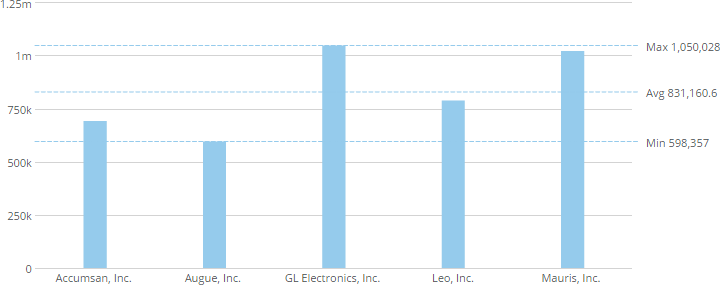
The following example shows a vertical bar chart with a **Width Percentage** of 20.
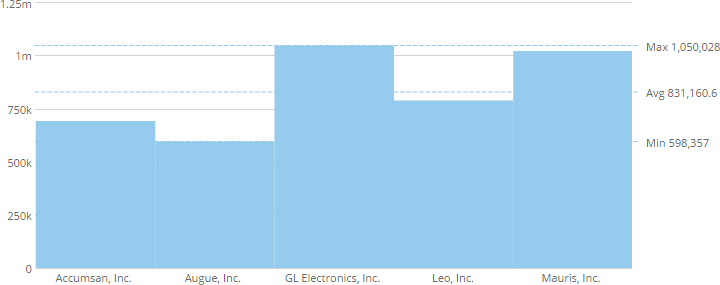
 The following example shows the same chart with a **Width Percentage** of 100.
 **To change the percentage of space taken up by bars in a chart,**
1. Open the Analyzer for the chart you want to edit.
2. In **Chart Properties**, click **Bar Settings**.
3. Enter the desired percentage value in the **Width Percentage** field (for a chart with vertical bars) or **Height Percentage** field (for a chart with horizontal bars).
**To change the percentage of space taken up by bars in a chart,**
1. Open the Analyzer for the chart you want to edit.
2. In **Chart Properties**, click **Bar Settings**.
3. Enter the desired percentage value in the **Width Percentage** field (for a chart with vertical bars) or **Height Percentage** field (for a chart with horizontal bars).