> ## Documentation Index
> Fetch the complete documentation index at: https://domoinc-openapi-sync-dataflows.mintlify.site/llms.txt
> Use this file to discover all available pages before exploring further.
# Pulling a Segment of Text from a Text String
## Intro
You can pull a segment of text from a text string using either a MySQL or Magic ETL DataFlow (similar to using SUBSTRING in Beast Mode).
## SUBSTRING in a MySQL DataFlow
You can use SUBSTRING\_INDEX() in a MySQL DataFlow to pull a segment of text from a string of text. For example, you might want to pull the number and name from \{"number":"91402","name":"Frodo"}.
Use SUBSTRING\_INDEX(*str,delim,count* ) to return the substring *str* before *count* occurrences of the delimiter *delim*. If *count* is positive, everything to the left of the final delimiter (counting from the left) is returned. If *count* is negative, everything to the right of the final delimiter (counting from the right) is returned. SUBSTRING\_INDEX() performs a case-sensitive match when searching for *delim*.
**`mysql> SELECT SUBSTRING_INDEX(' www.mysql.com ', '.', 2); -> 'www.mysql' mysql> SELECT SUBSTRING_INDEX(' www.mysql.com ', '.', -2); -> ' mysql.com '`**
Using our example...
``,substring_index(substring_index(`data`, '"', 4),'"',-1) as ‘number’ ``
``,substring_index(substring_index(`data`, '"', 8),'"',-1) as ‘name’ ``
## SUBSTRING in a Magic ETL DataFlow
To perform a SUBSTRING action in a Magic ETL DataFlow, use the **Replace Text** action. You will perform two searches in the same column. For the first search, use this regular expression:
^.\{X}
where X is the number of the character to start the SUBSTRING on.
For the first search, use this regular expression:
(?\<=^.\{Y}).+
where Y is the number of characters to remove.
For the functions to work, make sure you click the Gear icon and select **Use RegEx** for both search boxes.
So in the following example...
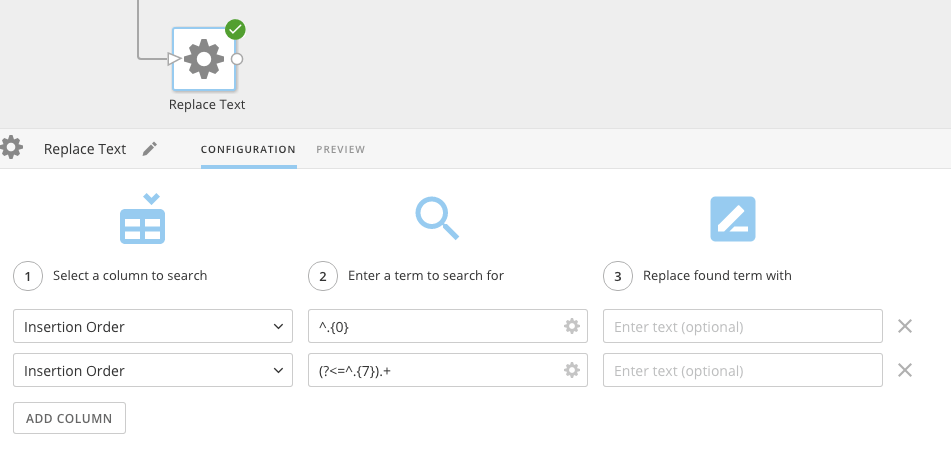 ...the SUBSTRING action begins at position 0 and extracts 7 characters.