> ## Documentation Index
> Fetch the complete documentation index at: https://domoinc-openapi-sync-dataflows.mintlify.site/llms.txt
> Use this file to discover all available pages before exploring further.
# 2024 Release 5 | September
export const InlineImage = ({src, alt = '', height = '1.6em'}) => {
return  ;
};
***
### October 2024 Updates
# AI Chat
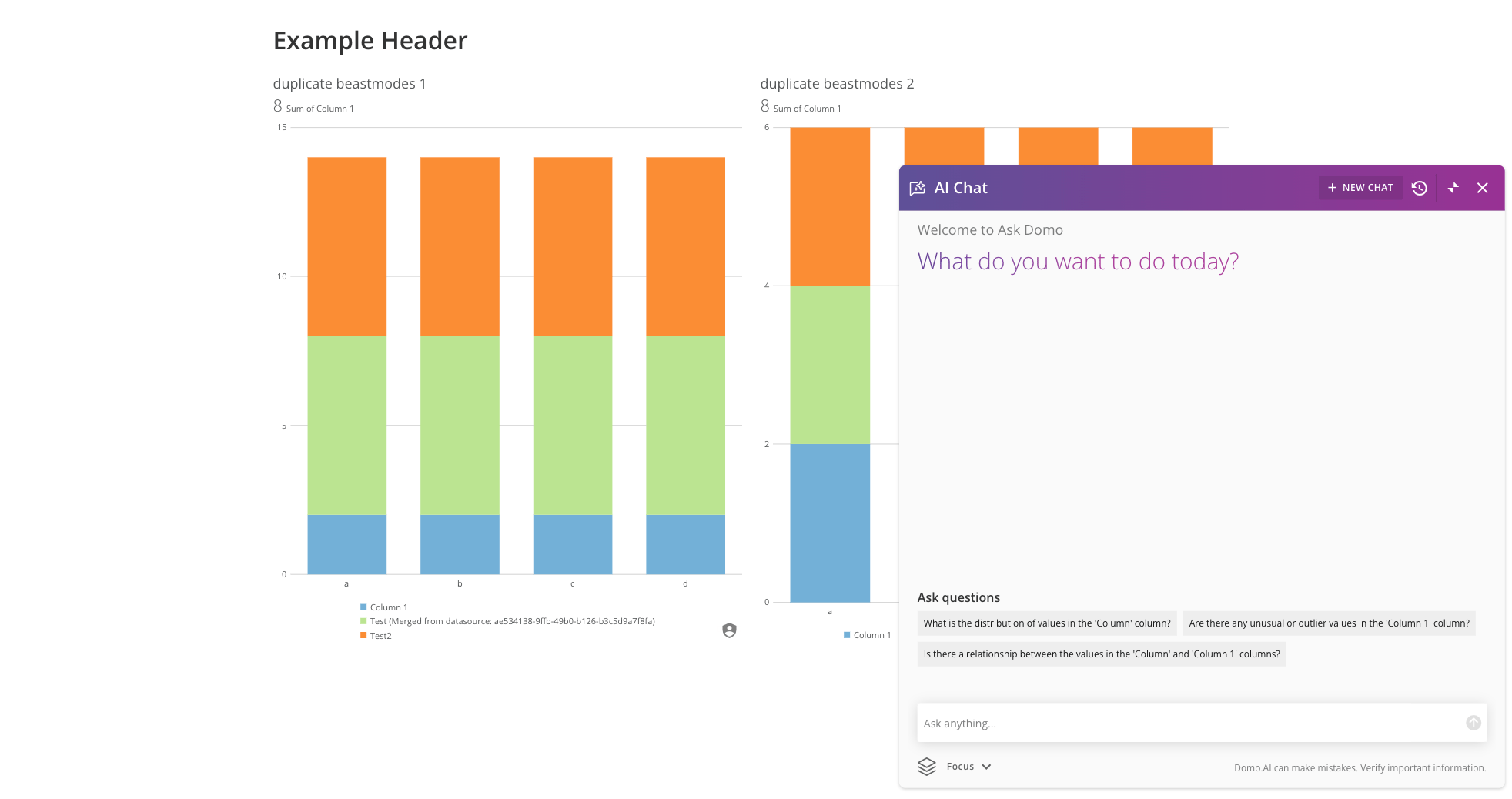
Domo. AI Chat is now available to everyone!
Ask a question about your data and AI Chat answers, providing a detailed breakdown of how it reached the response. You'll also get visualizations, data context, and prompts for additional questions. Go beyond natural language queries and let AI Chat help you accomplish tasks like setting an alert, calling an AI model, and more.
Learn more about [AI Chat](/s/article/000005539).
;
};
***
### October 2024 Updates
# AI Chat
Domo. AI Chat is now available to everyone!
Ask a question about your data and AI Chat answers, providing a detailed breakdown of how it reached the response. You'll also get visualizations, data context, and prompts for additional questions. Go beyond natural language queries and let AI Chat help you accomplish tasks like setting an alert, calling an AI model, and more.
Learn more about [AI Chat](/s/article/000005539).
 # AI Readiness
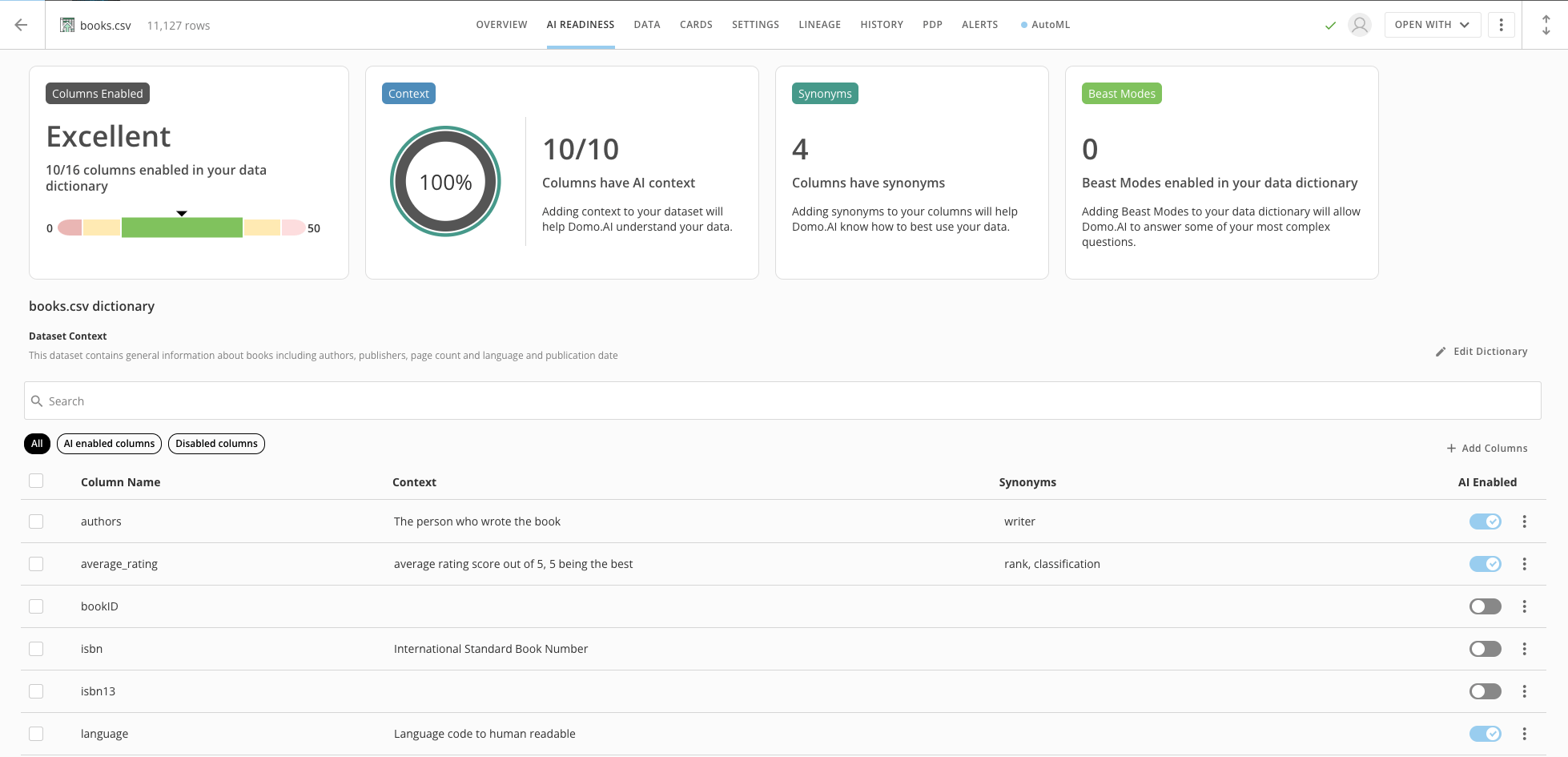
The new AI Readiness feature for DataSets helps prepare your data to realize the full potential of Domo. AI. Get an excellent readiness score by using the data dictionary and adding context to columns for maximum AI impact.
Learn more about AI Readiness.
###
# AI Readiness
The new AI Readiness feature for DataSets helps prepare your data to realize the full potential of Domo. AI. Get an excellent readiness score by using the data dictionary and adding context to columns for maximum AI impact.
Learn more about AI Readiness.
###
 # App Studio
#### Clear Filters
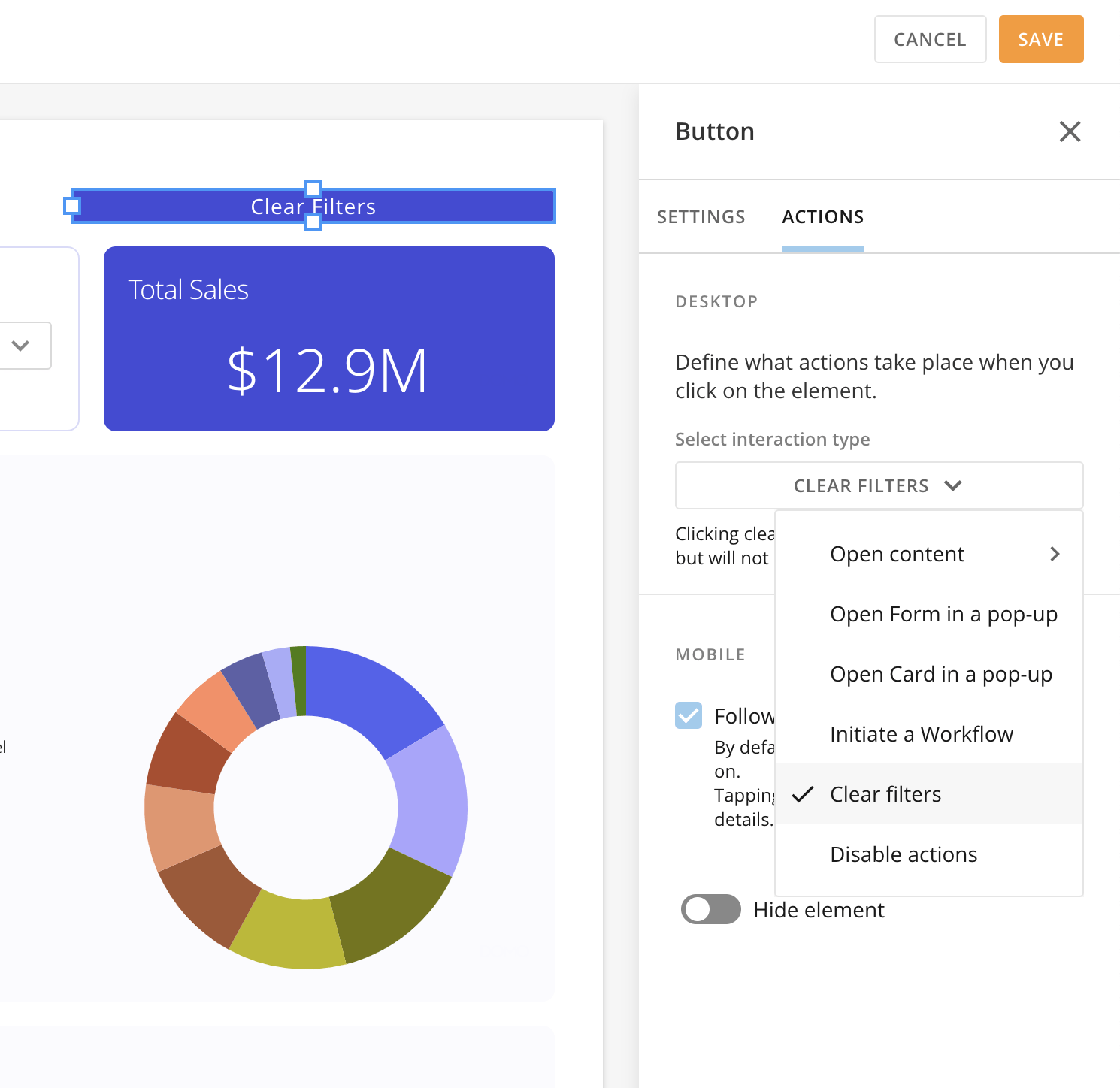
The **Clear Filters** action is now available in App Studio. This action allows you to clear all page filters with a single click, eliminating the need to go to the control panel.
# App Studio
#### Clear Filters
The **Clear Filters** action is now available in App Studio. This action allows you to clear all page filters with a single click, eliminating the need to go to the control panel.
 #### Card-on-Card Pop-ups
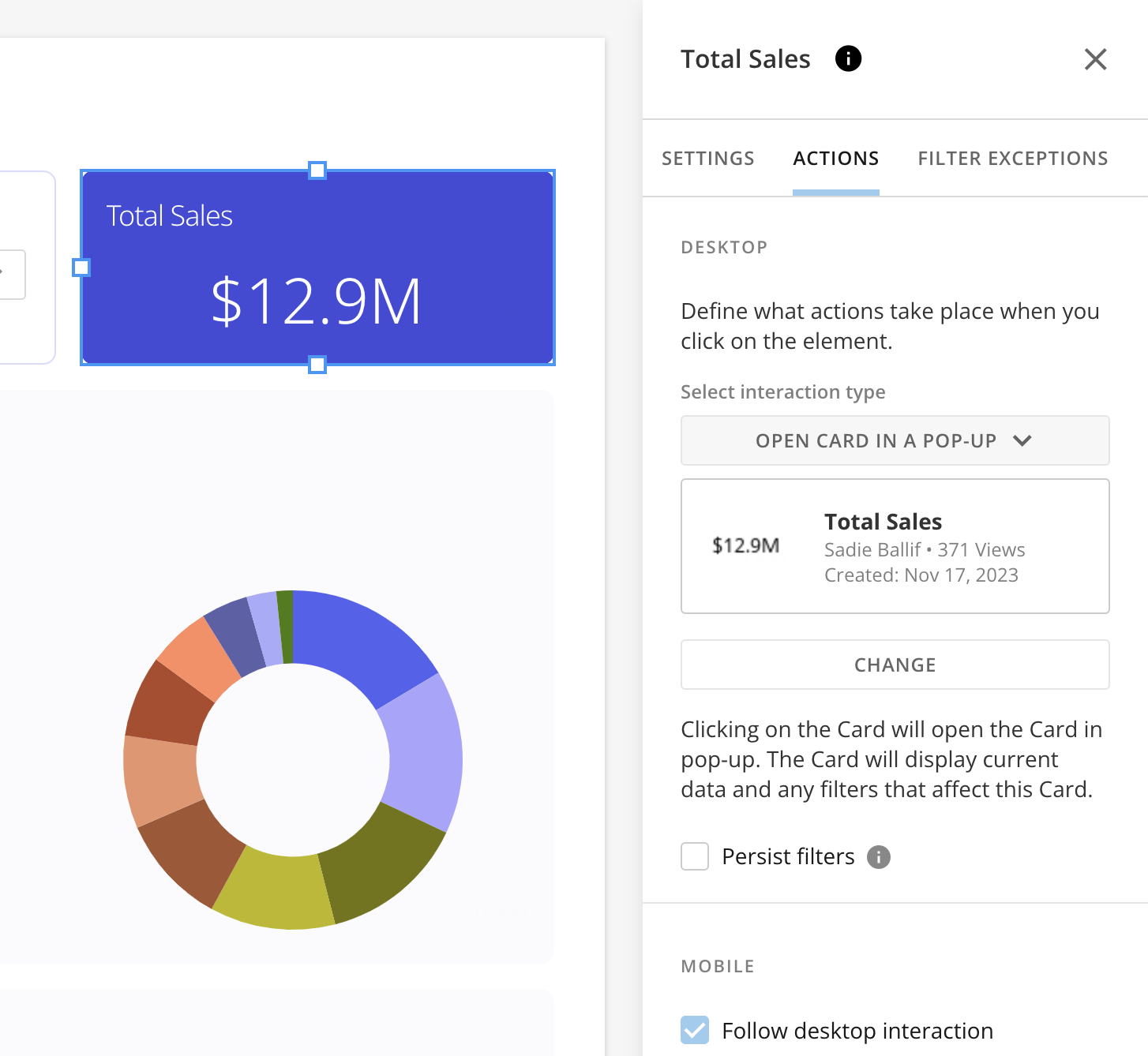
When viewing a page in an App Studio app, you can now open a second card via a pop-up on top of an existing card. Card-on-card pop-ups allow you to gather secondary information quickly with a single click.
#### Card-on-Card Pop-ups
When viewing a page in an App Studio app, you can now open a second card via a pop-up on top of an existing card. Card-on-card pop-ups allow you to gather secondary information quickly with a single click.
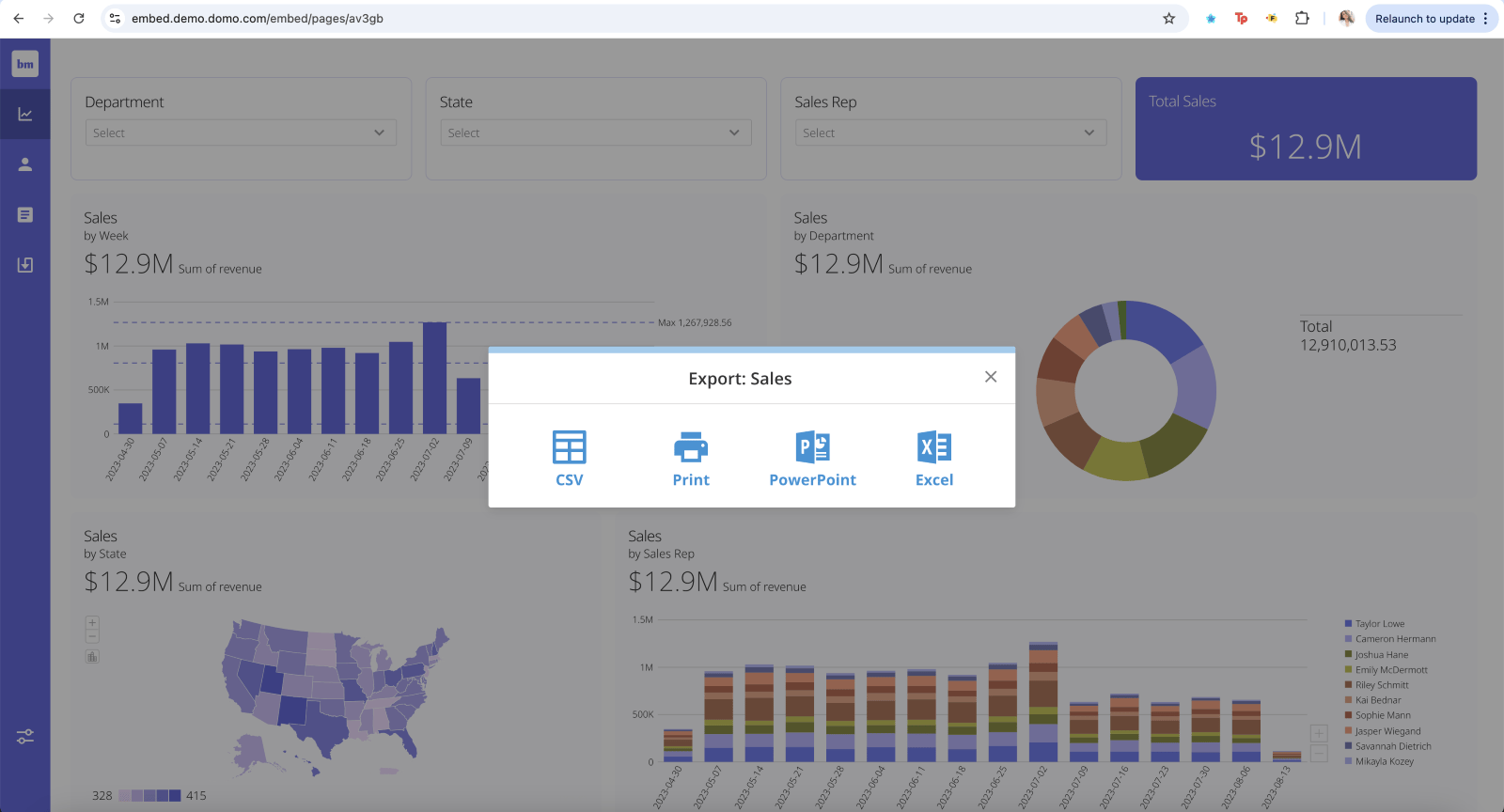
 #### Exports in App Studio Embed
Card exports are available with App Studio Embed. This feature allows you to export your cards in Embed as a CSV, PDF, PowerPoint, or Excel sheet.
#### Exports in App Studio Embed
Card exports are available with App Studio Embed. This feature allows you to export your cards in Embed as a CSV, PDF, PowerPoint, or Excel sheet.
 Learn more about [App Studio.](https://domo-support.domo.com/s/article/000005295?language=en_US)
# Bulk Filter Paste
A global filter update allows you to paste multiple comma-separated values directly into the filter search bar in Analyzer and card Details and when using dashboards and Quick Filters.
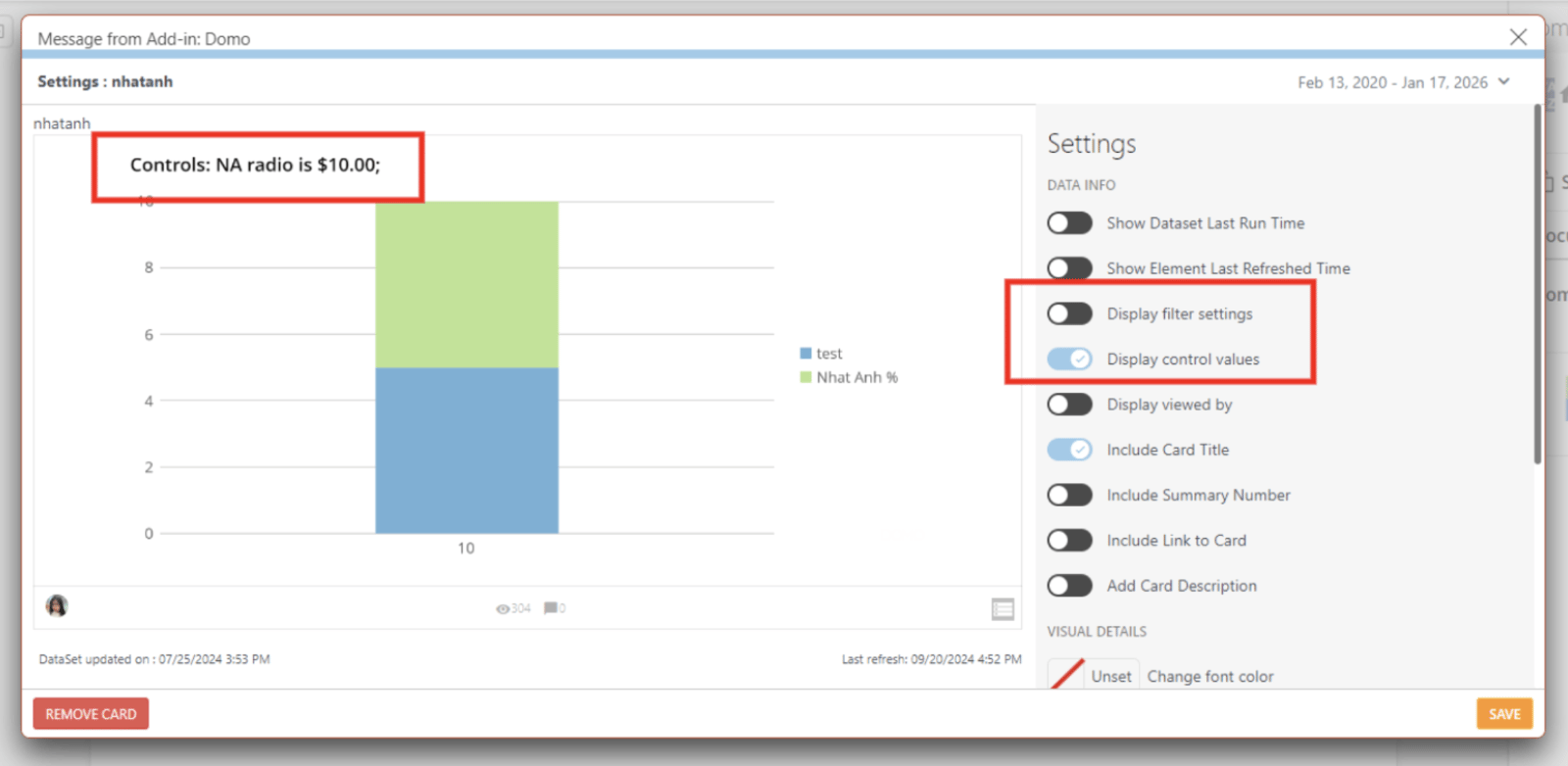
# Variables Support in PowerPoint Add-in
The Domo add-in for Microsoft PowerPoint now supports Variables at the document level. Variable controls can be selected and saved in your filters panel. Any updates made to the Variable controls apply to all of your cards using that variable at the document level.
Learn more about [Variables support for PowerPoint](https://domo-support.domo.com/s/article/000005143?language=en_US#enable_variable_display_powerpoint) and the [MS Office add-ins.](/s/article/000005143)
Learn more about [App Studio.](https://domo-support.domo.com/s/article/000005295?language=en_US)
# Bulk Filter Paste
A global filter update allows you to paste multiple comma-separated values directly into the filter search bar in Analyzer and card Details and when using dashboards and Quick Filters.
# Variables Support in PowerPoint Add-in
The Domo add-in for Microsoft PowerPoint now supports Variables at the document level. Variable controls can be selected and saved in your filters panel. Any updates made to the Variable controls apply to all of your cards using that variable at the document level.
Learn more about [Variables support for PowerPoint](https://domo-support.domo.com/s/article/000005143?language=en_US#enable_variable_display_powerpoint) and the [MS Office add-ins.](/s/article/000005143)
 ***
### New Features
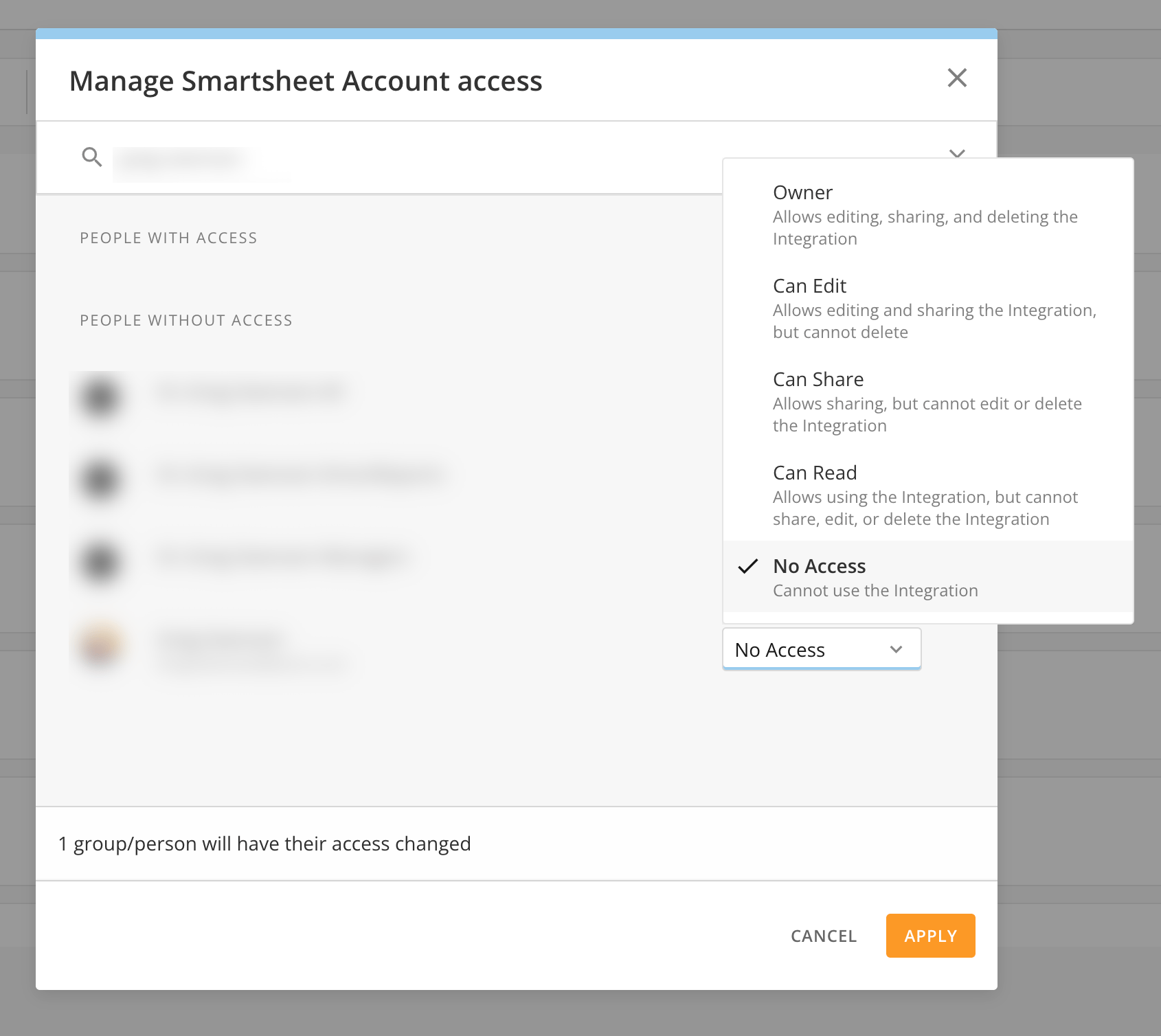
# Group Ownership of Accounts
The Accounts feature in the Data Center now supports group ownership.
The new account ownership modal includes the following capabilities:
* Multiple users and Domo Group account ownership.
* Granular permissions to own, edit, share, and use the account.
***
### New Features
# Group Ownership of Accounts
The Accounts feature in the Data Center now supports group ownership.
The new account ownership modal includes the following capabilities:
* Multiple users and Domo Group account ownership.
* Granular permissions to own, edit, share, and use the account.
 Learn more about [Accounts.](https://domo-support.domo.com/s/article/360042926054?language=en_US)
# Mini Map
The new Magic ETL Mini map provides an improved navigation experience and allows you to scroll around your DataFlow and see the tile layout.
Learn more about [Accounts.](https://domo-support.domo.com/s/article/360042926054?language=en_US)
# Mini Map
The new Magic ETL Mini map provides an improved navigation experience and allows you to scroll around your DataFlow and see the tile layout.
 Learn more about the [Mini map in Magic ETL.](https://domo-support.domo.com/s/article/360055259234?language=en_US)
# App Studio: New Queues Widget
The Queues widget in App Studio allows you to bring a queue directly into an App Studio app to access your tasks. The widget automatically matches your app theme.
Learn more about the [Mini map in Magic ETL.](https://domo-support.domo.com/s/article/360055259234?language=en_US)
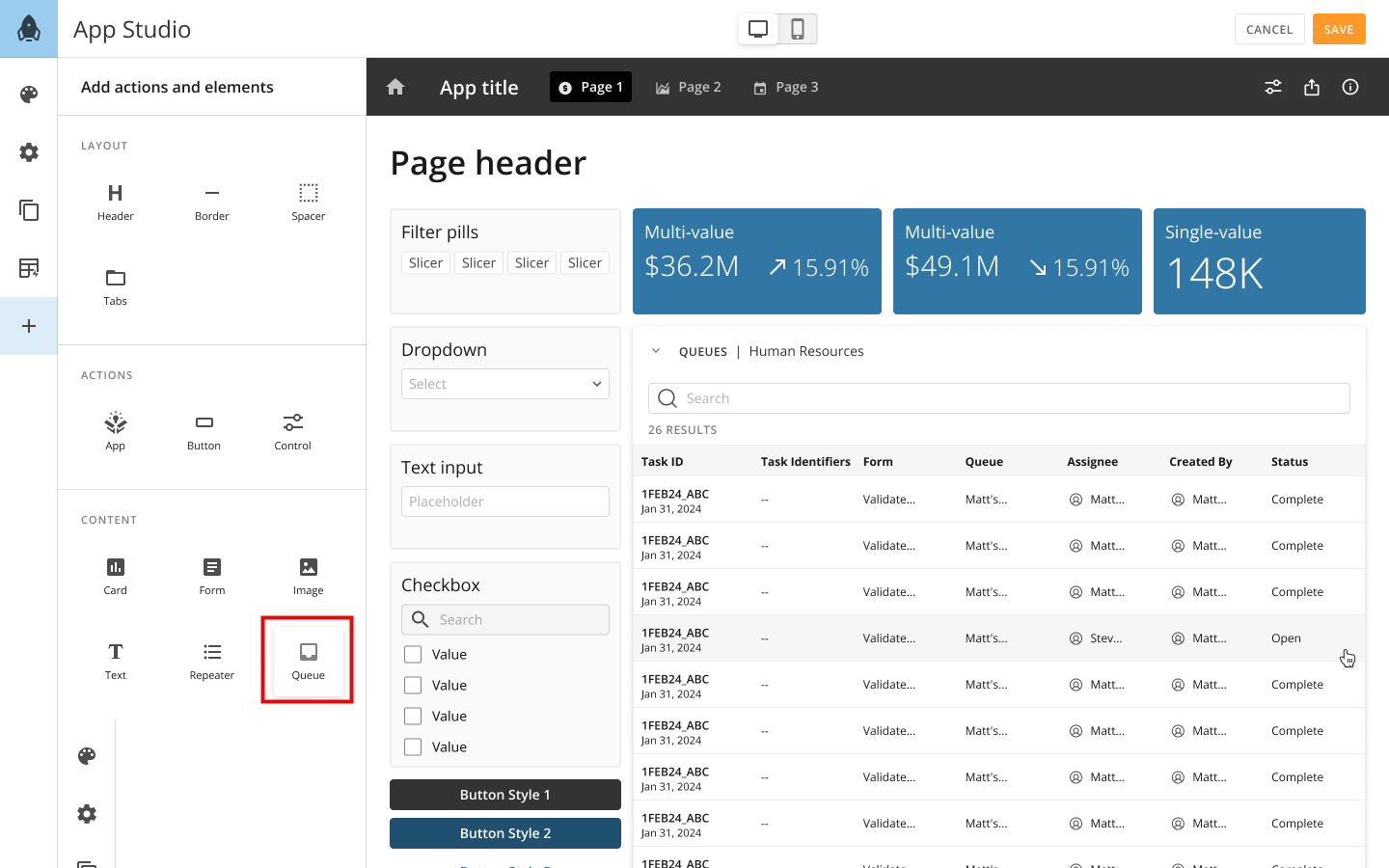
# App Studio: New Queues Widget
The Queues widget in App Studio allows you to bring a queue directly into an App Studio app to access your tasks. The widget automatically matches your app theme.
 Learn more about adding [content in App Studio.](https://domo-support.domo.com/s/article/000005295?language=en_US#content)
# Workflows Updates
#### Bulk Cancel
The new Bulk Cancel feature in Workflows allows you to select multiple in-progress or failed executions and submit a single cancellation request. Save time by submitting bulk cancellation requests instead of canceling executions one by one.
Learn about [canceling workflows in bulk](https://domo-support.domo.com/s/article/000005179?language=en_US#cancel_workflows_in_bulk).
Learn more about adding [content in App Studio.](https://domo-support.domo.com/s/article/000005295?language=en_US#content)
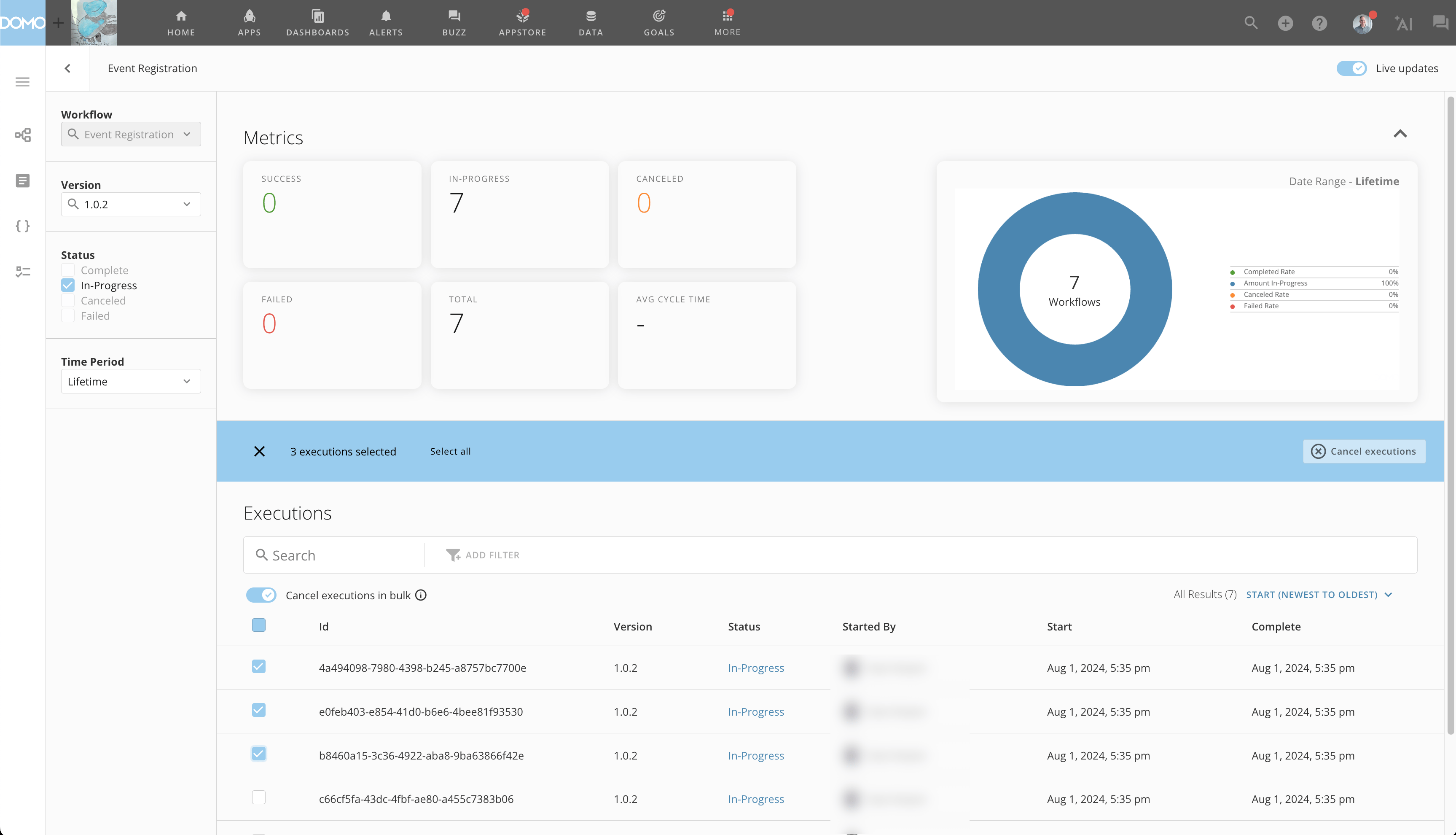
# Workflows Updates
#### Bulk Cancel
The new Bulk Cancel feature in Workflows allows you to select multiple in-progress or failed executions and submit a single cancellation request. Save time by submitting bulk cancellation requests instead of canceling executions one by one.
Learn about [canceling workflows in bulk](https://domo-support.domo.com/s/article/000005179?language=en_US#cancel_workflows_in_bulk).
 #### DataSet Query Task
The DataSet Query Task shape has been added to Workflows. This shape allows you to implement logic that queries and retrieves data from a Domo DataSet in your workflows.
The DataSet Query Task includes v ariable injections into queries, preview options, and auto-generated outputs.
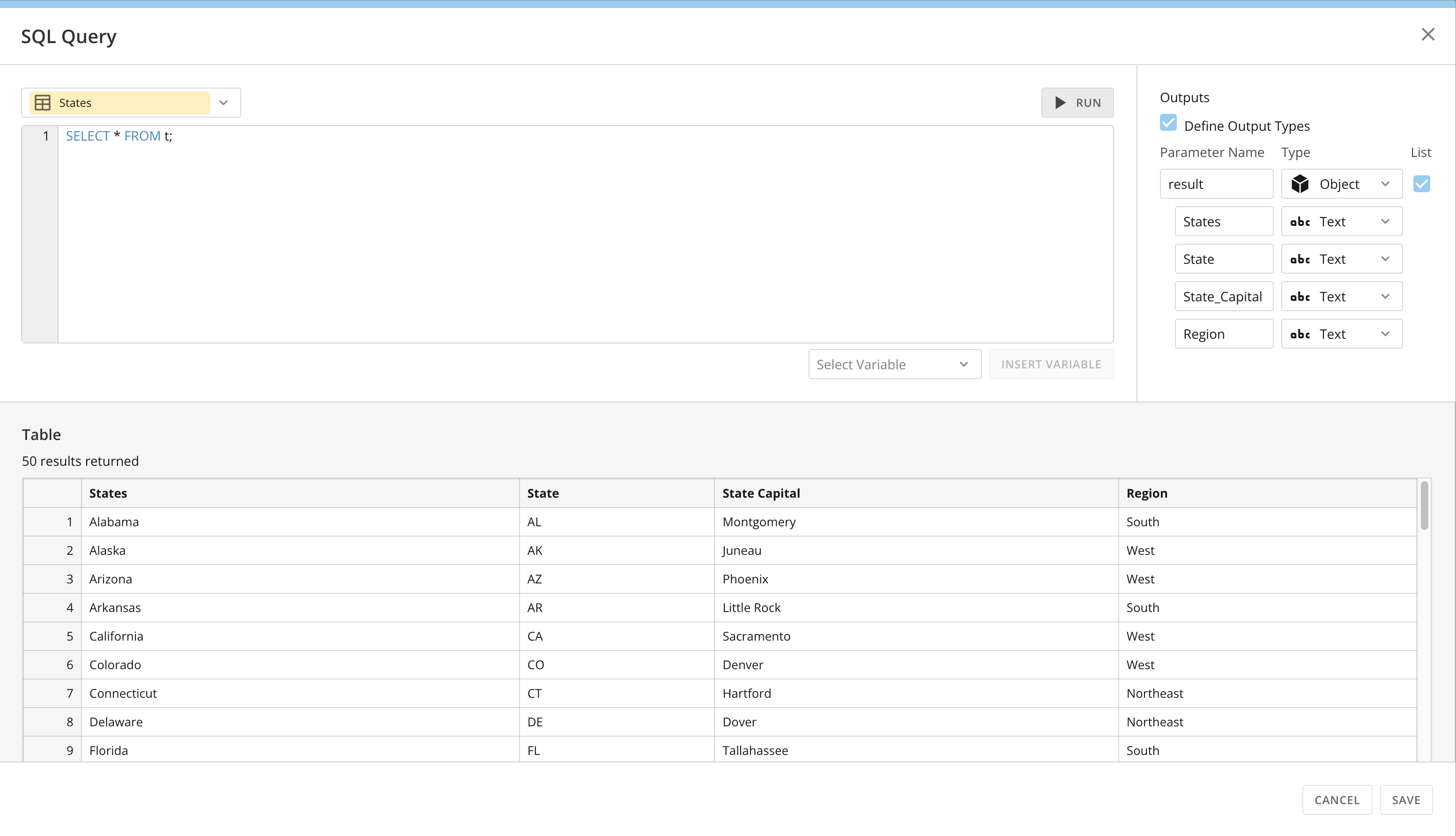
#### DataSet Query Task
The DataSet Query Task shape has been added to Workflows. This shape allows you to implement logic that queries and retrieves data from a Domo DataSet in your workflows.
The DataSet Query Task includes v ariable injections into queries, preview options, and auto-generated outputs.
 Learn how to [add a DataSet Query Task](https://domo-support.domo.com/s/article/000005331?language=en_US#add_query_table) to your workflow.
#### Queues Task Center Homepage
The Queues home page has been rebranded to Task Center (consistent with the mobile app) and redesigned with a more sleek and modern interface for accessing queues and tasks.
With the release, Task Center also receives the following updates:
* **Improved Usability —** Enhanced layout, styling, and usability.
* **Task Counts —** More visibility into volumes in queues.
* **Accessibility —** Queues are searchable and centrally positioned on the page.
* **Task List** **—** Rearranged column headers display task rows more logically.
Learn how to [add a DataSet Query Task](https://domo-support.domo.com/s/article/000005331?language=en_US#add_query_table) to your workflow.
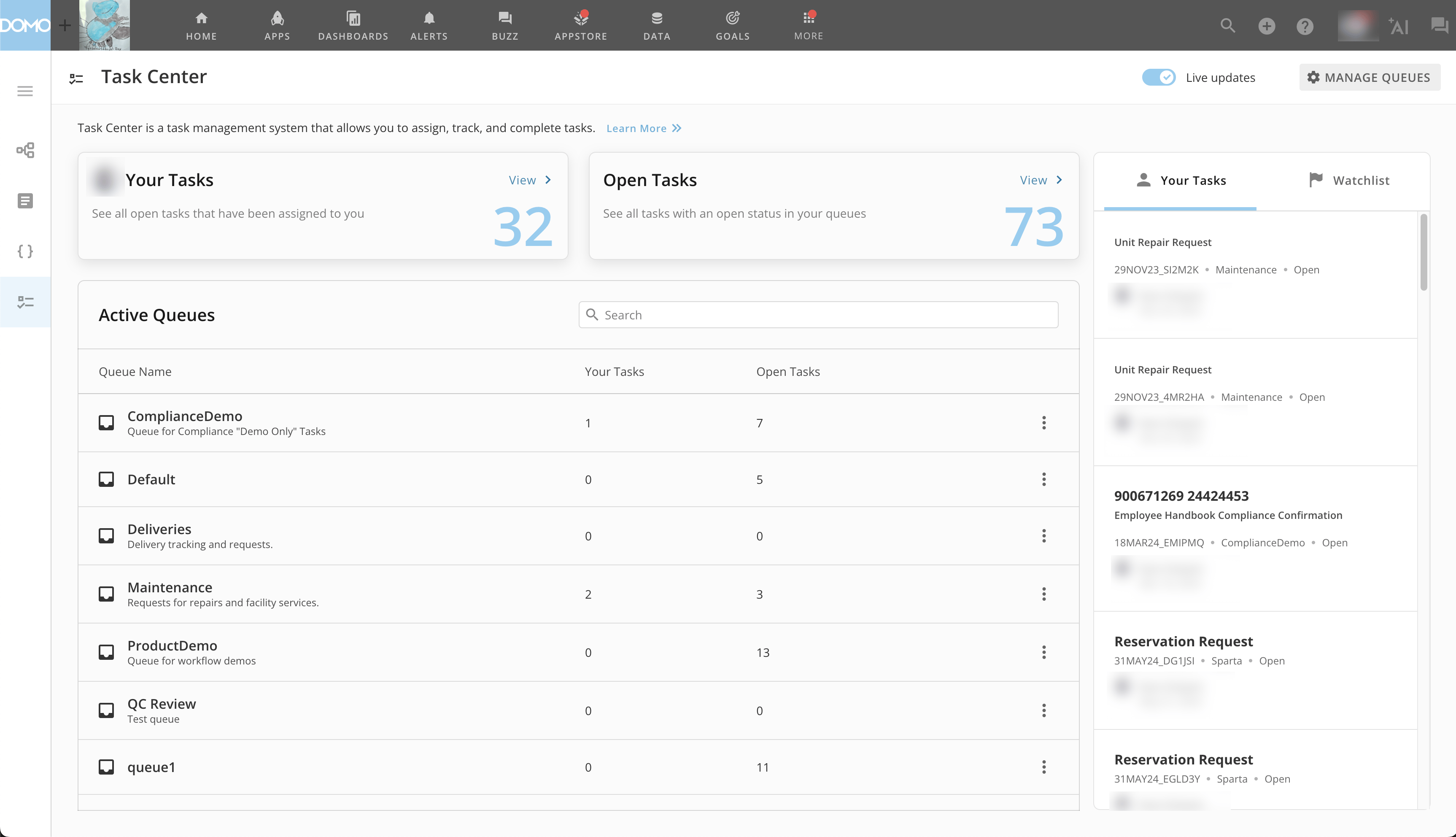
#### Queues Task Center Homepage
The Queues home page has been rebranded to Task Center (consistent with the mobile app) and redesigned with a more sleek and modern interface for accessing queues and tasks.
With the release, Task Center also receives the following updates:
* **Improved Usability —** Enhanced layout, styling, and usability.
* **Task Counts —** More visibility into volumes in queues.
* **Accessibility —** Queues are searchable and centrally positioned on the page.
* **Task List** **—** Rearranged column headers display task rows more logically.
 Learn more about [Task Center](/s/article/000005172).
***
### Platform Enhancements
# Snowflake Key-pair Authentication
The Key-pair authentication method is now available for Snowflake cloud integrations, allowing for more security and stronger credentials when connecting your Snowflake data to Domo.
Learn more about [Task Center](/s/article/000005172).
***
### Platform Enhancements
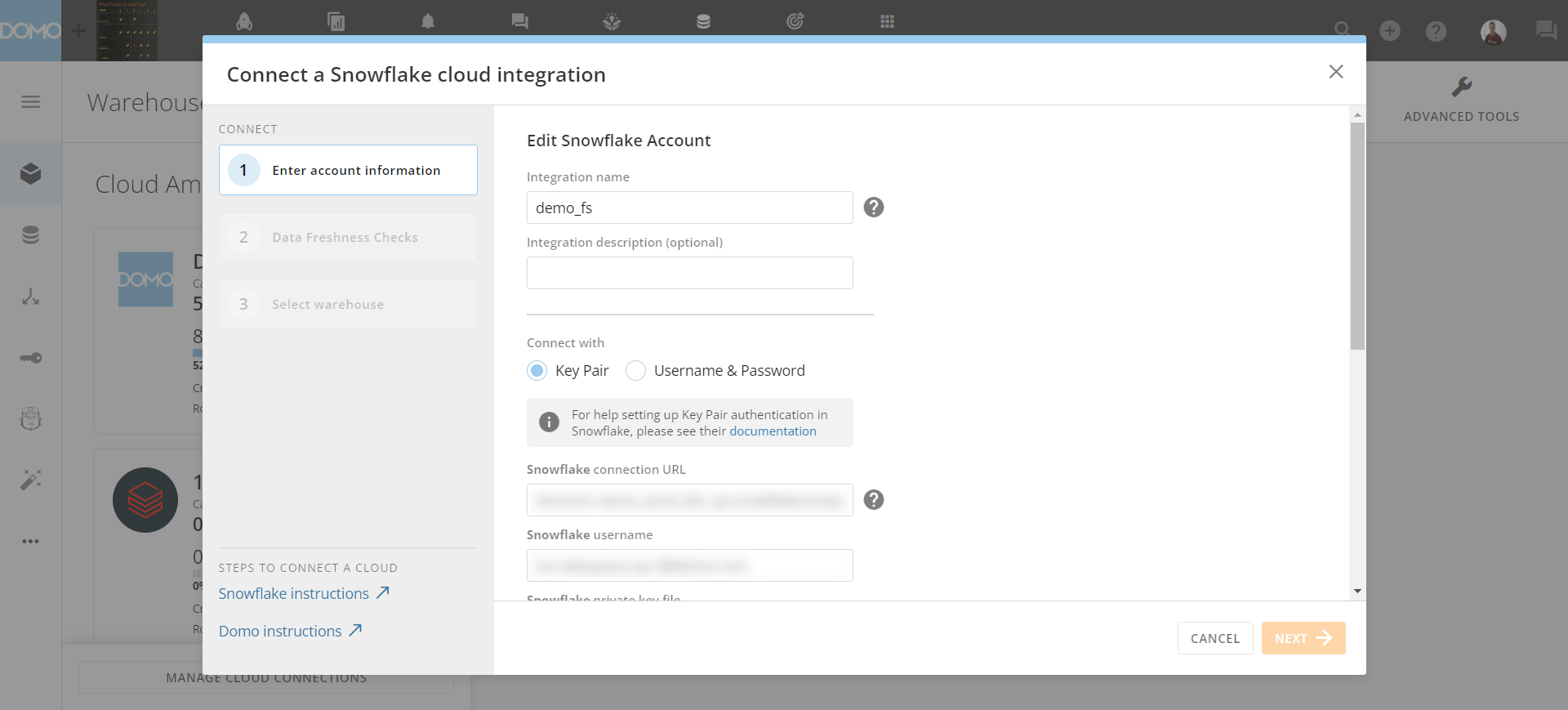
# Snowflake Key-pair Authentication
The Key-pair authentication method is now available for Snowflake cloud integrations, allowing for more security and stronger credentials when connecting your Snowflake data to Domo.
 Learn more about [Key-pair authentication.](https://domo-support.domo.com/s/article/4402322966807?language=en_US#snowflake_key-pair_authentication)
# Connectors Updates
#### Parsing Rules for JSON Webhook Jobs
You can now set parsing rules for JSON Webhook jobs and parse the responses into a tabular form that best suits your business needs.
Learn more about [Key-pair authentication.](https://domo-support.domo.com/s/article/4402322966807?language=en_US#snowflake_key-pair_authentication)
# Connectors Updates
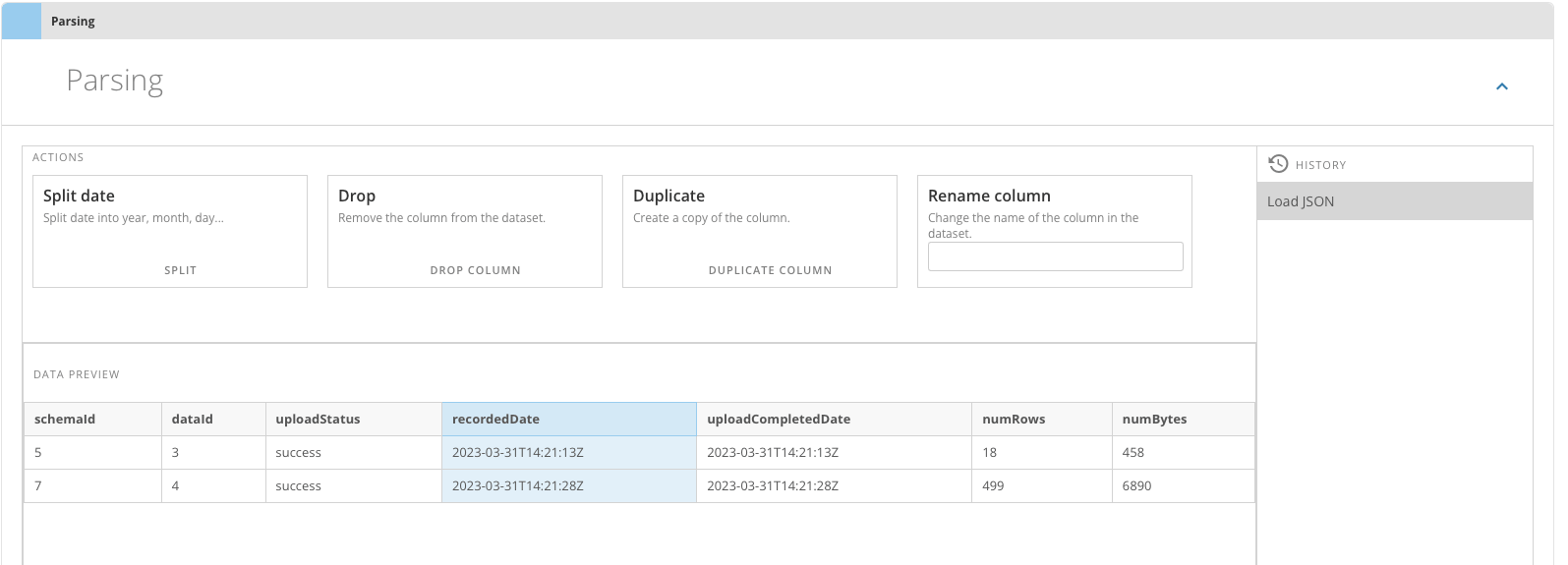
#### Parsing Rules for JSON Webhook Jobs
You can now set parsing rules for JSON Webhook jobs and parse the responses into a tabular form that best suits your business needs.
 #### Set a Schedule for a JSON Webhook DataSet
You can now run a JSON Webhook Connector on a set schedule, consuming less webhook data on ingestion, which allows you to connect to more systems at no extra cost.
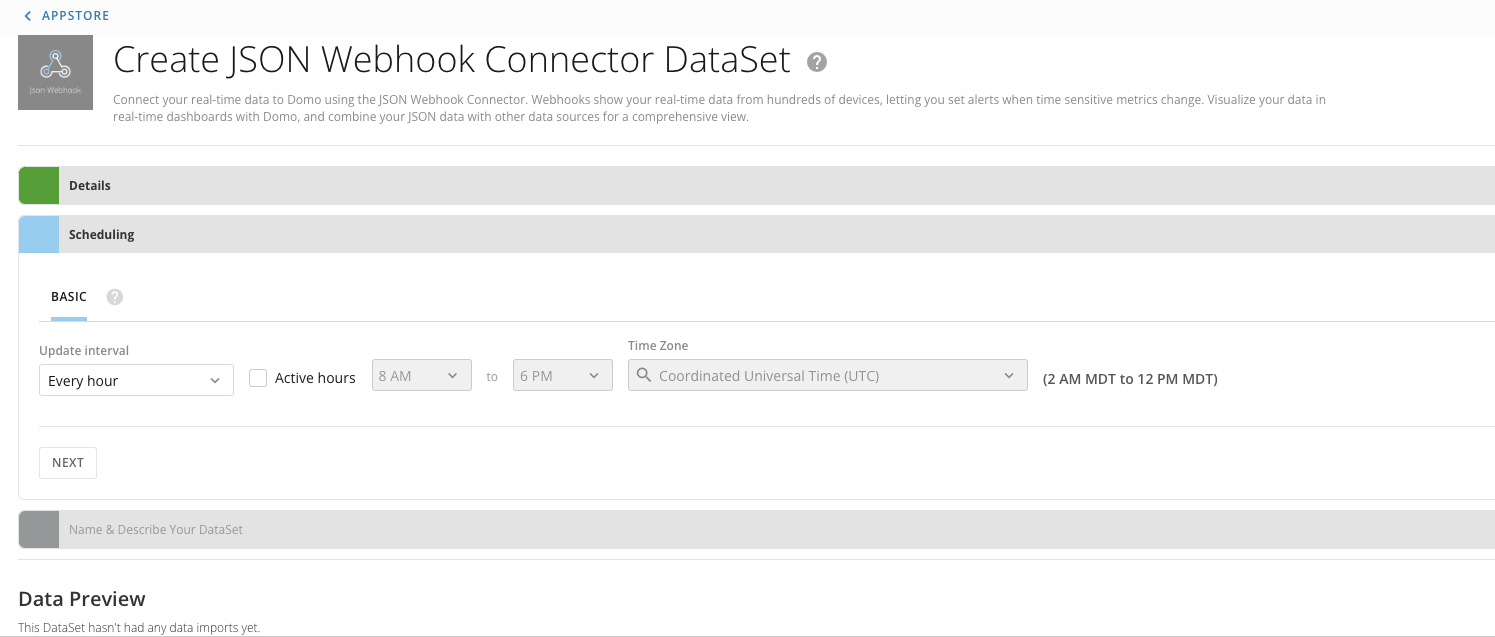
#### Set a Schedule for a JSON Webhook DataSet
You can now run a JSON Webhook Connector on a set schedule, consuming less webhook data on ingestion, which allows you to connect to more systems at no extra cost.
 #### Time Zone Added to Connector Scheduling
The connector scheduling section now allows you to select the time zone for your connector schedules.
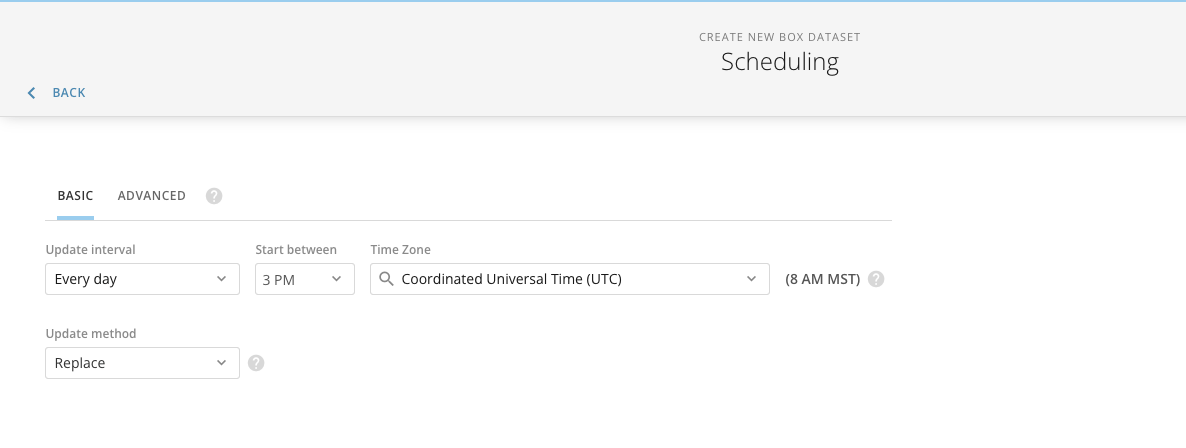
#### Time Zone Added to Connector Scheduling
The connector scheduling section now allows you to select the time zone for your connector schedules.
 # App Studio: Copy Custom Themes
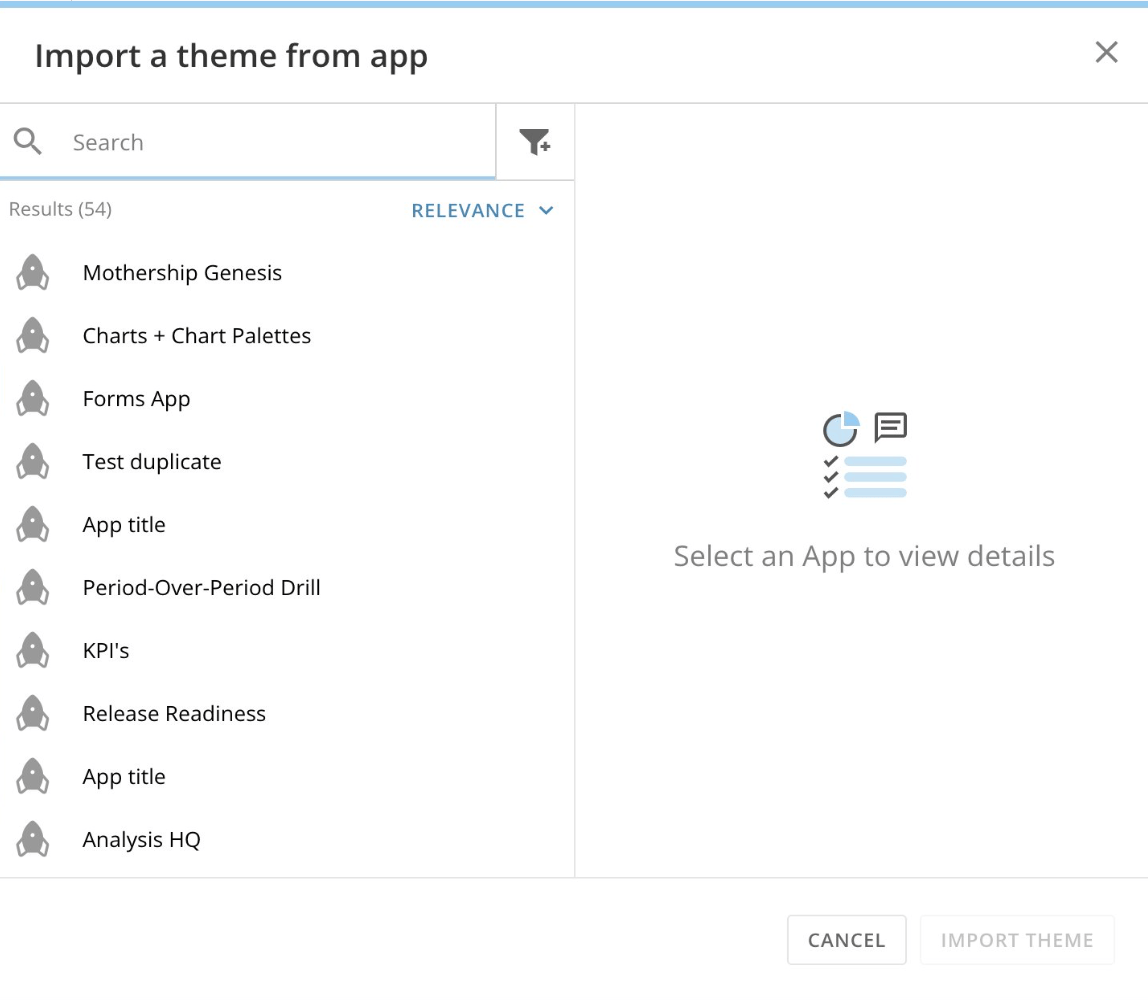
You can now copy an existing app theme to another app inside App Studio with the Copy Custom Themes feature.
You can also download a JSON version of a custom theme and upload it to any other App Studio app.
# App Studio: Copy Custom Themes
You can now copy an existing app theme to another app inside App Studio with the Copy Custom Themes feature.
You can also download a JSON version of a custom theme and upload it to any other App Studio app.
 Learn about [Themes in App Studio.](/s/article/000005543)
# Form Enhancements
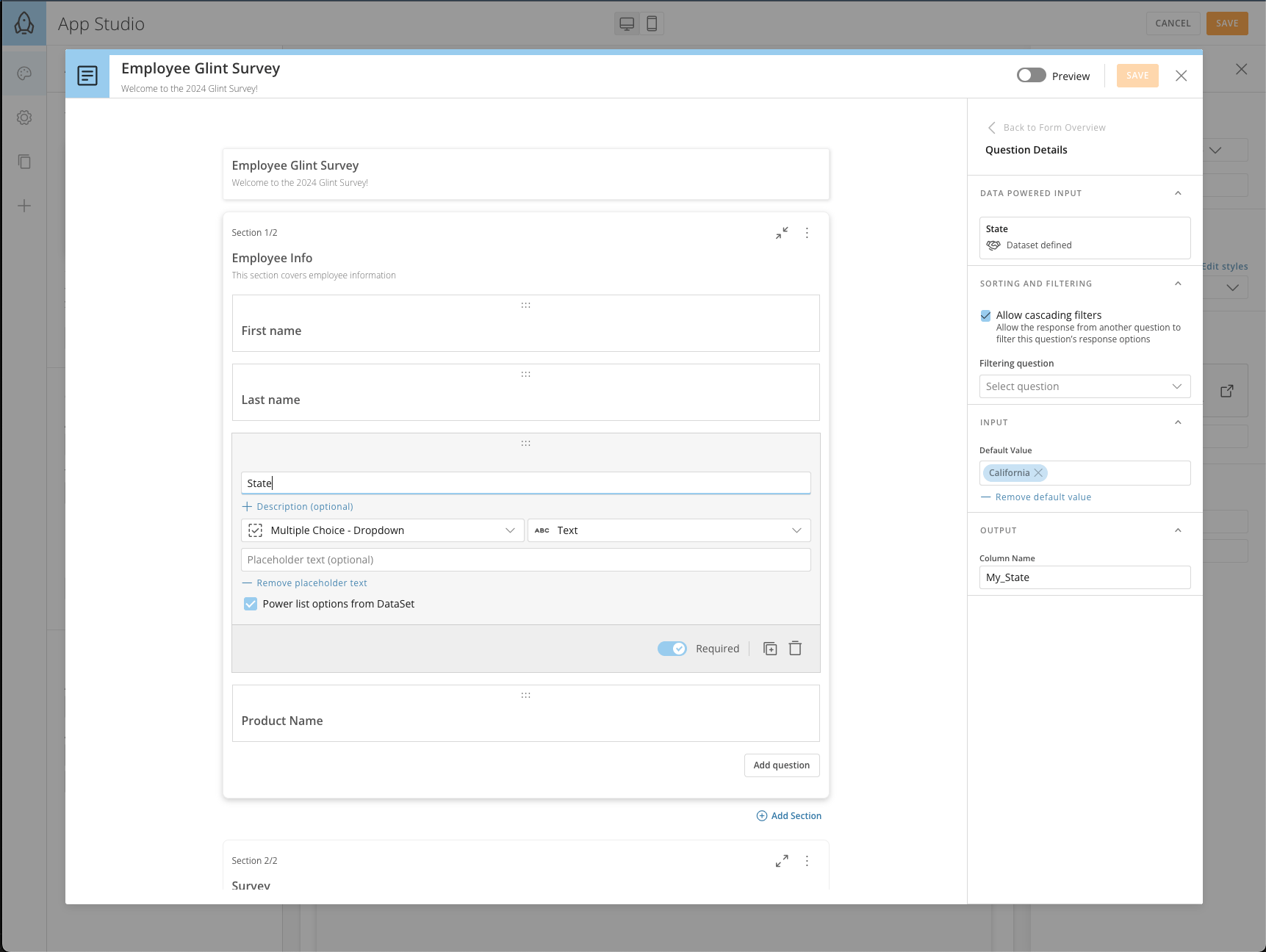
Forms now use page filters to filter form questions. Cascading filters allow earlier questions to filter later questions.
Learn more about [Forms](/s/article/000005171).
Learn about [Themes in App Studio.](/s/article/000005543)
# Form Enhancements
Forms now use page filters to filter form questions. Cascading filters allow earlier questions to filter later questions.
Learn more about [Forms](/s/article/000005171).
 # Magic ETL
#### Increased Canvas Size
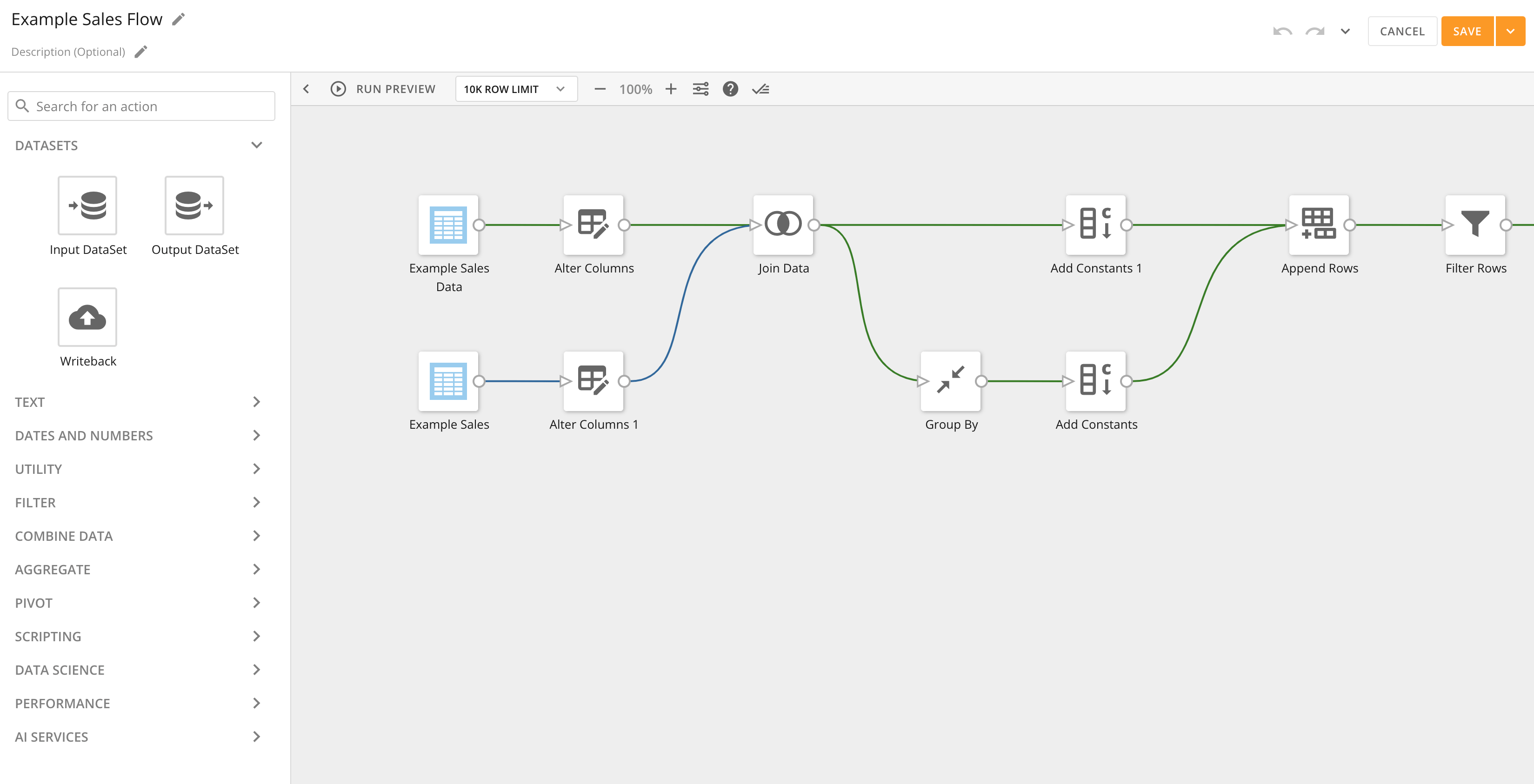
The Magic ETL canvas size has been increased to give you more space to build DataFlows. The canvas is no longer limited to a set number of tiles, alleviating the pain of having to scroll back and forth on your screen. The new [Mini map](#mini_map) helps you visualize and manage your larger canvas.
# Magic ETL
#### Increased Canvas Size
The Magic ETL canvas size has been increased to give you more space to build DataFlows. The canvas is no longer limited to a set number of tiles, alleviating the pain of having to scroll back and forth on your screen. The new [Mini map](#mini_map) helps you visualize and manage your larger canvas.
 #### Update to the "Remove Duplicates" Tile
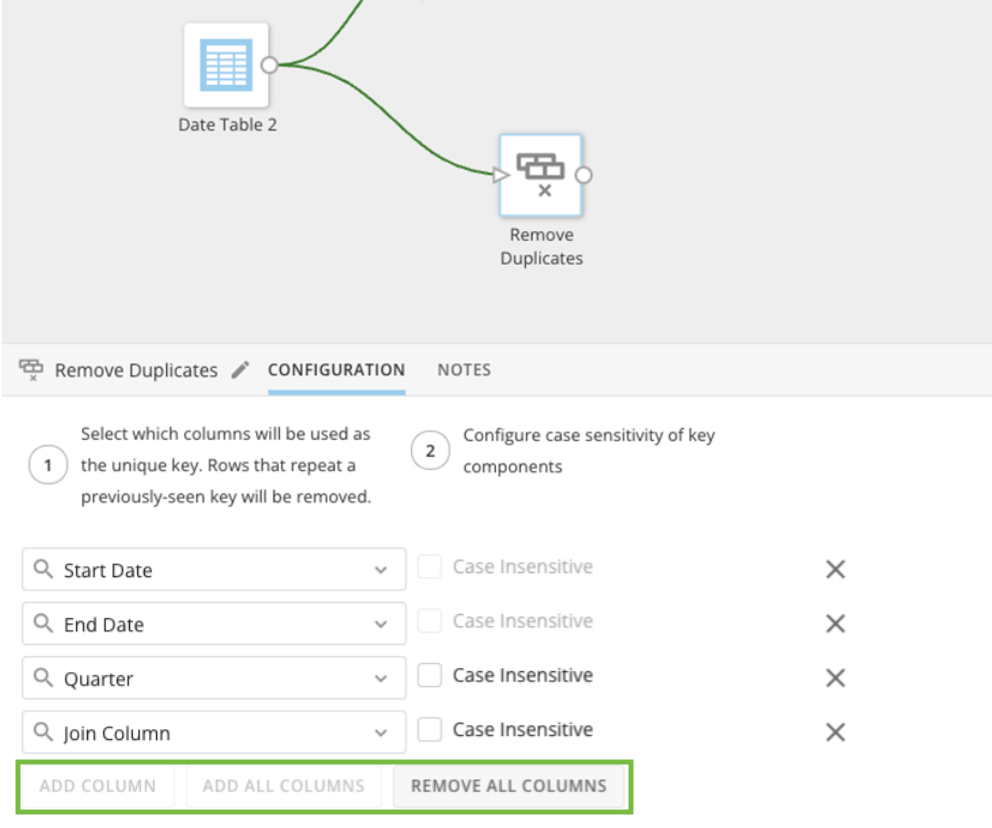
The Remove Duplicates tile now includes "Add All Columns" and "Remove All Columns" actions so you can easily add and remove columns in bulk.
#### Update to the "Remove Duplicates" Tile
The Remove Duplicates tile now includes "Add All Columns" and "Remove All Columns" actions so you can easily add and remove columns in bulk.
 #### Upsert
Upsert in Magic ETL allows you to update rows in your output DataSet without reprocessing the full DataSet based on a unique row-level key. Upsert replaces the need to create recursive DataFlows and makes it easier to recover if any issues occur in the pipeline.
#### Upsert
Upsert in Magic ETL allows you to update rows in your output DataSet without reprocessing the full DataSet based on a unique row-level key. Upsert replaces the need to create recursive DataFlows and makes it easier to recover if any issues occur in the pipeline.
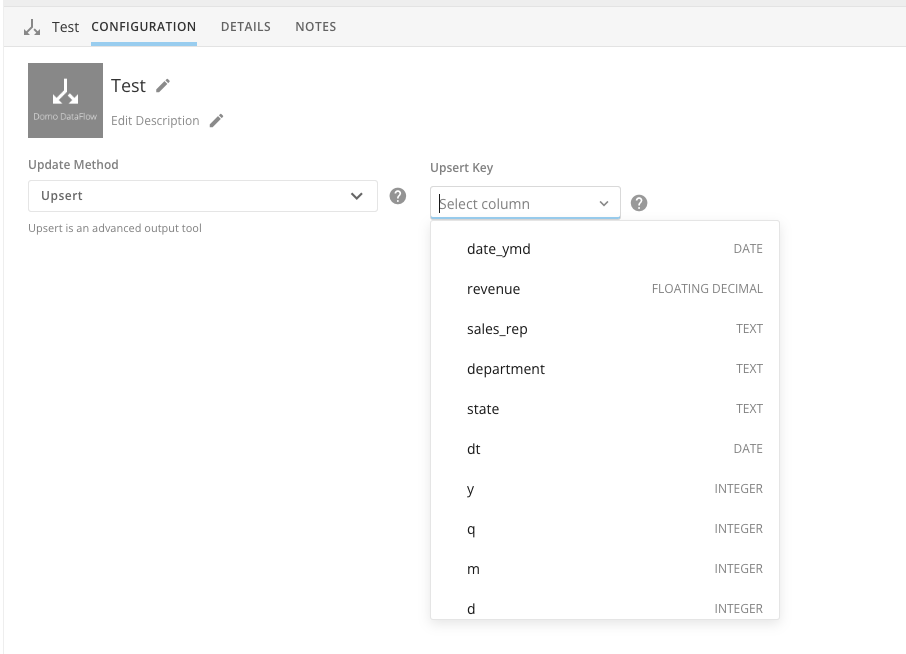 Learn more about [upsert](https://domo-support.domo.com/s/article/000005541?language=en_US#upsert) and [partitioning](https://domo-support.domo.com/s/article/000005541?language=en_US#partition) in Magic ETL.
# Workbench Enterprise 2.0
Workbench Enterprise has been enhanced with the following actions for admins:
* Import Workbench jobs to
[Workbench Enterprise.](https://domo-support.domo.com/s/article/000005303?language=en_US)
* Upload
[data partitions.](https://domo-support.domo.com/s/article/360062446514?language=en_US)
* Remotely execute Workbench jobs.
* Use File Watch. This action looks for the file to update and runs the job automatically.
* Use upserts as a top-level upload type.
Learn more about [implementing Workbench Enterprise.](https://domo-support.domo.com/s/article/000005303?language=en_US)
# Workflow Action Menu
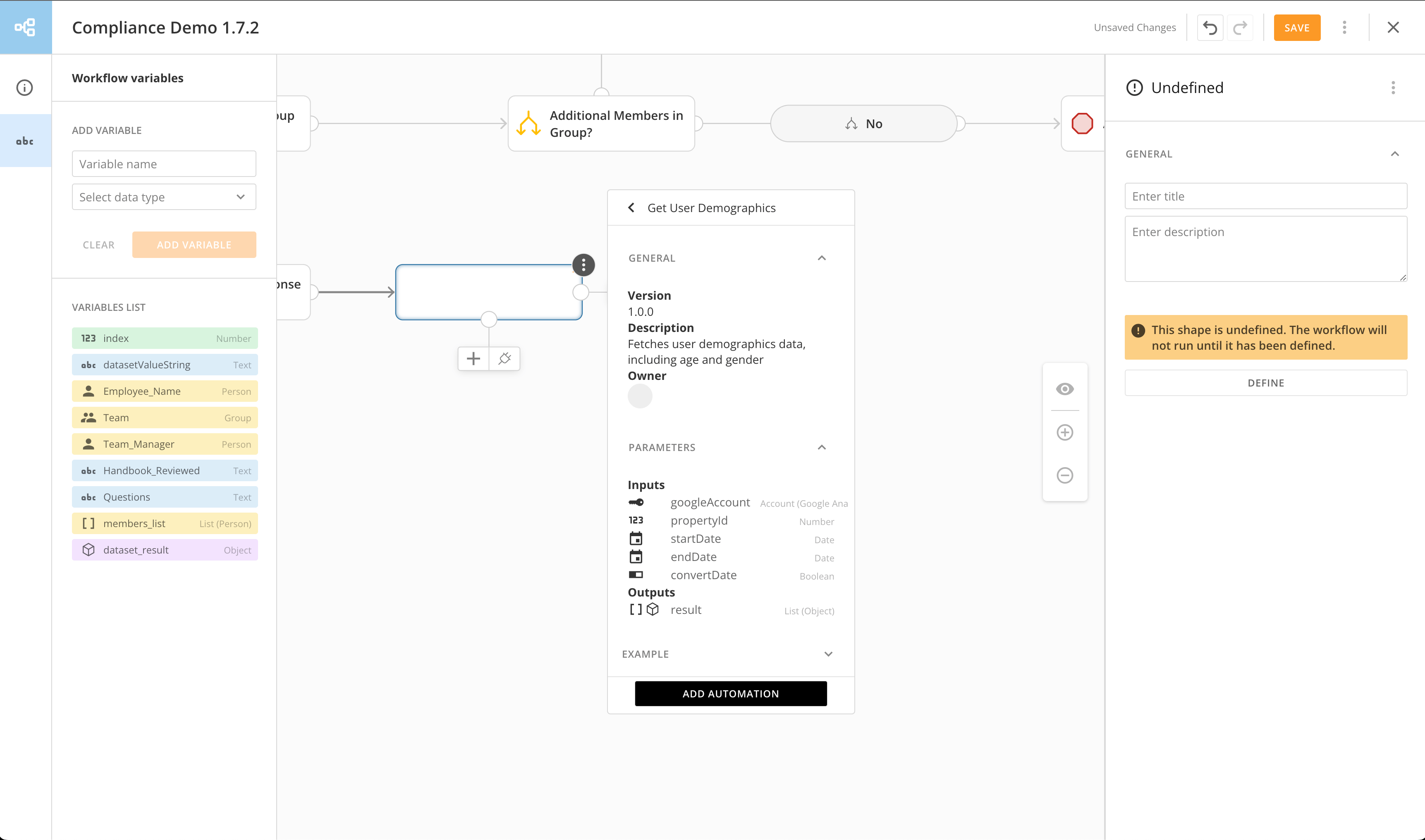
The new action menu replaces the existing notation pallet, simplifying the process of selecting actions for specific steps in your workflow.
The following changes are included with the new action menu:
* Workflow actions are displayed in logical categories: Flow Controls, DataSet Query Tasks, User Tasks, and Code Functions.
* Each category has sub-menus where you can drill down to a specific action.
* New search capabilities based on matching character sets make it easy to find an action.
* The action menu can be dismissed and recalled anytime during the editing process.
Learn more about [upsert](https://domo-support.domo.com/s/article/000005541?language=en_US#upsert) and [partitioning](https://domo-support.domo.com/s/article/000005541?language=en_US#partition) in Magic ETL.
# Workbench Enterprise 2.0
Workbench Enterprise has been enhanced with the following actions for admins:
* Import Workbench jobs to
[Workbench Enterprise.](https://domo-support.domo.com/s/article/000005303?language=en_US)
* Upload
[data partitions.](https://domo-support.domo.com/s/article/360062446514?language=en_US)
* Remotely execute Workbench jobs.
* Use File Watch. This action looks for the file to update and runs the job automatically.
* Use upserts as a top-level upload type.
Learn more about [implementing Workbench Enterprise.](https://domo-support.domo.com/s/article/000005303?language=en_US)
# Workflow Action Menu
The new action menu replaces the existing notation pallet, simplifying the process of selecting actions for specific steps in your workflow.
The following changes are included with the new action menu:
* Workflow actions are displayed in logical categories: Flow Controls, DataSet Query Tasks, User Tasks, and Code Functions.
* Each category has sub-menus where you can drill down to a specific action.
* New search capabilities based on matching character sets make it easy to find an action.
* The action menu can be dismissed and recalled anytime during the editing process.
 ***
### Need Support?
Domo provides education, community answers, and technical support.
* Search for a topic in the
[Help Center](https://www.domo.com/domo-central/help)
* Learn from
[Domo University](https://www.domo.com/domo-central/university)
* Search for training apps in the
[Appstore ](https://www.domo.com/appstore/)
* Get answers in the
[Community Forums ](https://community-forums.domo.com/main)
* Contact Technical Support by entering a help ticket in the
[Domo Support Portal ](https://www.domo.com/login/customer-community)
* Reach out to your Domo account team
### Have Feedback?
If you have feedback, please send it from within Domo:
In the navigation header, select **More** > **Feedback.**
Under **Product Feedback**, select **Go Now.**
***
### Need Support?
Domo provides education, community answers, and technical support.
* Search for a topic in the
[Help Center](https://www.domo.com/domo-central/help)
* Learn from
[Domo University](https://www.domo.com/domo-central/university)
* Search for training apps in the
[Appstore ](https://www.domo.com/appstore/)
* Get answers in the
[Community Forums ](https://community-forums.domo.com/main)
* Contact Technical Support by entering a help ticket in the
[Domo Support Portal ](https://www.domo.com/login/customer-community)
* Reach out to your Domo account team
### Have Feedback?
If you have feedback, please send it from within Domo:
In the navigation header, select **More** > **Feedback.**
Under **Product Feedback**, select **Go Now.**