> ## Documentation Index
> Fetch the complete documentation index at: https://domoinc-openapi-sync-dataflows.mintlify.site/llms.txt
> Use this file to discover all available pages before exploring further.
# Use AI Prompts in Jupyter
export const InlineImage = ({src, alt = '', height = '1.6em'}) => {
return  ;
};
### Intro
Jupyter Workspaces allows you to write AI prompts within Notebooks. Jupyter uses the same prompts as in the Domo. AI Playground without navigating away from Jupyter.
Learn more about [Jupyter AI](https://domo-support.domo.com/s/article/000005291?language=en_US) and the [AI Playground](https://domo-support.domo.com/s/article/000005236?language=en_US).
***
### Required Grants
To access Jupyter, at least one of the following grants must be enabled for your role:
* **Create Jupyter Workspace —** Allows a user to create, edit, and delete Jupyter Workspaces to which they have access.
* **Manage Jupyter Workspace** (Jupyter Admin) **—** Allows a user to view, edit, and delete any Jupyter Workspaces in the instance. This grant is needed to enable workspace sharing for other users.
### Access Jupyter Workspaces
In the navigation header, select **Data** to open the Data Center.
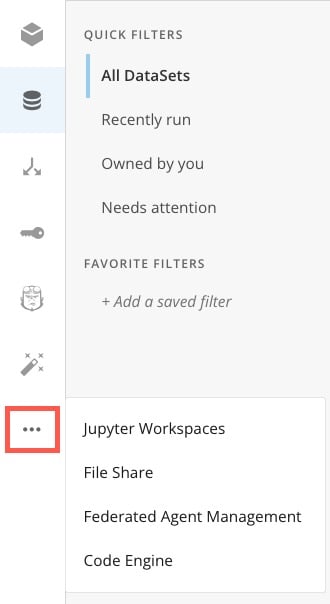
In the left navigation, select **More** (three horizontal dots icon) > **Jupyter Workspaces**.
;
};
### Intro
Jupyter Workspaces allows you to write AI prompts within Notebooks. Jupyter uses the same prompts as in the Domo. AI Playground without navigating away from Jupyter.
Learn more about [Jupyter AI](https://domo-support.domo.com/s/article/000005291?language=en_US) and the [AI Playground](https://domo-support.domo.com/s/article/000005236?language=en_US).
***
### Required Grants
To access Jupyter, at least one of the following grants must be enabled for your role:
* **Create Jupyter Workspace —** Allows a user to create, edit, and delete Jupyter Workspaces to which they have access.
* **Manage Jupyter Workspace** (Jupyter Admin) **—** Allows a user to view, edit, and delete any Jupyter Workspaces in the instance. This grant is needed to enable workspace sharing for other users.
### Access Jupyter Workspaces
In the navigation header, select **Data** to open the Data Center.
In the left navigation, select **More** (three horizontal dots icon) > **Jupyter Workspaces**.
 Learn more about [creating a Workspace](https://domo-support.domo.com/s/article/36004740075?language=en_US#create_workspace).
### Use the Generate Text Prompt
The generate\_text prompt provides answers to questions. In the example, the prompt provided to the AI service is in the prompt\_template. It is given a limitation of \${words}, which is provided in the prompt\_parameters.
The output prompt is provided at the bottom.
Learn more about [creating a Workspace](https://domo-support.domo.com/s/article/36004740075?language=en_US#create_workspace).
### Use the Generate Text Prompt
The generate\_text prompt provides answers to questions. In the example, the prompt provided to the AI service is in the prompt\_template. It is given a limitation of \${words}, which is provided in the prompt\_parameters.
The output prompt is provided at the bottom.
 You can modify the standard generate\_text template by providing a new prompt to the input\_str — the prompt\_template overrides the input\_str.
To use input\_str, the prompt\_template and prompt\_parameters must be deleted.
The following parameters are available in the generate\_text function. All of the parameters are optional except `input_str`.
```
def generate_text(input_str:str,
prompt_template: Optional[PromptTemplate] = None,
parameters: Optional[dict[str, str]] = None,
model: Optional[str] = None,
model_configuration: Optional[dict[str, object]] = None,
system: Optional[str] = None):
"""
Generate text from String input
Parameters:
input_str (str): input string
prompt_template (PromptTemplate): prompt template
parameters (dict[str, str]): parameters
model (str): model name
model_configuration (dict[str, object]): model configuration
system (str): Optional override for the default system instructions included with the prompt to the model.
Returns:
response: generated text
"""
text_generation_request = TextGenerationRequest(input_str, prompt_template, parameters, model,
model_configuration, system)
text_response = _jupyterhub.generate_text(text_generation_request.to_json())
text_ai_response = TextAIResponse(text_response['prompt'], text_response['choices'])
return text_ai_response
```
### Use the Text-to-SQL Prompt
The text\_to\_sql prompt provides a SQL query based on the question asked. In the example, the prompt provided to the AI service is in the prompt\_template, and the specified column is in the prompt\_parameters.
The functional SQL query is provided in the output at the bottom.
You can modify the standard generate\_text template by providing a new prompt to the input\_str — the prompt\_template overrides the input\_str.
To use input\_str, the prompt\_template and prompt\_parameters must be deleted.
The following parameters are available in the generate\_text function. All of the parameters are optional except `input_str`.
```
def generate_text(input_str:str,
prompt_template: Optional[PromptTemplate] = None,
parameters: Optional[dict[str, str]] = None,
model: Optional[str] = None,
model_configuration: Optional[dict[str, object]] = None,
system: Optional[str] = None):
"""
Generate text from String input
Parameters:
input_str (str): input string
prompt_template (PromptTemplate): prompt template
parameters (dict[str, str]): parameters
model (str): model name
model_configuration (dict[str, object]): model configuration
system (str): Optional override for the default system instructions included with the prompt to the model.
Returns:
response: generated text
"""
text_generation_request = TextGenerationRequest(input_str, prompt_template, parameters, model,
model_configuration, system)
text_response = _jupyterhub.generate_text(text_generation_request.to_json())
text_ai_response = TextAIResponse(text_response['prompt'], text_response['choices'])
return text_ai_response
```
### Use the Text-to-SQL Prompt
The text\_to\_sql prompt provides a SQL query based on the question asked. In the example, the prompt provided to the AI service is in the prompt\_template, and the specified column is in the prompt\_parameters.
The functional SQL query is provided in the output at the bottom.
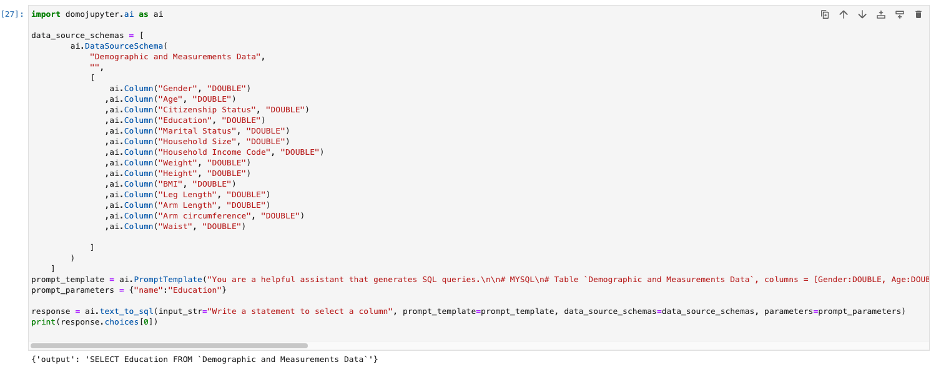 You can modify the standard text\_to\_sql template by providing a new DataSourceSchema and an input\_str that specifies what the AI prompt should write.
You can also provide the workspace\_data\_source\_alias for an existing DataSet attached to the workspace. Providing the workspace\_data\_source\_alias allows the workspace to use the schema when generating the column names for the SQL query.
The following parameters are available in the text\_to\_sql function. All of the parameters are optional except `input_str`.
```
def text_to_sql(input_str: str,
prompt_template: Optional[PromptTemplate] = None,
data_source_schemas: Optional[list[DataSourceSchema]] = None,
parameters: Optional[dict[str, str]] = None,
model: Optional[str] = None,
model_configuration: Optional[dict[str, object]] = None,
workspace_data_source_alias: Optional[str] = None,
dataframe: Optional[pd.DataFrame] = None,
system: Optional[str] = None
):
"""
Convert text to SQL
Parameters:
input_str (str): input string
data_source_schemas (list[DataSourceSchema]): list of data source schemas
prompt_template (PromptTemplate): prompt template
parameters (dict[str, str]): parameters
model (str): model name
model_configuration (dict[str, object]): model configuration
workspace_data_source_alias (str): data source schema alias associated to workspace
dataframe (pd.DataFrame): Pandas dataframe
system (str): Optional override for the default system instructions included with the prompt to the model.
Returns:
text_ai_response: TextAiResponse
""" if workspace_data_source_alias is not None:
data_source_schemas = [
DataSourceSchema.from_optional_list(domojupyter.io.get_schema_from_datasource(workspace_data_source_alias).get('schema'),
workspace_data_source_alias)]
elif dataframe is not None:
schema = domojupyter.io.get_schema_from_dataframe(dataframe)
data_source_schemas = [
DataSourceSchema.from_optional_list(schema,
dataframe.name)]
text_to_sql_request = TextToSQLRequest(input_str, data_source_schemas, prompt_template, parameters, model,
model_configuration, system)
sql_response = _jupyterhub.text_to_sql(text_to_sql_request.to_json())
text_ai_response = TextAIResponse(sql_response['prompt'], sql_response['choices'])
return text_ai_response
```
### Use the Text-to-Beast-Mode Prompt
The Text-to-Beast-Mode service provides a Beast Mode function based on the question asked. In the example, the prompt provided to the AI asks to add all of the value columns (data\_source\_schemas) together.
The Beast Mode function is provided in the output at the bottom.
You can modify the standard text\_to\_sql template by providing a new DataSourceSchema and an input\_str that specifies what the AI prompt should write.
You can also provide the workspace\_data\_source\_alias for an existing DataSet attached to the workspace. Providing the workspace\_data\_source\_alias allows the workspace to use the schema when generating the column names for the SQL query.
The following parameters are available in the text\_to\_sql function. All of the parameters are optional except `input_str`.
```
def text_to_sql(input_str: str,
prompt_template: Optional[PromptTemplate] = None,
data_source_schemas: Optional[list[DataSourceSchema]] = None,
parameters: Optional[dict[str, str]] = None,
model: Optional[str] = None,
model_configuration: Optional[dict[str, object]] = None,
workspace_data_source_alias: Optional[str] = None,
dataframe: Optional[pd.DataFrame] = None,
system: Optional[str] = None
):
"""
Convert text to SQL
Parameters:
input_str (str): input string
data_source_schemas (list[DataSourceSchema]): list of data source schemas
prompt_template (PromptTemplate): prompt template
parameters (dict[str, str]): parameters
model (str): model name
model_configuration (dict[str, object]): model configuration
workspace_data_source_alias (str): data source schema alias associated to workspace
dataframe (pd.DataFrame): Pandas dataframe
system (str): Optional override for the default system instructions included with the prompt to the model.
Returns:
text_ai_response: TextAiResponse
""" if workspace_data_source_alias is not None:
data_source_schemas = [
DataSourceSchema.from_optional_list(domojupyter.io.get_schema_from_datasource(workspace_data_source_alias).get('schema'),
workspace_data_source_alias)]
elif dataframe is not None:
schema = domojupyter.io.get_schema_from_dataframe(dataframe)
data_source_schemas = [
DataSourceSchema.from_optional_list(schema,
dataframe.name)]
text_to_sql_request = TextToSQLRequest(input_str, data_source_schemas, prompt_template, parameters, model,
model_configuration, system)
sql_response = _jupyterhub.text_to_sql(text_to_sql_request.to_json())
text_ai_response = TextAIResponse(sql_response['prompt'], sql_response['choices'])
return text_ai_response
```
### Use the Text-to-Beast-Mode Prompt
The Text-to-Beast-Mode service provides a Beast Mode function based on the question asked. In the example, the prompt provided to the AI asks to add all of the value columns (data\_source\_schemas) together.
The Beast Mode function is provided in the output at the bottom.
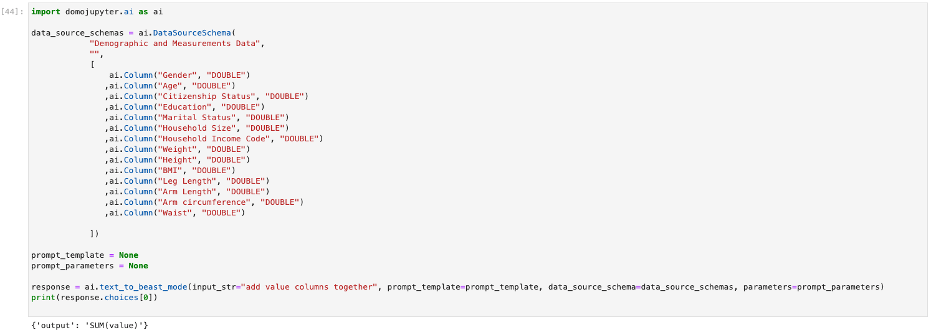 The following parameters are available in the text\_to\_beast\_mode function. All of the parameters are optional except `input_str`.
```
def text_to_beast_mode(input_str: str,
prompt_template: Optional[PromptTemplate] = None,
data_source_schema: Optional[DataSourceSchema] = None,
parameters: Optional[dict[str, str]] = None,
model: Optional[str] = None,
model_configuration: Optional[dict[str, object]] = None,
system: Optional[str] = None):
"""
Convert text to Beastmode
Parameters:
input_str (str): input string
data_source_schema (DataSourceSchema): data source schema
prompt_template (PromptTemplate): prompt
parameters (dict[str, str]): parameters
model (str): model name
model_configuration (dict[str, object]): model configuration
system (str): Optional override for the default system instructions included with the prompt to the model.
Returns:
sql: SQL string
"""
```
### Use the Summarize Text Prompt
The summarize\_text prompt provides a text summary based on the question asked. In the example, the prompt provided to the AI service is in text\_summarization.
The output prompt is provided at the bottom.
The following parameters are available in the text\_to\_beast\_mode function. All of the parameters are optional except `input_str`.
```
def text_to_beast_mode(input_str: str,
prompt_template: Optional[PromptTemplate] = None,
data_source_schema: Optional[DataSourceSchema] = None,
parameters: Optional[dict[str, str]] = None,
model: Optional[str] = None,
model_configuration: Optional[dict[str, object]] = None,
system: Optional[str] = None):
"""
Convert text to Beastmode
Parameters:
input_str (str): input string
data_source_schema (DataSourceSchema): data source schema
prompt_template (PromptTemplate): prompt
parameters (dict[str, str]): parameters
model (str): model name
model_configuration (dict[str, object]): model configuration
system (str): Optional override for the default system instructions included with the prompt to the model.
Returns:
sql: SQL string
"""
```
### Use the Summarize Text Prompt
The summarize\_text prompt provides a text summary based on the question asked. In the example, the prompt provided to the AI service is in text\_summarization.
The output prompt is provided at the bottom.
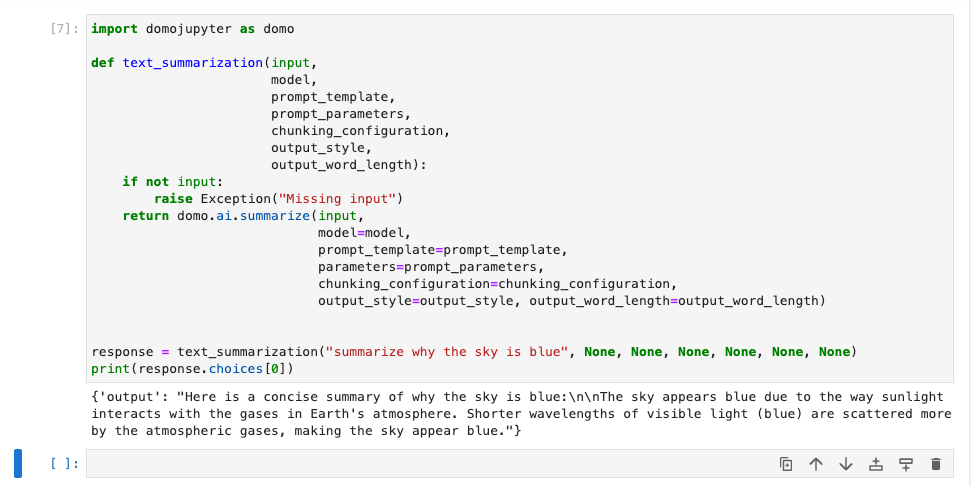 The following parameters are available in the summarize\_text function. All of the parameters are optional except `input_str`.
```
def summarize(input_str: str,
prompt_template: Optional[PromptTemplate] = None,
parameters: Optional[dict[str, str]] = None,
model: Optional[str] = None,
model_configuration: Optional[dict[str, object]] = None,
system: Optional[str] = None,
chunking_configuration: Optional[ChunkingConfiguration] = None,
output_style: Optional[SummarizationOutputStyle] = None,
output_word_length: Optional[SizeBoundary] = None):
"""
Summarize text
Parameters:
input_str (str): Text information to be summarized. This attribute is mandatory.
prompt_template (PromptTemplate): prompt template
parameters (dict): A dictionary containing parameter-name and its corresponding value.
It's used for replacing the placeholders in the PromptTemplate.
model (str): Name/id of the language model to be used for summarization
model_configuration (dict): A dictionary with custom configuration parameters for a selected language model.
system (str): Optional override for the default system instructions included with the prompt to the model.
chunking_configuration (ChunkingConfiguration): Configuration for dividing the given text into smaller parts or chunks.
output_style (SummarizationOutputStyle): Determines the design, structuring and organization of the summarization's output.
output_word_length (SizeBoundary): Defines a size boundary to limit the length of the output summary, based on number of words.
Returns:
response: summarized text
"""
```
The following parameters are available in the summarize\_text function. All of the parameters are optional except `input_str`.
```
def summarize(input_str: str,
prompt_template: Optional[PromptTemplate] = None,
parameters: Optional[dict[str, str]] = None,
model: Optional[str] = None,
model_configuration: Optional[dict[str, object]] = None,
system: Optional[str] = None,
chunking_configuration: Optional[ChunkingConfiguration] = None,
output_style: Optional[SummarizationOutputStyle] = None,
output_word_length: Optional[SizeBoundary] = None):
"""
Summarize text
Parameters:
input_str (str): Text information to be summarized. This attribute is mandatory.
prompt_template (PromptTemplate): prompt template
parameters (dict): A dictionary containing parameter-name and its corresponding value.
It's used for replacing the placeholders in the PromptTemplate.
model (str): Name/id of the language model to be used for summarization
model_configuration (dict): A dictionary with custom configuration parameters for a selected language model.
system (str): Optional override for the default system instructions included with the prompt to the model.
chunking_configuration (ChunkingConfiguration): Configuration for dividing the given text into smaller parts or chunks.
output_style (SummarizationOutputStyle): Determines the design, structuring and organization of the summarization's output.
output_word_length (SizeBoundary): Defines a size boundary to limit the length of the output summary, based on number of words.
Returns:
response: summarized text
"""
```