> ## Documentation Index
> Fetch the complete documentation index at: https://domoinc-openapi-sync-dataflows.mintlify.site/llms.txt
> Use this file to discover all available pages before exploring further.

# Manage API Clients

export const InlineImage = ({src, alt = '', height = '1.6em'}) => {
  return <img noZoom src={src} alt={alt} style={{
    display: 'inline',
    verticalAlign: 'start',
    height: height,
    margin: '0'
  }} />;
};

### Intro

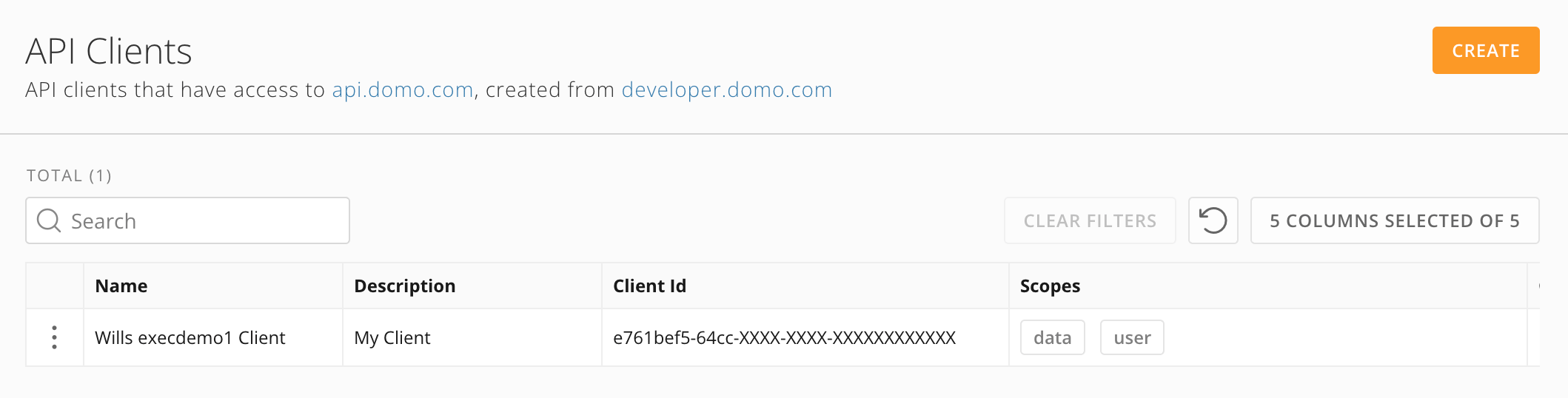
The API Clients feature in the Admin Settings allows you to create and manage your own API clients and allows admin users to manage all API clients for your instance. API Clients displays a list of clients with their scopes and allows you to revoke clients that are no longer needed.

***

### Required Grants

You must have ONE of the following grants to access the API Clients feature:

* **Create API OAuth Clients —** Allows you to view and revoke your own API clients. You must have this grant to create API clients.
* **(Admin-only) Manage All Access Tokens and API Clients —** Allows admins to view and revoke all API clients in your Domo instance.

This table highlights the differences between the grants.

<table border="1" cellpadding="1" cellspacing="1" data-aura-rendered-by="33:209;a"><thead><tr><th colspan="1" rowspan="1"><p> Access </p></th><th colspan="1" rowspan="1"><p> Create API <br /> OAuth Clients </p></th><th colspan="1" rowspan="1"><p> Manage All Access Tokens <br /> and API Clients </p></th></tr></thead><tbody><tr><td colspan="1" rowspan="1"><p> Create clients </p></td><td colspan="1" rowspan="1"><p><img alt="checkmark.jpeg" src="https://mintcdn.com/domoinc-openapi-sync-dataflows/DkLG580DK4bdXUC1/images/kb/ka0Vq0000001Fg9-00N5w00000Ri7BU-0EM5w000005wybS.jpg?fit=max&auto=format&n=DkLG580DK4bdXUC1&q=85&s=0c7f5735b9fff7a57a3dd82c89d7b77f" style={{width: 35, height: 36}} width="70" height="72" data-path="images/kb/ka0Vq0000001Fg9-00N5w00000Ri7BU-0EM5w000005wybS.jpg" /></p></td><td colspan="1" rowspan="1"><p><img alt="red x.jpeg" src="https://mintcdn.com/domoinc-openapi-sync-dataflows/DkLG580DK4bdXUC1/images/kb/ka0Vq0000001Fg9-00N5w00000Ri7BU-0EM5w000005wybX.jpg?fit=max&auto=format&n=DkLG580DK4bdXUC1&q=85&s=44ddd144feab205ecd9ea0cd2a4251a8" style={{width: 32, height: 29}} width="76" height="70" data-path="images/kb/ka0Vq0000001Fg9-00N5w00000Ri7BU-0EM5w000005wybX.jpg" /></p></td></tr><tr><td colspan="1" rowspan="1"><p> View clients you own </p></td><td colspan="1" rowspan="1"><p><img alt="checkmark.jpeg" src="https://mintcdn.com/domoinc-openapi-sync-dataflows/DkLG580DK4bdXUC1/images/kb/ka0Vq0000001Fg9-00N5w00000Ri7BU-0EM5w000005wybS.jpg?fit=max&auto=format&n=DkLG580DK4bdXUC1&q=85&s=0c7f5735b9fff7a57a3dd82c89d7b77f" style={{width: 35, height: 36}} width="70" height="72" data-path="images/kb/ka0Vq0000001Fg9-00N5w00000Ri7BU-0EM5w000005wybS.jpg" /></p></td><td colspan="1" rowspan="1"><p><img alt="checkmark.jpeg" src="https://mintcdn.com/domoinc-openapi-sync-dataflows/DkLG580DK4bdXUC1/images/kb/ka0Vq0000001Fg9-00N5w00000Ri7BU-0EM5w000005wybS.jpg?fit=max&auto=format&n=DkLG580DK4bdXUC1&q=85&s=0c7f5735b9fff7a57a3dd82c89d7b77f" style={{width: 35, height: 36}} width="70" height="72" data-path="images/kb/ka0Vq0000001Fg9-00N5w00000Ri7BU-0EM5w000005wybS.jpg" /></p></td></tr><tr><td colspan="1" rowspan="1"><p> View all clients in the instance </p></td><td colspan="1" rowspan="1"><p><img alt="red x.jpeg" src="https://mintcdn.com/domoinc-openapi-sync-dataflows/DkLG580DK4bdXUC1/images/kb/ka0Vq0000001Fg9-00N5w00000Ri7BU-0EM5w000005wybX.jpg?fit=max&auto=format&n=DkLG580DK4bdXUC1&q=85&s=44ddd144feab205ecd9ea0cd2a4251a8" style={{width: 32, height: 29}} width="76" height="70" data-path="images/kb/ka0Vq0000001Fg9-00N5w00000Ri7BU-0EM5w000005wybX.jpg" /></p></td><td colspan="1" rowspan="1"><p><img alt="checkmark.jpeg" src="https://mintcdn.com/domoinc-openapi-sync-dataflows/DkLG580DK4bdXUC1/images/kb/ka0Vq0000001Fg9-00N5w00000Ri7BU-0EM5w000005wybS.jpg?fit=max&auto=format&n=DkLG580DK4bdXUC1&q=85&s=0c7f5735b9fff7a57a3dd82c89d7b77f" style={{width: 35, height: 36}} width="70" height="72" data-path="images/kb/ka0Vq0000001Fg9-00N5w00000Ri7BU-0EM5w000005wybS.jpg" /></p></td></tr><tr><td colspan="1" rowspan="1"><p> Delete/revoke clients you create <a id="access_api_clients" target="_blank" /></p></td><td colspan="1" rowspan="1"><p><img alt="checkmark.jpeg" src="https://mintcdn.com/domoinc-openapi-sync-dataflows/DkLG580DK4bdXUC1/images/kb/ka0Vq0000001Fg9-00N5w00000Ri7BU-0EM5w000005wybS.jpg?fit=max&auto=format&n=DkLG580DK4bdXUC1&q=85&s=0c7f5735b9fff7a57a3dd82c89d7b77f" style={{width: 35, height: 36}} width="70" height="72" data-path="images/kb/ka0Vq0000001Fg9-00N5w00000Ri7BU-0EM5w000005wybS.jpg" /></p></td><td colspan="1" rowspan="1"><p><img alt="checkmark.jpeg" src="https://mintcdn.com/domoinc-openapi-sync-dataflows/DkLG580DK4bdXUC1/images/kb/ka0Vq0000001Fg9-00N5w00000Ri7BU-0EM5w000005wybS.jpg?fit=max&auto=format&n=DkLG580DK4bdXUC1&q=85&s=0c7f5735b9fff7a57a3dd82c89d7b77f" style={{width: 35, height: 36}} width="70" height="72" data-path="images/kb/ka0Vq0000001Fg9-00N5w00000Ri7BU-0EM5w000005wybS.jpg" /></p></td></tr><tr><td colspan="1" rowspan="1"><p> Revoke access for all clients in the instance </p></td><td colspan="1" rowspan="1"><p><img alt="red x.jpeg" src="https://mintcdn.com/domoinc-openapi-sync-dataflows/DkLG580DK4bdXUC1/images/kb/ka0Vq0000001Fg9-00N5w00000Ri7BU-0EM5w000005wybX.jpg?fit=max&auto=format&n=DkLG580DK4bdXUC1&q=85&s=44ddd144feab205ecd9ea0cd2a4251a8" style={{width: 32, height: 29}} width="76" height="70" data-path="images/kb/ka0Vq0000001Fg9-00N5w00000Ri7BU-0EM5w000005wybX.jpg" /></p></td><td colspan="1" rowspan="1"><p><img alt="checkmark.jpeg" src="https://mintcdn.com/domoinc-openapi-sync-dataflows/DkLG580DK4bdXUC1/images/kb/ka0Vq0000001Fg9-00N5w00000Ri7BU-0EM5w000005wybS.jpg?fit=max&auto=format&n=DkLG580DK4bdXUC1&q=85&s=0c7f5735b9fff7a57a3dd82c89d7b77f" style={{width: 35, height: 36}} width="70" height="72" data-path="images/kb/ka0Vq0000001Fg9-00N5w00000Ri7BU-0EM5w000005wybS.jpg" /></p></td></tr></tbody></table>

### Access API Clients

Navigate to **Admin** > **Authentication** > **API Clients**.

<Frame>
  <img alt="" src="https://mintcdn.com/domoinc-openapi-sync-dataflows/-nfdSCiV_P1xrFhN/images/kb/ka0Vq000000G1wD-00N5w00000Ri7BU-0EMVq000007Rbp4.jpg?fit=max&auto=format&n=-nfdSCiV_P1xrFhN&q=85&s=def4f2f1c7c553f06beca95d5ac5d814" style={{width: 748, height: 190}} width="2118" height="538" data-path="images/kb/ka0Vq000000G1wD-00N5w00000Ri7BU-0EMVq000007Rbp4.jpg" />
</Frame>

### Create API Clients

<Note>
  **Note:** While API clients can also currently be created in the [Domo developer portal](https://developer.domo.com) <InlineImage src="/images/kb/ka0Vq000000G1wD-00N5w00000Ri7BU-0EMVq000004oUwf.jpg" />, this functionality will be removed in the future.
</Note>

Users with the Create API OAuth Clients [grant](#required_grants) can follow these steps to create a client:

1. [Access](#access_api_clients) the API Clients feature and select **Create** to open the creation modal.

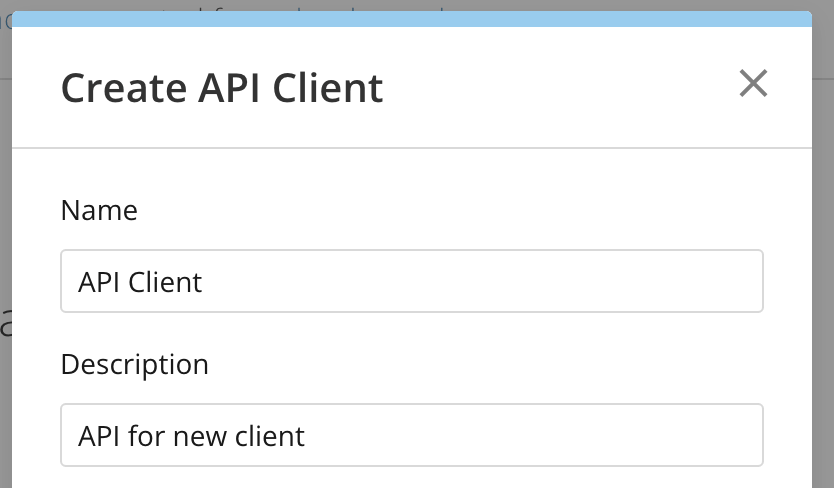
2. In the modal, enter a unique name and description for your client. To facilitate proper client governance, pick a name and description that captures the planned usage of the API client.

   <Frame>
     <img alt="Screenshot 2025-01-17 at 11.55.54 AM.png" src="https://mintcdn.com/domoinc-openapi-sync-dataflows/-nfdSCiV_P1xrFhN/images/kb/ka0Vq000000G1wD-00N5w00000Ri7BU-0EMVq000004sne9.jpg?fit=max&auto=format&n=-nfdSCiV_P1xrFhN&q=85&s=42e5f75b6343a4c29d2b01ff5db0ee4e" style={{width: 399, height: 234}} width="834" height="488" data-path="images/kb/ka0Vq000000G1wD-00N5w00000Ri7BU-0EMVq000004sne9.jpg" />
   </Frame>

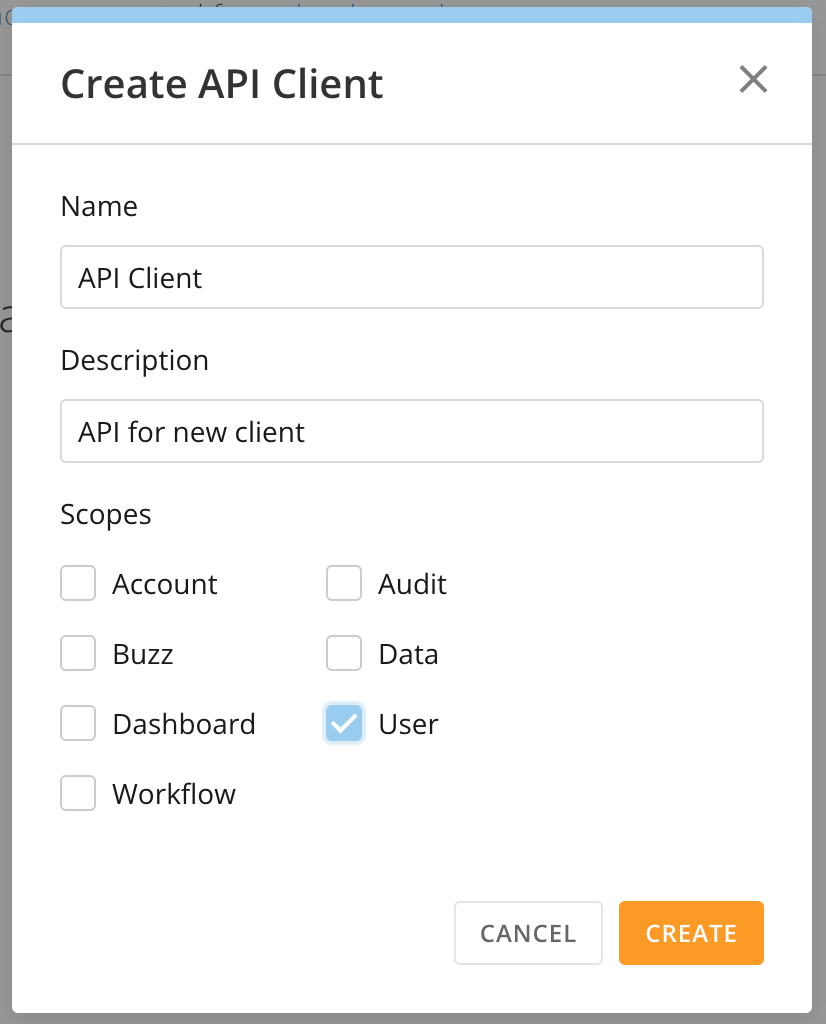
3. Select which scopes you want to give the client.
<Note>
  **Note:** Domo recommends adhering to the principle of least privilege by giving your client only those scopes required by your use case.
</Note>

<Frame>
  <img alt="Screenshot 2025-01-17 at 11.56.03 AM.png" src="https://mintcdn.com/domoinc-openapi-sync-dataflows/-nfdSCiV_P1xrFhN/images/kb/ka0Vq000000G1wD-00N5w00000Ri7BU-0EMVq000004smoY.jpg?fit=max&auto=format&n=-nfdSCiV_P1xrFhN&q=85&s=6e46a808f19b97ef25df2b51921e6f54" style={{width: 398, height: 494}} width="826" height="1024" data-path="images/kb/ka0Vq000000G1wD-00N5w00000Ri7BU-0EMVq000004smoY.jpg" />
</Frame>

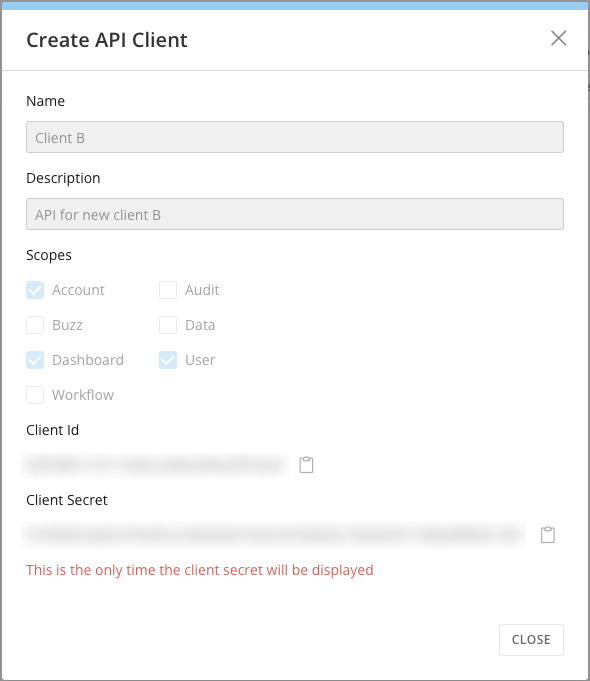
4. Select **Create**. Upon confirmation, the ID and secret for your new client appear. **Important:** This is the only time the client secret displays.
   <Warning>
     **Warning:** The client ID and secret are highly sensitive because they grant access to your Domo instance. Treat these credentials in accordance with your organization's security policies.
   </Warning>

   <Frame>
     <img alt="Screenshot 2025-01-13 at 8.47.30 AM.png" src="https://mintcdn.com/domoinc-openapi-sync-dataflows/-nfdSCiV_P1xrFhN/images/kb/ka0Vq000000G1wD-00N5w00000Ri7BU-0EMVq000004m6vF.jpg?fit=max&auto=format&n=-nfdSCiV_P1xrFhN&q=85&s=3df1edd6b009050e52375067dafdc418" style={{width: 400, height: 463}} width="590" height="681" data-path="images/kb/ka0Vq000000G1wD-00N5w00000Ri7BU-0EMVq000004m6vF.jpg" />
   </Frame>

### View and Manage API Clients

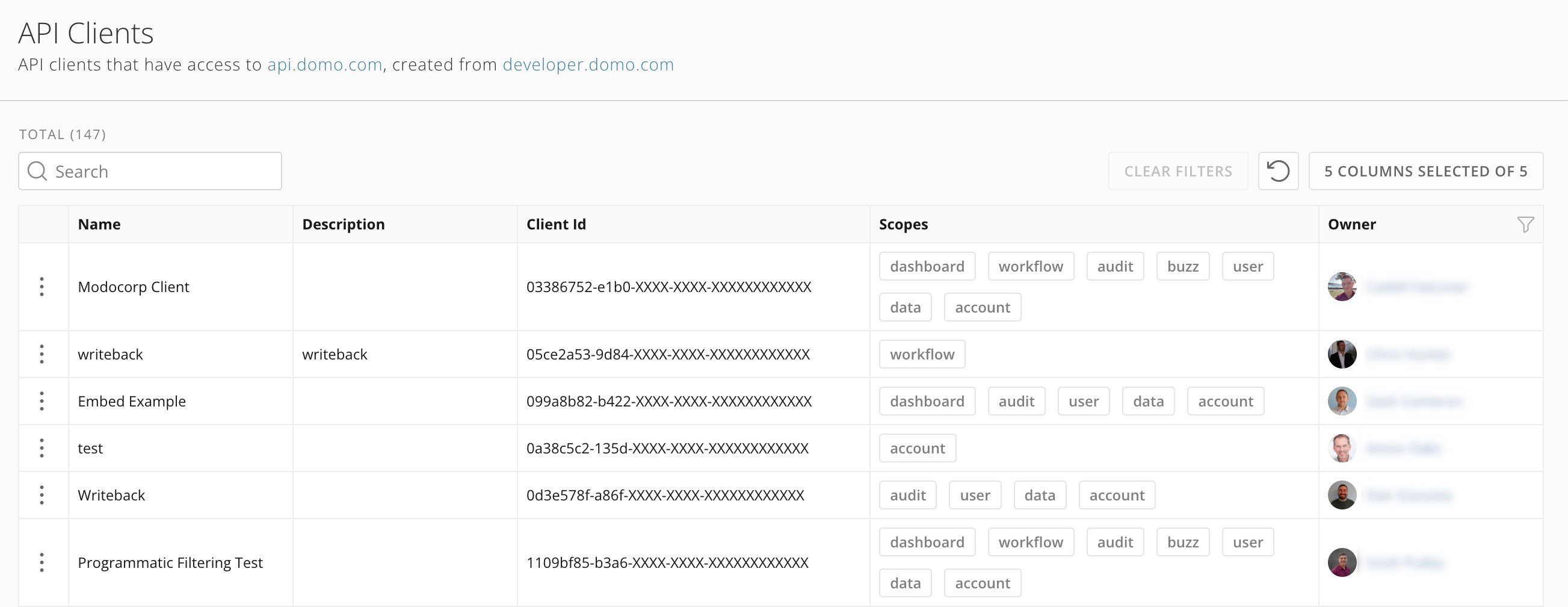
The API Clients page lists active API clients in the Domo instance, depending on your [grants](#required_grants).

The list only displays partial client IDs, and the client secret is hidden to ensure security. The client's scope and owner are also displayed.
<Frame>
  <img alt="" src="https://mintcdn.com/domoinc-openapi-sync-dataflows/-nfdSCiV_P1xrFhN/images/kb/ka0Vq000000G1wD-00N5w00000Ri7BU-0EMVq000007RZk2.jpg?fit=max&auto=format&n=-nfdSCiV_P1xrFhN&q=85&s=8e4dc4f2e2c8e9bef302316f59def31a" style={{width: 848, height: 328}} width="2606" height="1008" data-path="images/kb/ka0Vq000000G1wD-00N5w00000Ri7BU-0EMVq000007RZk2.jpg" />
</Frame>

# Delete a Client

API clients can't be edited, but you can delete a client, depending on your [grants](#required_grants). To delete a client, follow these steps:

1. On the row for the client you want to delete, select
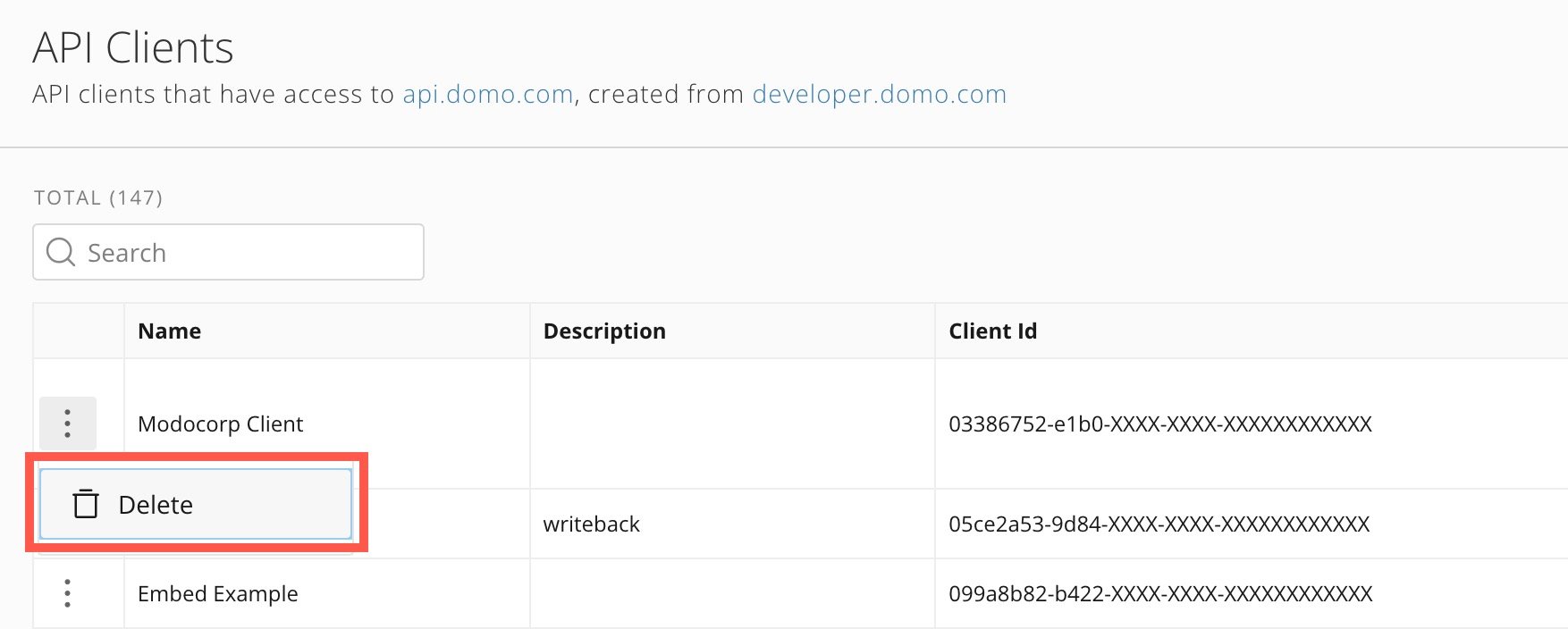
   <InlineImage src="/images/kb/ka0Vq000000G1wD-00N5w00000Ri7BU-0EMVq000007Rchu.jpg" /> **More** (three vertical dots icon) > **Delete**.

   <Frame>
     <img alt="" src="https://mintcdn.com/domoinc-openapi-sync-dataflows/-nfdSCiV_P1xrFhN/images/kb/ka0Vq000000G1wD-00N5w00000Ri7BU-0EMVq000007ReII.jpg?fit=max&auto=format&n=-nfdSCiV_P1xrFhN&q=85&s=941d77fe1ccb56e7c24fd8656b0bb45f" style={{width: 700, height: 281}} width="1754" height="704" data-path="images/kb/ka0Vq000000G1wD-00N5w00000Ri7BU-0EMVq000007ReII.jpg" />
   </Frame>

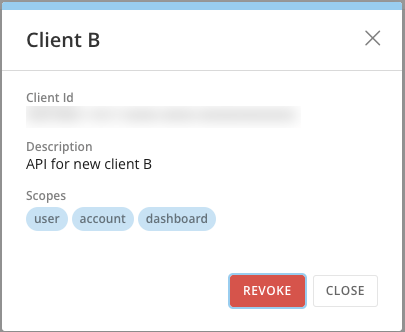
2. In the confirmation dialog, select **Revoke.**
   <Frame>
     <img alt="Screenshot 2025-01-13 at 9.49.28 AM.png" src="https://mintcdn.com/domoinc-openapi-sync-dataflows/-nfdSCiV_P1xrFhN/images/kb/ka0Vq000000G1wD-00N5w00000Ri7BU-0EMVq000004mE1Z.jpg?fit=max&auto=format&n=-nfdSCiV_P1xrFhN&q=85&s=3d18f24ff0041b9b476afa9dfc8d40b5" style={{width: 318, height: 261}} width="405" height="332" data-path="images/kb/ka0Vq000000G1wD-00N5w00000Ri7BU-0EMVq000004mE1Z.jpg" />
   </Frame>

   <Warning>
     **Important:** There is no warning dialog when you select **Revoke** —the client is removed. Ensure you are revoking the correct client, as this action cannot be undone. Note that existing sessions continue to be valid until they expire.
   </Warning>