> ## Documentation Index
> Fetch the complete documentation index at: https://domoinc-openapi-sync-dataflows.mintlify.site/llms.txt
> Use this file to discover all available pages before exploring further.
# Upgrade to Workbench 5.2
## Intro
To experience the best performance and most up-to-date features, it's important to have the latest version of Workbench. Domo Support can always help troubleshoot issues with legacy versions, but we provide our best support when you’re running the latest version. We strongly recommend that you check regularly and upgrade to the latest version if necessary.
**Note:** Before proceeding with any update or migration, you should back up your jobs. If there are issues or errors during the upgrade, you may need backups. If possible, ask your IT department to take a full snapshot or backup of your VM, Server, or PC before performing an upgrade.
***
## Identify Your Current Version
To determine which version of Workbench you are currently running, launch Workbench and note the version on the splash screen, as shown below.
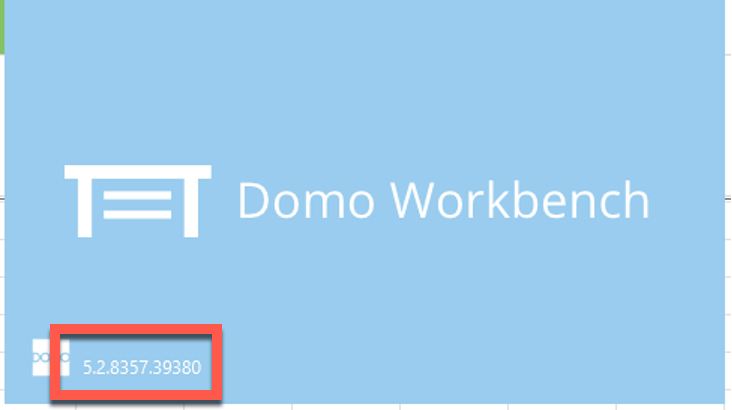 If you contact Domo Support, you may be asked what version of Workbench you are running to receive customized assistance.
## Download Workbench 5.2
Follow these steps to download the latest version of Workbench:
1. In the navigation header, select
**More**
>
**Admin**.
The Admin page displays.
2. Locate the
**More** section, then select **Tool Downloads**.
3. In
**Tool Downloads**, locate the **Workbench 5.2** section.
4. Select
**Download Domo Workbench**.
The installer file downloads.
## Turn Off Automatic Updates
By default, automatic updates are enabled and apply to the latest major product version.
Automatic updates include a restart of the Workbench service. Users who want change control and planned maintenance may want to turn off the automatic update feature. This process is described below.
1. Open the Workbench application.
2. Select
**More**.
3. In the
**Settings** section, locate **Updates**.
4. Uncheck
**Install updates automatically**.
If you contact Domo Support, you may be asked what version of Workbench you are running to receive customized assistance.
## Download Workbench 5.2
Follow these steps to download the latest version of Workbench:
1. In the navigation header, select
**More**
>
**Admin**.
The Admin page displays.
2. Locate the
**More** section, then select **Tool Downloads**.
3. In
**Tool Downloads**, locate the **Workbench 5.2** section.
4. Select
**Download Domo Workbench**.
The installer file downloads.
## Turn Off Automatic Updates
By default, automatic updates are enabled and apply to the latest major product version.
Automatic updates include a restart of the Workbench service. Users who want change control and planned maintenance may want to turn off the automatic update feature. This process is described below.
1. Open the Workbench application.
2. Select
**More**.
3. In the
**Settings** section, locate **Updates**.
4. Uncheck
**Install updates automatically**.
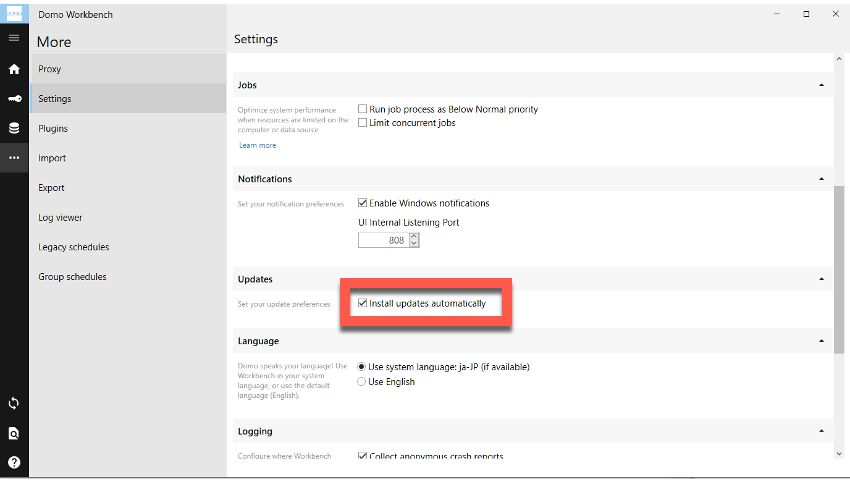 If you choose to turn off automatic updates, we strongly recommend that you plan for regular manual maintenance and updates to ensure the best performance from your Workbench application.
## Upgrading Error
If the error shown below displays in Workbench logs when upgrading a Workbench application, it is because the Microsoft.NET 4.8 Framework installer cannot make it through to the internet due to a proxy blocking it when upgrading Workbench.
You can get around this by going to [https://support.microsoft.com/en-us/topic/microsoft-net-framework-4-8-offline-installer-for-windows-9d23f658-3b97-68ab-d013-aa3c3e7495e0](http://support.microsoft.com/en-us/topic/microsoft-net-framework-4-8-offline-installer-for-windows-9d23f658-3b97-68ab-d013-aa3c3e7495e0) and downloading the offline installer, then installing with it.
###### Log Error
***
\[1A00:0123]\[2023-01-10T12:34:56]i123: Detect begin, 5 packages
\[1A00:0123]\[2023-01-10T12:34:56]i123: Setting string variable 'NETFRAMEWORK45' to value '394802'
\[1A00:0123]\[2023-01-10T12:34:56]i123: Setting string variable 'QBFC16INSTALLED' to value ''
\[1A00:0123]\[2023-01-10T12:34:56]i123: Registry value not found. Key = 'SOFTWARE\Microsoft\Windows\CurrentVersion\Uninstall\{42A7A870-C6A9-4EEE-8755-2755E3C60EE4}', Value = '(null)'
\[1A00:0123]\[2023-01-10T12:34:56]i125: Condition 'NETFRAMEWORK45 >= 528040' evaluates to false.
***
If you choose to turn off automatic updates, we strongly recommend that you plan for regular manual maintenance and updates to ensure the best performance from your Workbench application.
## Upgrading Error
If the error shown below displays in Workbench logs when upgrading a Workbench application, it is because the Microsoft.NET 4.8 Framework installer cannot make it through to the internet due to a proxy blocking it when upgrading Workbench.
You can get around this by going to [https://support.microsoft.com/en-us/topic/microsoft-net-framework-4-8-offline-installer-for-windows-9d23f658-3b97-68ab-d013-aa3c3e7495e0](http://support.microsoft.com/en-us/topic/microsoft-net-framework-4-8-offline-installer-for-windows-9d23f658-3b97-68ab-d013-aa3c3e7495e0) and downloading the offline installer, then installing with it.
###### Log Error
***
\[1A00:0123]\[2023-01-10T12:34:56]i123: Detect begin, 5 packages
\[1A00:0123]\[2023-01-10T12:34:56]i123: Setting string variable 'NETFRAMEWORK45' to value '394802'
\[1A00:0123]\[2023-01-10T12:34:56]i123: Setting string variable 'QBFC16INSTALLED' to value ''
\[1A00:0123]\[2023-01-10T12:34:56]i123: Registry value not found. Key = 'SOFTWARE\Microsoft\Windows\CurrentVersion\Uninstall\{42A7A870-C6A9-4EEE-8755-2755E3C60EE4}', Value = '(null)'
\[1A00:0123]\[2023-01-10T12:34:56]i125: Condition 'NETFRAMEWORK45 >= 528040' evaluates to false.
***