> ## Documentation Index
> Fetch the complete documentation index at: https://domoinc-openapi-sync-dataflows.mintlify.site/llms.txt
> Use this file to discover all available pages before exploring further.
# User Management
## Overview
User management API is a fast and convenient way for people to create and manage the user accounts inside the Domo platform.
 ### User use cases
***
Domo User Management API is used to enable the following experiences:
* **User Creation:** User management allows you to quickly add, update, or delete users within your Domo instance with minimal effort by each individual effort.
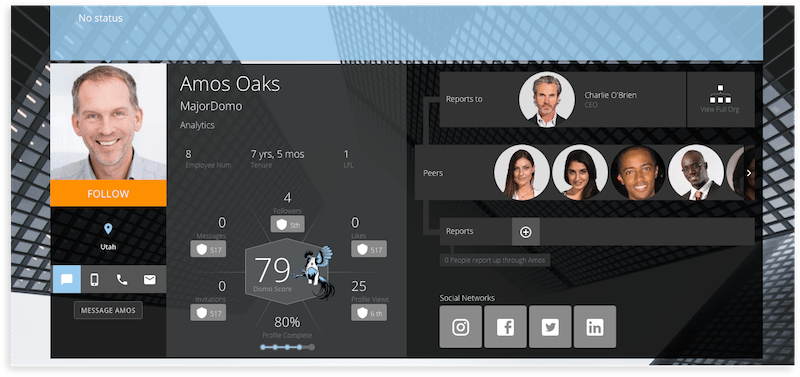
* **Personalization:** Personalizing user profile information creates a more social and personal experience within Domo. Every time a user interacts inside Domo, having more personalized information about that user helps provide the context for others to know their position in the company, contact information, or their locale.
* **Scaled Synchronization:** As more individuals leverage Domo within an organization, the User API enables you to keep user information up-to-date at an enterprise scale.
For additional help refer to the following guides and articles:
* [Managing Users and Groups](https://knowledge.domo.com/Administer/Managing_Users_and_Groups)
* [Personalized Data Permissions Guide](https://knowledge.domo.com/Connect/Personalized_Data_Permissions_\(PDP\))
* [Specifying Security Options](https://knowledge.domo.com/Administer/Specifying_Security_Options)
## Quickstart
In this guide we will show you how to:
* Create a user
* Update a user's information
* Delete a user from Domo
Once a user is created, you can then make updates to the user's information displayed in the Domo application as well as the user's role which grants permission to functionality throughout each Domo feature.
**Note**
In order to follow this Quickstart you will need to obtain an [access token](/portal/uc9ls4li6ny8s-embed-token-api#quickstart) or you can leverage any of [Domo's SDKs](/portal/Getting-Started/sdks) which will also handle authentication.
### Step 1: Create a user
***
#### Sample Request
See this sample request in [Java](https://github.com/domoinc/domo-java-sdk/tree/master/domo-java-sdk-all/src/test/java/com/domo/sdk/users/CreateExample.java), [Python](https://github.com/domoinc/domo-python-sdk/blob/master/examples/user.py).
```HTTP theme={"dark"}
POST /v1/users?sendInvite=true HTTP/1.1
Content-Type: application/json
Accept: application/json
Host: api.domo.com
Content-Length: 90
Authorization: bearer
{
"title": "Software Engineer",
"email": "leonhard.euler@domo.com",
"alternateEmail": "leonhardeuler@email.com",
"role": "Admin",
"phone": "888-555-0123",
"name": "Leonhard Euler",
"location": "American Fork",
"timezone": "",
"locale": "",
"employeeNumber": 23432
}
```
Make sure to store the `user_id` value with the user's name in order to make updates to user information, the user's role in Domo, or adding access rights to data within a DataSet or content found in a Domo Page or Card.
### Step 2: Update a user's information
***
With a new `user_id`, update the user's information:
#### Sample Request
See this sample request in [Java](https://github.com/domoinc/domo-java-sdk/tree/master/domo-java-sdk-all/src/test/java/com/domo/sdk/users/UpdateExample.java), [Python](https://github.com/domoinc/domo-python-sdk/blob/master/examples/user.py).
```HTTP theme={"dark"}
PUT /v1/users/855462682 HTTP/1.1
Content-Type: application/json
Accept: application/json
Host: api.domo.com
Content-Length: 41
Authorization: bearer
{
"email": "leonhard.euler@domo.com",
"role": "Admin",
"name": "Leonhard Euler"
}
```
### Step 3: Delete a user from Domo
***
Similar to updating a user's information, provide the correct `user_id` when attempting to delete the user from Domo:
#### Sample Request
See this sample request in [Java](https://github.com/domoinc/domo-java-sdk/tree/master/domo-java-sdk-all/src/test/java/com/domo/sdk/users/DeleteExample.java), [Python](https://github.com/domoinc/domo-python-sdk/blob/master/examples/user.py).
```HTTP theme={"dark"}
DELETE /v1/users/855462682 HTTP/1.1
Accept: application/json
Host: api.domo.com
Authorization: bearer
```
### User use cases
***
Domo User Management API is used to enable the following experiences:
* **User Creation:** User management allows you to quickly add, update, or delete users within your Domo instance with minimal effort by each individual effort.
* **Personalization:** Personalizing user profile information creates a more social and personal experience within Domo. Every time a user interacts inside Domo, having more personalized information about that user helps provide the context for others to know their position in the company, contact information, or their locale.
* **Scaled Synchronization:** As more individuals leverage Domo within an organization, the User API enables you to keep user information up-to-date at an enterprise scale.
For additional help refer to the following guides and articles:
* [Managing Users and Groups](https://knowledge.domo.com/Administer/Managing_Users_and_Groups)
* [Personalized Data Permissions Guide](https://knowledge.domo.com/Connect/Personalized_Data_Permissions_\(PDP\))
* [Specifying Security Options](https://knowledge.domo.com/Administer/Specifying_Security_Options)
## Quickstart
In this guide we will show you how to:
* Create a user
* Update a user's information
* Delete a user from Domo
Once a user is created, you can then make updates to the user's information displayed in the Domo application as well as the user's role which grants permission to functionality throughout each Domo feature.
**Note**
In order to follow this Quickstart you will need to obtain an [access token](/portal/uc9ls4li6ny8s-embed-token-api#quickstart) or you can leverage any of [Domo's SDKs](/portal/Getting-Started/sdks) which will also handle authentication.
### Step 1: Create a user
***
#### Sample Request
See this sample request in [Java](https://github.com/domoinc/domo-java-sdk/tree/master/domo-java-sdk-all/src/test/java/com/domo/sdk/users/CreateExample.java), [Python](https://github.com/domoinc/domo-python-sdk/blob/master/examples/user.py).
```HTTP theme={"dark"}
POST /v1/users?sendInvite=true HTTP/1.1
Content-Type: application/json
Accept: application/json
Host: api.domo.com
Content-Length: 90
Authorization: bearer
{
"title": "Software Engineer",
"email": "leonhard.euler@domo.com",
"alternateEmail": "leonhardeuler@email.com",
"role": "Admin",
"phone": "888-555-0123",
"name": "Leonhard Euler",
"location": "American Fork",
"timezone": "",
"locale": "",
"employeeNumber": 23432
}
```
Make sure to store the `user_id` value with the user's name in order to make updates to user information, the user's role in Domo, or adding access rights to data within a DataSet or content found in a Domo Page or Card.
### Step 2: Update a user's information
***
With a new `user_id`, update the user's information:
#### Sample Request
See this sample request in [Java](https://github.com/domoinc/domo-java-sdk/tree/master/domo-java-sdk-all/src/test/java/com/domo/sdk/users/UpdateExample.java), [Python](https://github.com/domoinc/domo-python-sdk/blob/master/examples/user.py).
```HTTP theme={"dark"}
PUT /v1/users/855462682 HTTP/1.1
Content-Type: application/json
Accept: application/json
Host: api.domo.com
Content-Length: 41
Authorization: bearer
{
"email": "leonhard.euler@domo.com",
"role": "Admin",
"name": "Leonhard Euler"
}
```
### Step 3: Delete a user from Domo
***
Similar to updating a user's information, provide the correct `user_id` when attempting to delete the user from Domo:
#### Sample Request
See this sample request in [Java](https://github.com/domoinc/domo-java-sdk/tree/master/domo-java-sdk-all/src/test/java/com/domo/sdk/users/DeleteExample.java), [Python](https://github.com/domoinc/domo-python-sdk/blob/master/examples/user.py).
```HTTP theme={"dark"}
DELETE /v1/users/855462682 HTTP/1.1
Accept: application/json
Host: api.domo.com
Authorization: bearer
```