> ## Documentation Index
> Fetch the complete documentation index at: https://domoinc-openapi-sync-dataflows.mintlify.site/llms.txt
> Use this file to discover all available pages before exploring further.

# Campaigns API

### はじめに

Campaignsは、APIの呼び出しからキャンペーンを開始する機能をサポートしています。

### キャンペーンを開始する

##### エンドポイント

キャンペーンを開始するために呼び出すエンドポイントは、以下のとおりです。

[https://campaigns-prod.domolabs.io/api/v1/campaigns/start](https://campaigns-prod.domolabs.io/api/v1/campaigns/start "https://campaigns-prod.domolabs.io/api/v1/campaigns/start")

##### オブジェクト

以下のJSONオブジェクトを使用して、上記のエンドポイントにPOSTイベントを呼び出します。

```json theme={"dark"}
{ "campaignId": 0, "domoAccessToken": "", "domoAccessTokenOwnerEmailAddress": "", "emailAddresses": [], "instance": "" }
```

###### キャンペーンID

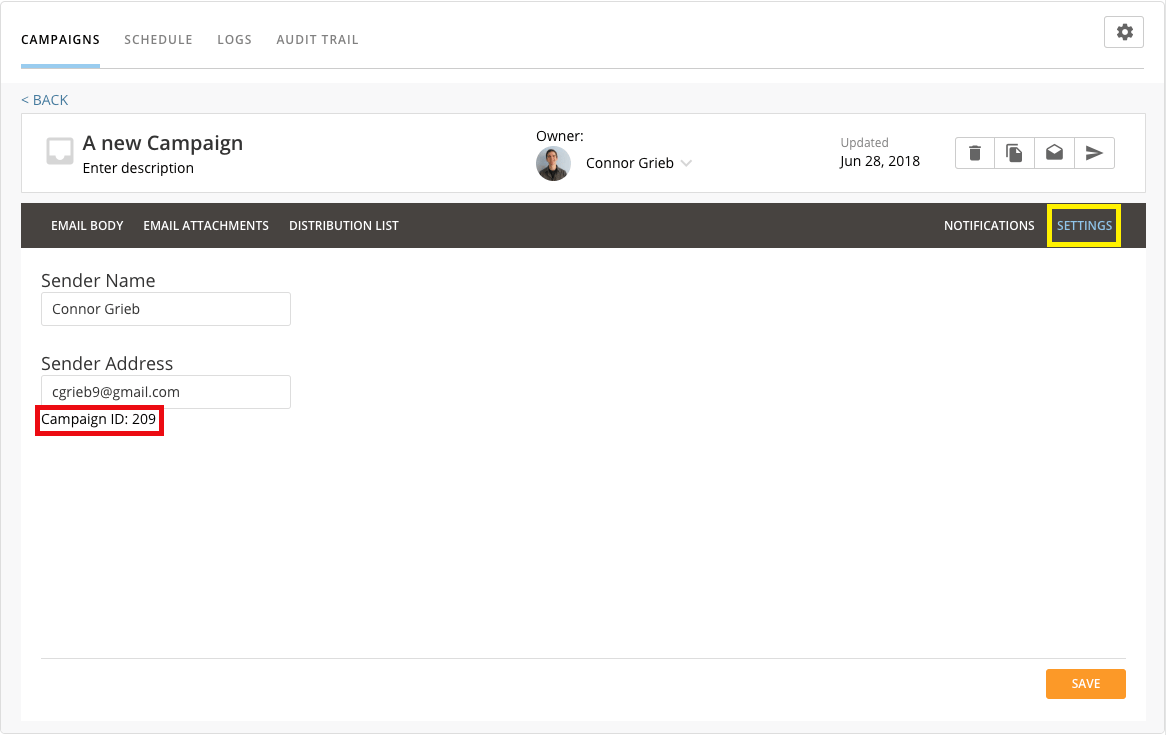
開始するキャンペーンのID。キャンペーンIDは、キャンペーンを編集し［SETTINGS］タブに移動することで確認できます。

<Frame>
  <img alt="CampaignId.png" src="https://mintcdn.com/domoinc-openapi-sync-dataflows/3A4Whxu66v2UwluW/images/kb/ka05w00000123V9-00N5w00000Ri7BU-0EM5w000005vOOT.png?fit=max&auto=format&n=3A4Whxu66v2UwluW&q=85&s=30cae15f1b5432243f80ede05f41a598" style={{width: 476, height: 300}} width="1166" height="735" data-path="images/kb/ka05w00000123V9-00N5w00000Ri7BU-0EM5w000005vOOT.png" />
</Frame>

###### Domoアクセストークン

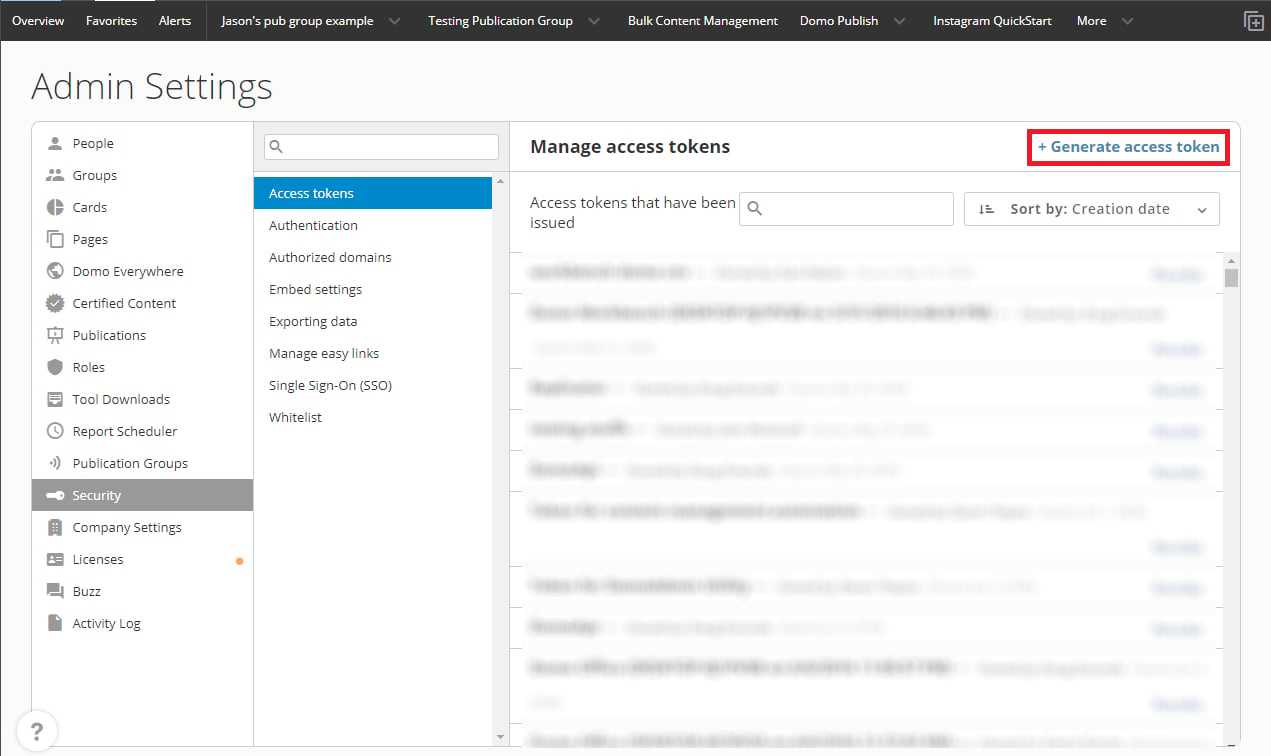
Domoで生成されたDomoアクセストークン。Domoアクセストークンは、ログインして管理者設定セクションに移動し、［セキュリティ］に進み、［アクセストークン］を選択することで生成できます。ここで、APIの呼び出しに使用する新しいアクセストークンを簡単に生成できます。
<Frame>
  <img alt="AccessToken.PNG" src="https://mintcdn.com/domoinc-openapi-sync-dataflows/3A4Whxu66v2UwluW/images/kb/ka05w00000123UJ-00N5w00000Ri7BU-0EM5w000005vOKU.png?fit=max&auto=format&n=3A4Whxu66v2UwluW&q=85&s=42fddc435d6143ef7a2f883762302f00" style={{width: 588, height: 350}} width="1271" height="756" data-path="images/kb/ka05w00000123UJ-00N5w00000Ri7BU-0EM5w000005vOKU.png" />
</Frame>

###### Domoアクセストークン所有者のメールアドレス

上記で指定した **Domoアクセストークン** を所有しているユーザーのメールアドレス。

###### メールアドレス（オプション）

キャンペーンを配信するメールアドレスのリスト。メールアドレスが選択されていない場合、キャンペーン全体が開始され、配布リストのすべての受信者に配信されます。

###### インスタンス

お客様のDomoインスタンス（例： [domo.domo.com](http://domo.domo.com) ）。

##### まとめ

<table class="mt-responsive-table" data-aura-rendered-by="33:203;a"><tbody><tr><th colspan="1" rowspan="1"> パス </th><td class="mt-colspan" colspan="1" rowspan="1"><code><a href="https://campaigns-prod.domolabs.io/api/v1/campaigns/start" target="_blank" title="https://campaigns-prod.domolabs.io/api/v1/campaigns/start"> [https://campaigns-prod.domolabs.io/api/v1/campaigns/start](https://campaigns-prod.domolabs.io/api/v1/campaigns/start) </a></code></td></tr><tr><td colspan="1" rowspan="1"> 右のバージョン以降 </td><td class="mt-colspan" colspan="1" rowspan="1"> 1.0 </td></tr><tr><th colspan="1" rowspan="1"> 説明 </th><td class="mt-colspan" colspan="1" rowspan="1"> キャンペーンを実行して、配布リストのすべてのユーザーまたは選択したユーザーリストにメールを送信します。 </td></tr><tr><th colspan="1" rowspan="1"> 認証 </th><td class="mt-colspan" colspan="1" rowspan="1"> なし、Roles：anonymous </td></tr><tr><th colspan="2" rowspan="1"> 生成 </th></tr><tr><td class="mt-colspan" colspan="2" rowspan="1"><code> application/json </code></td></tr><tr><th colspan="2" rowspan="1"> 消費 </th></tr><tr><td class="mt-colspan" colspan="2" rowspan="1"><code> application/json </code></td></tr><tr><th colspan="2" rowspan="1"> Bodyオブジェクト </th></tr><tr><td class="mt-colspan" colspan="2" rowspan="1"><code> startcampaign </code></td></tr><tr><th colspan="2" rowspan="1"> Responseステータスコード </th></tr><tr><td class="mt-colspan" colspan="2" rowspan="1"><code> 200 - OK </code></td></tr><tr><th colspan="2" rowspan="1"> Responseオブジェクト </th></tr><tr><td class="mt-colspan" colspan="2" rowspan="1"><code> void </code></td></tr></tbody></table>

日本語
