> ## Documentation Index
> Fetch the complete documentation index at: https://domoinc-openapi-sync-dataflows.mintlify.site/llms.txt
> Use this file to discover all available pages before exploring further.

# Bing Ads Analytics App

## はじめに

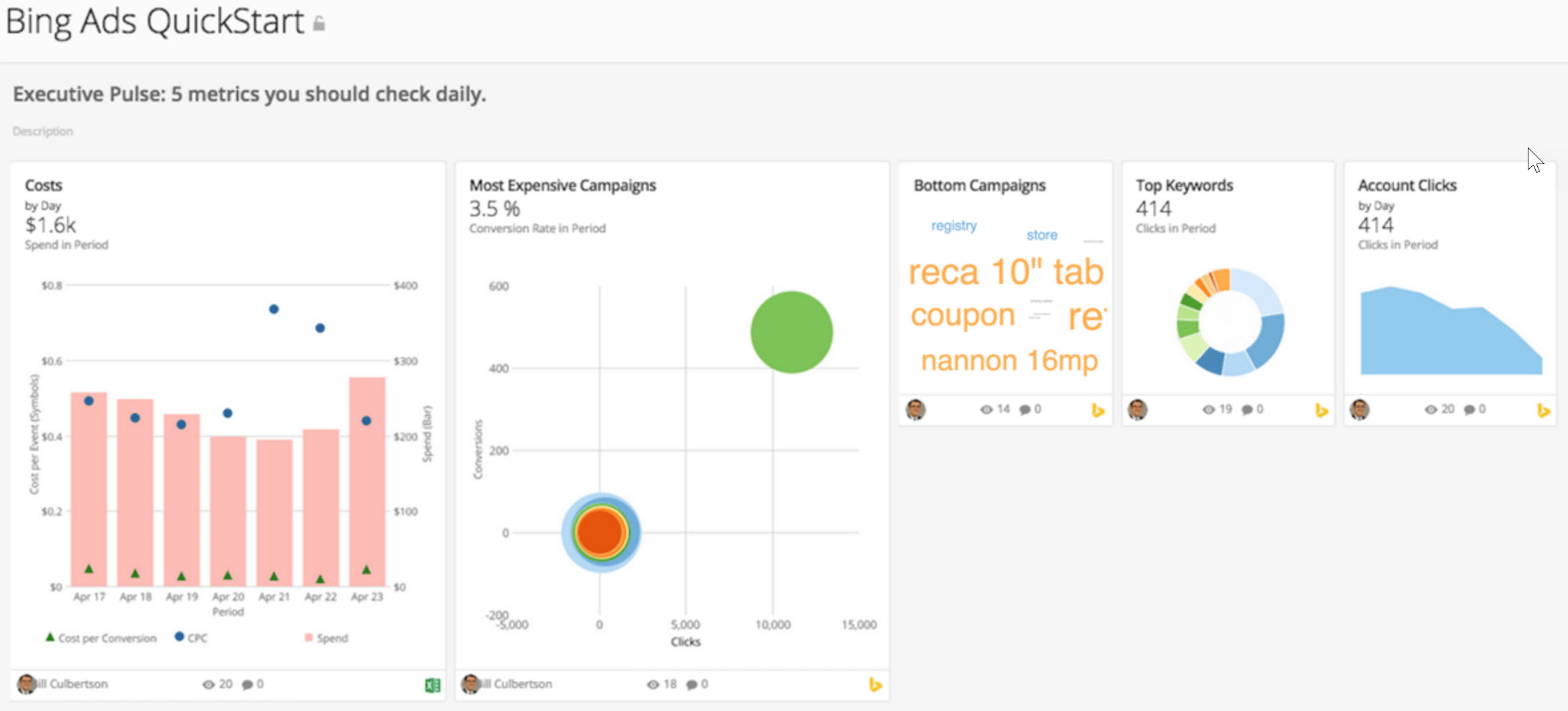
マーケターがPPC結果を追跡および評価する際、Bing Adsはそれに関するインサイトを提供します。Bing Ads Analytics Appは、顧客の購入やフォーム記入、クリックそしてインプレッションなどから顧客とのインタラクションのサマリービューを提供します。

## スクリーンショット

<Frame>
  <img alt="bingads_qs.png" src="https://mintcdn.com/domoinc-openapi-sync-dataflows/DfXQTn5UA-Ig8rT5/images/kb/ka05w000001241f-00N5w00000Ri7BU-0EM5w000005vYxo.png?fit=max&auto=format&n=DfXQTn5UA-Ig8rT5&q=85&s=4222b0804c1d8a51e4bd6ad4767b2e11" width="2340" height="1061" data-path="images/kb/ka05w000001241f-00N5w00000Ri7BU-0EM5w000005vYxo.png" />
</Frame>

## 要件と注意点

APIアクセスとBing Adsプロファイルのキーが必要になります。

## 使用方法

* 広告コンバージョン：広告は売り上げをもたらしているのか、それとも費用を発生させているだけなのか？

  * コンバージョン率とコンバージョン
  * 最もコンバージョン率の高かったキーワード
  * キャンペーンのコンバージョン
  * キャンペーン別コンバージョン率
  * 広告グループのコンバージョン
* 広告エンゲージメント：どんな広告パフォーマンスを達成しているか？

  * 低クオリティのクリック
  * 予算のため表示されなかったインプレッション数
  * CTR
  * キーワード関連性のため表示されなかったインプレッション数
  * 広告ポジションのトレンド
  * クリックされたキーワード
  * キャンペーンインプレッションシェア
  * 品質スコアのトレンド
* コスト：予算は、可能な限り高いROIをもたらすよう活用されているか？

  * キャンペーン予算支出
  * CPAトレンド
  * CPCトレンド
  * キャンペーン別コンパージョン単価
  * 推定支出
* エグゼクティブパルス：毎日5メトリクスをチェックする必要があります

  * 下位キャンペーン
  * コスト
  * 最も費用のかかったキャンペーン
  * アカウントのクリック
  * 上位キーワード

## 認証

<table border="1" cellpadding="0" cellspacing="0" data-aura-rendered-by="33:208;a"><thead><tr><th colspan="1" rowspan="1"><p> 認証情報 </p></th><th colspan="1" rowspan="1"><p> 説明 </p></th></tr></thead><tbody><tr><td colspan="1" rowspan="1"><p> デベロッパートークン </p></td><td colspan="1" rowspan="1"><p> 1. <a href="http://BingAds.com" rel="noopener" target="_blank"> BingAds.com </a> にサインインします。 </p><p> 2. <b> ［Account & Billing］ </b> タブに進みます。 </p><p> 3. 古いバージョンに切り替えます（オプションは右上にあります）。 </p><p> 4. <b> ［User］ </b> タブに進み、スーパーユーザーをクリックして右ペインの <b> ［Get API access key］ </b> のオプションを表示させます。 </p><p> 5. <b> ［Get API access key］ </b> をクリックし、デベロッパートークンを表示させます。 </p><p> 6. デベロッパートークンをコピーし、コネクターの <b> ［認証情報］ </b> の <b> ［Developer Token］ </b> フィールドにペーストします。 </p></td></tr></tbody></table>

## ダッシュボードレポート

これらレポートの説明は、「 Bing Adsコネクター 」を参照してください。

<table border="1" cellpadding="0" cellspacing="0" data-aura-rendered-by="33:208;a" width="1558"><thead><tr><th colspan="1" rowspan="1"><p> レポート </p></th><th colspan="1" rowspan="1"><p> スケジュール更新の設定 </p></th><th colspan="1" rowspan="1"><p> パラメーター </p></th><th colspan="1" rowspan="1"><p> 選択 </p></th></tr></thead><tbody><tr><td colspan="1" rowspan="6"><p> Conversion Performance </p></td><td colspan="1" rowspan="6"><p> Replace </p></td><td colspan="1" rowspan="1"><p> Report </p></td><td colspan="1" rowspan="1"><p> Conversion Performance Report </p></td></tr><tr><td colspan="1" rowspan="1"><p> Aggregate By </p></td><td colspan="1" rowspan="1"><p> Daily </p></td></tr><tr><td colspan="1" rowspan="1"><p> Duration </p></td><td colspan="1" rowspan="1"><p> Date Range </p></td></tr><tr><td colspan="1" rowspan="1"><p> Start Date </p></td><td colspan="1" rowspan="1"><p> Relative | 31 </p></td></tr><tr><td colspan="1" rowspan="1"><p> End Date </p></td><td colspan="1" rowspan="1"><p> Relative | 1 </p></td></tr><tr><td colspan="1" rowspan="1"><p> Backfill </p></td><td colspan="1" rowspan="1"><p /></td></tr><tr><td colspan="1" rowspan="6"><p> Account Performance </p></td><td colspan="1" rowspan="6"><p> Replace </p></td><td colspan="1" rowspan="1"><p> Report </p></td><td colspan="1" rowspan="1"><p> Account Performance Report </p></td></tr><tr><td colspan="1" rowspan="1"><p> Aggregate By </p></td><td colspan="1" rowspan="1"><p> Daily </p></td></tr><tr><td colspan="1" rowspan="1"><p> Duration </p></td><td colspan="1" rowspan="1"><p> Date Range </p></td></tr><tr><td colspan="1" rowspan="1"><p> Start Date </p></td><td colspan="1" rowspan="1"><p> Relative | 366 </p></td></tr><tr><td colspan="1" rowspan="1"><p> End Date </p></td><td colspan="1" rowspan="1"><p> Relative | 1 </p></td></tr><tr><td colspan="1" rowspan="1"><p> Backfill </p></td><td colspan="1" rowspan="1"><p /></td></tr><tr><td colspan="1" rowspan="6"><p> Keyword Performance </p></td><td colspan="1" rowspan="6"><p> Replace </p></td><td colspan="1" rowspan="1"><p> Report </p></td><td colspan="1" rowspan="1"><p> Keyword Performance Report </p></td></tr><tr><td colspan="1" rowspan="1"><p> Aggregate By </p></td><td colspan="1" rowspan="1"><p> Daily </p></td></tr><tr><td colspan="1" rowspan="1"><p> Duration </p></td><td colspan="1" rowspan="1"><p> Date Range </p></td></tr><tr><td colspan="1" rowspan="1"><p> Start Date </p></td><td colspan="1" rowspan="1"><p> Relative | 31 </p></td></tr><tr><td colspan="1" rowspan="1"><p> End Date </p></td><td colspan="1" rowspan="1"><p> Relative | 1 </p></td></tr><tr><td colspan="1" rowspan="1"><p> Backfill </p></td><td colspan="1" rowspan="1"><p /></td></tr><tr><td colspan="1" rowspan="5"><p> Budget </p></td><td colspan="1" rowspan="5"><p> Replace </p></td><td colspan="1" rowspan="1"><p> Report </p></td><td colspan="1" rowspan="1"><p> Budget Summary Report </p></td></tr><tr><td colspan="1" rowspan="1"><p> Duration </p></td><td colspan="1" rowspan="1"><p> Date Range </p></td></tr><tr><td colspan="1" rowspan="1"><p> Start Date </p></td><td colspan="1" rowspan="1"><p> Relative | 31 </p></td></tr><tr><td colspan="1" rowspan="1"><p> End Date </p></td><td colspan="1" rowspan="1"><p> Relative | 1 </p></td></tr><tr><td colspan="1" rowspan="1"><p> Backfill </p></td><td colspan="1" rowspan="1"><p /></td></tr></tbody></table>

日本語
